The Anatomy of a High-Performing LinkedIn Carousel
Break down the structure of a strong LinkedIn carousel, from the first-slide hook to the final CTA and PDF upload checklist.

No one can guarantee that a LinkedIn carousel will go viral. But high-performing carousels usually share the same anatomy: a specific first-slide hook, a clear slide sequence, one idea per slide, enough visual hierarchy to make the post readable, and a final slide that tells the reader what to do next.
Think of a carousel as a short argument, not a slideshow. Every slide should move the reader forward.
Key takeaways
- Judge the deck by its structure and usefulness, not by a promise of virality.
- Make slide 1 specific, use slide 2 to prove the premise, and give every middle slide one job.
- Add at least one concrete example so the advice does not stay abstract.
- Use the five-part diagnostic below before you polish the design or export the PDF.
Direct answer
A high-performing LinkedIn carousel has six parts: a hook, a setup, a structured middle, a concrete example, a useful summary, and a clear CTA. The best carousels are easy to swipe, specific to an audience, and useful enough to revisit.
Part 1: The first-slide hook
The first slide has one job: make the right person want to open the deck.
It is not:
- Your logo.
- A generic title.
- A decorative cover.
- A vague motivational quote.
It is a promise.
Weak hooks
- My thoughts on content strategy
- Leadership tips
- How to grow on LinkedIn
- Client onboarding guide
Stronger hooks
- Your client onboarding is too detailed to be useful
- 7 content strategy mistakes that make good ideas invisible
- Most LinkedIn carousels fail before slide 2
- The reporting habit that quietly ruins agency retainers
The stronger versions are specific. They name a problem, audience, or tension.
Part 2: The setup slide
Slide 2 should prove that the hook was not empty. It gives context, frames the problem, or explains why the reader should care.
Example:
Slide 1:
Your client reports are too detailed to be useful
Slide 2:
The problem is not that clients hate data. The problem is that most reports show activity instead of decisions.
This keeps the deck moving. Do not jump from a hook straight into a random list unless the list is obvious.
Part 3: The middle slides
The middle slides deliver the value. They should follow a deliberate structure.
Common patterns:
| Pattern | Best for |
|---|---|
| List | Tips, mistakes, tools, examples |
| Step-by-step | Workflows, tutorials, processes |
| Before/after | Transformations, critiques, comparisons |
| Myth/reality | Thought leadership and education |
| Story | Lessons, failures, case studies |
Whatever pattern you choose, keep one idea per slide.
Bad slide
Better reporting means fewer charts, clearer priorities, stronger decision points, more client trust, improved retention, and better meeting rhythm.
Better slide
Fewer charts. Clearer decisions.
Supporting line:
A good report should help the client choose what to keep, change, or stop.
The better slide is easier to read on a phone and easier to remember.
Part 4: The proof or example
Most carousels become forgettable because they stay abstract. Add at least one example.
Abstract:
Make your onboarding process clearer.
Example:
Replace the 12-page kickoff PDF with a one-page map: roles, risks, rhythm, results.
Examples make the content feel earned. They give the reader something concrete to compare with their own work.
Part 5: The summary slide
Near the end, compress the lesson.
A good summary slide might use:
- A checklist.
- A 3-part formula.
- A decision tree.
- A before/after recap.
- A "remember this" statement.
Example:
The reporting rule: if it does not trigger a decision, it does not belong in the meeting.
Part 6: The CTA slide
The final slide should ask for one action.
Good CTAs:
- Save this before your next client review.
- Comment "template" if you want the reporting checklist.
- Follow for practical content systems for consultants.
- Try this framework with your latest article.
Weak CTAs:
- Thanks for reading.
- Like and share.
- Visit my website, subscribe, comment, save, and follow.
Pick one action. The more actions you ask for, the less likely the reader is to do any of them.
Design anatomy
A high-performing carousel does not need complicated visuals. It needs readability.
Use:
- Large type.
- Strong contrast.
- Short lines.
- Consistent spacing.
- Slide numbers.
- Repeated layout patterns.
- Enough white space.
Avoid:
- Dense paragraphs.
- Tiny footnotes.
- Multiple competing fonts.
- Decorative images that do not support the message.
- Slides that look different for no reason.
Technical anatomy
Since LinkedIn displays carousels as document posts, technical quality matters.
Before publishing:
- Export as PDF.
- Keep the file under LinkedIn's document upload limit.
- Use consistent page sizes.
- Open the PDF before posting.
- Check that links are safe if included.
- Add a clear document title on LinkedIn.
LinkedIn says uploaded documents can be posted from the homepage, Groups, or LinkedIn Pages. Files can be up to 100 MB and 300 pages, and LinkedIn recommends converting documents to PDF where possible. You can edit the post description after upload, but you cannot replace or edit the document inside the post. LinkedIn Help document upload

Use the checklist before publishing the final carousel.
The high-performing carousel formula
Use this:
Specific hook + credible setup + structured middle + concrete example + useful summary + one CTA
That formula will not guarantee virality, but it gives the carousel a real chance because it respects the reader's time.
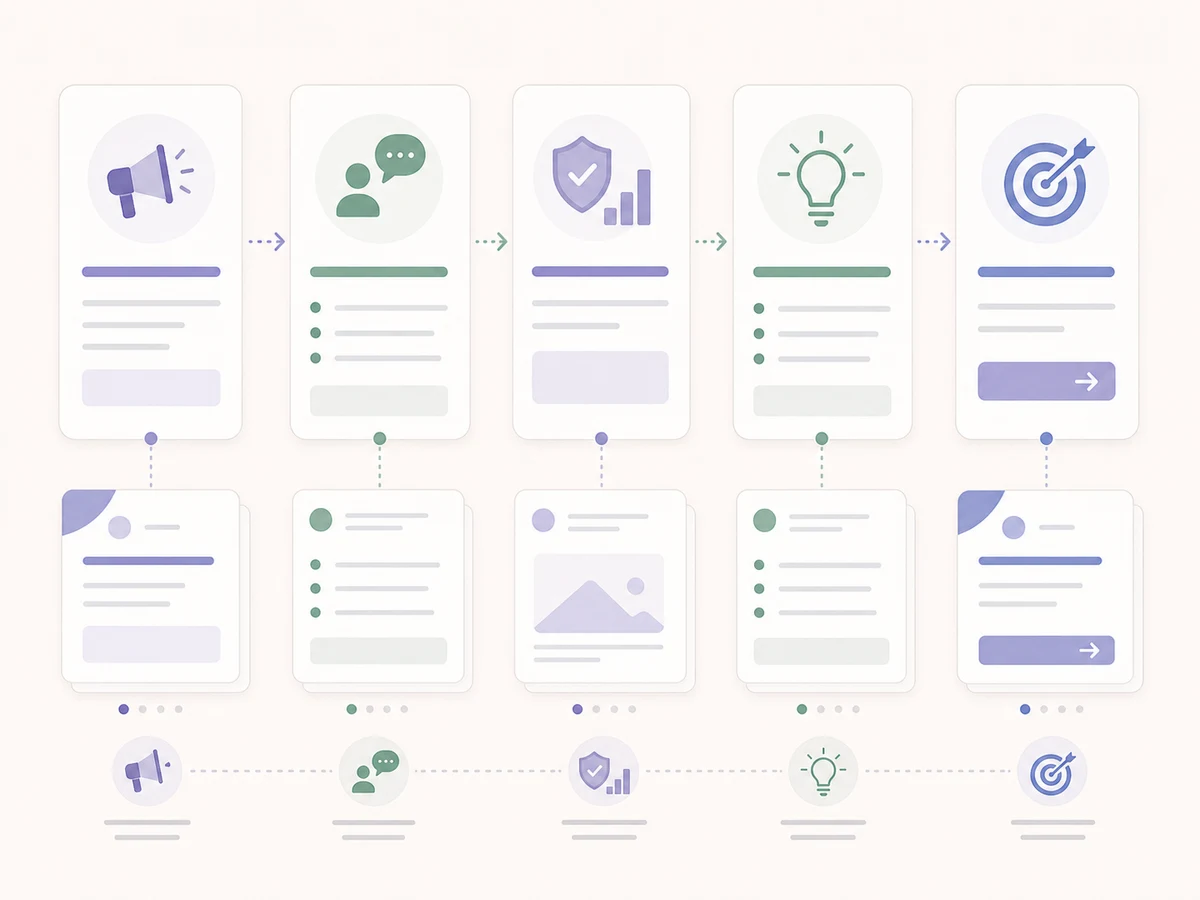
The workflow should make the article usable even for readers who skim.
Worked example: score a real seven-slide deck
The carousel in the LinkedIn document posts guide is a real seven-slide SlideDrift output. Its sequence moves from a definition to benefits, design guidance, suitable topics, a recommended structure, and a final action.
Run that deck through five yes-or-no checks:
Five-part carousel anatomy diagnostic
From a plausible structure to an actionable edit list
- Hook: Does slide 1 make a specific promise? Yes. It tells readers they will learn what document posts are and why they matter.
- Sequence: Does slide 2 prove the premise, and does each later slide have one job? Yes. The deck defines the format before moving through benefits, design, use cases, and structure.
- Specificity: Does the deck include a concrete worked example, not only categories and advice? No. It names useful content types but does not show one source idea becoming slides.
- Summary: Does the reader get a compact rule or checklist before the ending? Yes. Slide 6 gives a reusable eight-page structure.
- CTA: Does the final slide ask for one clear action? No. It combines a topic question with a product direction.
Draft score: 3/5. Keep the definition-to-structure sequence. Add one source-to-slide example, then choose either the topic question or the product action for the last slide.
Target score: 5/5. This is an editorial readiness check, not a performance forecast.
Use the same test on your own deck. Five “yes” answers mean the structure is ready for design review. A “no” gives you a specific edit instead of a vague instruction to make the carousel better.
How SlideDrift helps
SlideDrift is designed to handle the structure and design work that usually slows people down. Start from a URL, notes, text, or rough idea. Generate the carousel, then review the deck in the editor:
- Does the first slide make a specific promise?
- Does slide 2 prove the premise?
- Is every middle slide doing one job?
- Is there at least one example?
- Is the final CTA clear?
Then export the deck as a PDF and upload it to LinkedIn.
For a focused pass on the opening, use the first-slide examples and diagnostic. To shape the middle, choose a LinkedIn carousel storytelling framework. Before finishing the deck, check the carousel CTA examples against the action you want readers to take.
Final takeaway
Viral posts are unpredictable. Useful posts are more controllable.
Build carousels that are specific, structured, readable, and useful enough to revisit. That is the anatomy you can repeat.
Related reading
Before you publish, use the LinkedIn carousel checklist and confirm dimensions with the LinkedIn carousel size guide.
FAQ
Can you guarantee a LinkedIn carousel will go viral?
No. Virality depends on many factors outside the post itself. You can improve the odds by using a clear hook, strong structure, useful examples, and a focused CTA.
What should the first slide of a LinkedIn carousel do?
The first slide should make a specific promise to a specific reader. It should not be a generic title page or logo slide.
What makes the middle slides work?
The middle slides should follow a structure such as list, step-by-step, before/after, myth/reality, or story. Each slide should communicate one idea.
What should the last slide say?
The last slide should ask for one action, such as save, comment, follow, or try the framework.
Can SlideDrift help improve carousel structure?
Yes. SlideDrift generates editable slides from your source material, and the editor lets you revise copy, reorder slides, and export as PDF.
Turn your idea into slides
Ready to make one? Start with a URL, notes, or a short outline in SlideDrift, then export the finished carousel as a PDF for LinkedIn.