LinkedIn Carousel Ideas for Engineers: 30 Technical Post Formats That Stay Clear
30 LinkedIn carousel ideas for engineers: technical explainers, tradeoffs, failure reviews, diagrams and career lessons, with a real postmortem carousel.
The best LinkedIn carousel ideas for engineers teach one technical idea clearly: how a system works, a tradeoff, a failure review, a diagram explained or a career lesson. They work because engineering ideas have an order, and a carousel shows one step per page.
- Explain one thing per carousel: a pattern, a metric, a decision or a lesson.
- Keep the caveats: state your assumptions and limits. Accuracy beats reach.
- Share the principle, not the proprietary detail: no internal diagrams, incident specifics or customer names.
Below are 30 ideas in five groups, three reusable templates, and a brief for drafting your own.
Keep it accurate and public-safe
The NSPE Code of Ethics asks engineers to perform services only in areas of their competence and to issue public statements only in an objective and truthful manner. On LinkedIn, that means stating your assumptions, staying inside what you know, and leaving confidential details out.
Failure reviews show the balance best. Google's SRE book describes a blameless postmortem as one that looks for the contributing causes "without indicting any individual or team." The same rule makes a lesson safe to share: the principle travels, the incident details stay inside.
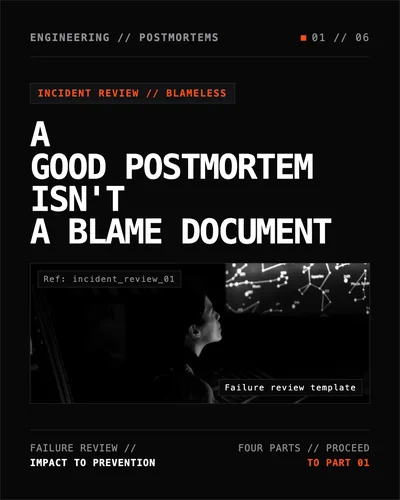
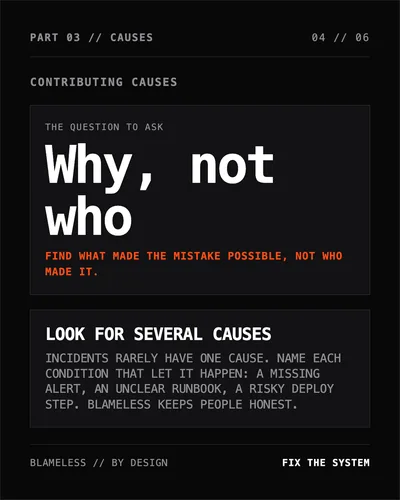
Here's idea 11 from the list, a postmortem structure, as a carousel made in SlideDrift.
SlideDriftCreate your ownCarousel transcriptShowHide


- 01A good postmortem isn't a blame document. Incident review, blameless. A failure review template in four parts, from impact to prevention.
- 02Part 01, what happened: summary and impact. Say what broke, who was affected and for how long, in plain words. Someone outside the team should understand it in one read. Who was affected: users and services; name the customers, regions or systems hit. How long: start to recovery; give the times, so the timeline can be checked. Rule: impact first, causes later.
- 03Part 02, write the timeline first. Times in UTC: detect, respond, recover. Facts before opinions: list what happened and when, the first alert, each decision and the recovery. Use logs and chat history, not memory.
- 04Part 03, contributing causes. The question to ask: why, not who. Find what made the mistake possible, not who made it. Look for several causes: incidents rarely have one cause. Name each condition that let it happen, such as a missing alert, an unclear runbook or a risky deploy step. Blameless keeps people honest.
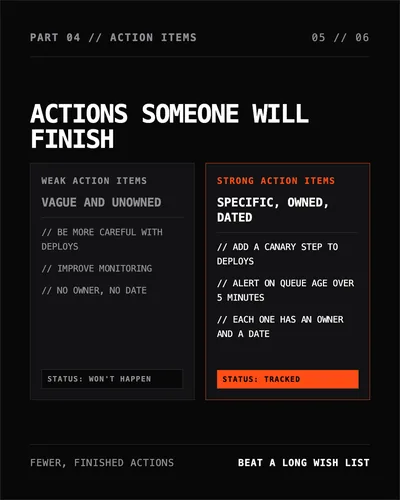
- 05Part 04, actions someone will finish. Weak action items are vague and unowned: be more careful with deploys, improve monitoring, no owner and no date. Strong action items are specific, owned and dated: add a canary step to deploys, alert on queue age over 5 minutes, and give each one an owner and a date.
- 06Impact. Timeline. Causes. Actions. Share the principle: post the lesson, not the incident. The principle travels; customer names, internal systems and confidential details stay private.
30 LinkedIn carousel ideas for engineers
Each idea comes with an example first slide. To sharpen yours, see the carousel hook examples.
Technical explainers
- How a system actually works. Hook: "The simple diagram most people skip." Slide flow: context, components, data flow, caveat.
- A beginner guide to one architecture choice. Hook: "This architecture pattern solves one problem well." Slide flow: problem, pattern, tradeoff, example.
- What a metric does and doesn't tell you. Hook: "This metric is useful until you ask it the wrong question." Slide flow: definition, use, limit.
- Latency explained in plain English. Hook: "Latency is not one number." Slide flow: parts, diagnosis, example.
- Why constraints shape design. Hook: "Engineering decisions start with constraints, not preferences." Slide flow: constraints, tradeoffs, choice.
Tradeoffs and decisions
- A build vs buy decision tree. Hook: "Build vs buy isn't a philosophy. It's a decision tree." Slide flow: criteria, risks, scorecard.
- Speed vs reliability. Hook: "Faster isn't better if recovery gets worse." Slide flow: tradeoff, example, mitigation.
- When to add automation. Hook: "Automation is expensive while the process is still changing." Slide flow: signals, risks, timing.
- Choosing the boring technology. Hook: "Boring technology is often an engineering advantage." Slide flow: why, examples, caveat.
- When a workaround becomes technical debt. Hook: "A workaround has an expiry date." Slide flow: definition, signals, plan.
Failure and debugging
- A postmortem structure. Hook: "A good postmortem isn't a blame document." Slide flow: impact, timeline, contributing causes, action items. It's the carousel embedded above.
- How to debug a flaky issue. Hook: "Flaky bugs punish assumptions." Slide flow: reproduce, isolate, log, verify.
- The hidden cost of unclear ownership. Hook: "Some incidents start as org chart problems." Slide flow: symptom, cause, fix.
- Why dashboards lie by omission. Hook: "The dashboard can be green while users are stuck." Slide flow: metric gaps, examples, what to add.
- How small changes create big failures. Hook: "Complex systems fail through combinations." Slide flow: coupling, trigger, prevention.
Diagrams and teaching
- One concept, one diagram. Hook: "If a diagram needs a paragraph, simplify the diagram." Slide flow: before, after, rules.
- How to read a sequence diagram. Hook: "A sequence diagram should answer one question." Slide flow: parts, mistakes, example.
- An architecture review checklist. Hook: "Before you present an architecture, answer these questions." Slide flow: goals, constraints, risks.
- Data flow for non-engineers. Hook: "Data flow diagrams are stakeholder tools too." Slide flow: why, labels, review.
- Explaining technical debt to leadership. Hook: "Technical debt is a risk conversation." Slide flow: cost, examples, decision.
Career and communication
- How junior engineers can ask better questions. Hook: "A good question includes what you already tried." Slide flow: context, attempts, ask.
- How to write a useful technical update. Hook: "Status updates should reduce uncertainty." Slide flow: structure, example.
- How to disagree in a design review. Hook: "Disagree with the constraint, not the person." Slide flow: language, evidence, alternative.
- What senior engineers actually do. Hook: "Seniority isn't just harder tickets." Slide flow: judgment, leverage, mentoring.
- How to document decisions. Hook: "Future engineers need the why, not just the what." Slide flow: decision record, context, tradeoffs.
- How to explain risk without drama. Hook: "Risk communication needs specifics." Slide flow: probability, impact, mitigation.
- What to include in a handoff. Hook: "A handoff is a reliability tool." Slide flow: state, risks, next steps.
- How to make engineering lessons public-safe. Hook: "Share the principle, not the proprietary detail." Slide flow: abstract, anonymize, caveat.
- Code review comments that teach. Hook: "A good review comment explains the why." Slide flow: weak comment, better comment, rule.
- Estimating work honestly. Hook: "An estimate is a range, not a promise." Slide flow: unknowns, range, when to update it.
Reusable carousel templates
Tradeoff matrix
- Use when: a decision has no universally correct answer.
- Slide outline: problem, options, tradeoffs, recommendation by context, caveat.
- Close: "Save this matrix for your next design review."
Failure review
- Use when: you want to teach from a mistake without exposing sensitive details.
- Slide outline: impact, timeline, contributing causes, action items, the rule you now follow.
- Close: "What would you add to the review?"
Explain it to stakeholders
- Use when: a technical concept affects business decisions.
- Slide outline: plain-language definition, why it matters, the risk, the question to ask.
- Close: "Send this to someone who needs the non-jargon version."
Make one in SlideDrift
Start from notes you already have: an outline, a design doc you're allowed to share, or a draft article. Give SlideDrift a brief like this, with your material below it:
SlideDrift brief
Turn the notes below into a 6-slide LinkedIn carousel for engineers.
Explain one idea, one point per slide, and keep the caveats.
Leave out customer names, internal systems and confidential details.
End with one rule readers can reuse.

[Paste your notes, outline or article here]Check every technical claim in the draft, then export the PDF. The carousel checklist covers the final pass.
Share an engineering lesson as a carousel
Paste your notes or an outline. SlideDrift drafts the slides, you check every claim, then export the PDF.
Brief for this carousel
Make a 6-slide LinkedIn carousel for engineers on writing a blameless postmortem. A cover (a good postmortem isn't a blame document), then one part per slide: summary and impact (what broke, who was affected, for how long), the timeline (first alert, decisions, recovery, from logs rather than memory), contributing causes (why, not who), and action items (specific, owned and dated rather than vague). End with a recap and a reminder to share the principle, not confidential details.
Mistakes to avoid
- Publishing internal material. Proprietary diagrams and incident details stay inside.
- Cutting the caveats to sound bolder. Context is part of the answer.
- Unreadable screenshots. Redraw the one part that matters as a clean diagram.
- Universal advice. Say when it depends on scale, stack or team.
- Simple over accurate. Simplify the wording, not the facts.
A simple monthly plan
| Week | Carousel type | Example |
|---|---|---|
| 1 | Technical explainer | Define one confusing concept |
| 2 | Tradeoff | Compare two options for a common decision |
| 3 | Failure review | Share the principle from a lesson learned |
| 4 | Career note | Show how you write, review or estimate |
Before you publish, confirm the dimensions with the LinkedIn carousel size guide.
FAQ
What should engineers post on LinkedIn carousels?
Explainers, tradeoffs, failure reviews, diagrams and career lessons. The best posts make one technical idea easier to understand without dropping the caveats.
Should engineers include technical diagrams in carousels?
Yes, when the diagram makes the idea easier to follow. Use one diagram per slide and keep the labels big enough to read on a phone.
How can engineers avoid oversimplifying?
State the assumption, the context and the limits. A clear caveat usually builds trust rather than weakening the post.
How do I share a lesson from an incident safely?
Share the principle, not the incident: leave out customer names, internal system names and timelines that identify the event, and check your company's rules before you post.