How to Turn Podcast Notes Into a LinkedIn Carousel
Repurpose podcast notes, transcripts, and episode outlines into a LinkedIn carousel with this practical workflow.

A podcast episode can become more than an audio file. It can become a LinkedIn carousel, a text post, a newsletter, a quote graphic, and a short video. The carousel is especially useful when the episode contains a framework, a story, a checklist, or a strong guest insight.
The trick is not to summarize the whole episode. The trick is to choose one useful angle and turn it into a swipeable lesson.
To turn podcast notes into a LinkedIn carousel, choose one angle from the episode, extract 5 to 8 useful points, rewrite them as slide headlines, add one example or quote, create a final takeaway slide, and export the deck as a PDF. In SlideDrift, paste your notes, transcript excerpt, or episode outline into the text input and add a short instruction about the audience and desired angle.
Key takeaways
- Choose one framework, story, checklist, or guest insight instead of summarizing the full episode.
- Keep a source note beside every claim and quote so the carousel stays faithful to the conversation.
- Rewrite spoken language for slides: one point per page, shorter sentences, and a clear reading order.
- Use SlideDrift to generate an editable first draft, then check attribution, readability, and the exported PDF before publishing.
What podcast material works best
Good carousel source material includes:
- A transcript excerpt.
- Show notes.
- Guest bullet points.
- A host monologue.
- A framework discussed in the episode.
- A list of mistakes or lessons.
- A story with a clear turning point.
- A Q&A section.
An unedited transcript with no direction is weak source material. Clean it first, or tell SlideDrift which section and angle to use.
Step 1: Choose one angle
A 45-minute episode can produce several LinkedIn posts. Do not try to fit everything into one carousel.
Example episode: "How agencies can improve client reporting"
Possible carousel angles:
- 7 mistakes agencies make in client reports.
- The reporting framework our guest uses every month.
- Why dashboards do not create client trust.
- A before/after example of a useful report.
- 5 questions clients actually want answered.
Each is a different carousel.
Step 2: Extract the evidence before writing slides
Create a small source record with 4 fields:
- Angle: the one idea this carousel will teach.
- Source: the timestamp, transcript line, or show-note section behind each point.
- Attribution: the speaker behind every quote or opinion.
- Boundary: what the episode did not establish, so you do not strengthen the claim while shortening it.
If the episode has a great quote, use it once. A carousel should feel like a structured lesson, not a quote dump.
Worked example: turn one real episode insight into a slide story
Google Search Central published a companion article for episode 105 of its Search Off the Record podcast. The source explains that Googlebot fetches up to 2 MB for an individual HTML URL, excluding PDFs, and that bytes beyond the cutoff are not processed. It also says most sites will never reach that limit. Google Search Central: Inside Googlebot
That gives you a focused angle: why the order of critical page information still matters on unusually large HTML pages. It does not justify a broader claim that every site has a crawl-size problem.
Source-backed extraction card
From episode notes to a seven-slide story
- Hook: Googlebot does not read unlimited HTML from one URL.
- Context: The current fetch limit for an individual HTML URL is 2 MB, including headers.
- Consequence: Content after that cutoff is not fetched, rendered, or indexed.
- Boundary: Google says 2 MB of HTML is unusually large for most pages.
- Example: Heavy inline assets or oversized menus can push important content later in the response.
- Action: Keep essential metadata and primary content early, and move heavy CSS or JavaScript into separate files.
- Pointer: Listen to episode 105 for the deeper discussion, then read the companion source before publishing technical claims.
Traceability check: 5 slides state source-backed facts, 1 preserves the source boundary, and 1 points readers to the original episode.
The example works because every factual slide can be checked against the official companion source. The carousel adds sequence and emphasis without pretending the episode said more than it did.
Step 3: Rewrite spoken language
Podcast language is conversational. Carousel language needs compression.
Transcript sentence:
What we found was that most clients were not confused because they lacked access to the dashboard; they were confused because nobody had explained what decision each metric was supposed to support.
Carousel slide:
Clients do not need more dashboard access.
Supporting line:
They need to know which decision each metric should support.
Spoken language often needs tightening before it works visually.
Step 4: Build a clear slide structure
Start with this 8-slide format:
| Slide | Content |
|---|---|
| 1 | Strong hook from the episode |
| 2 | Why the topic matters |
| 3 | Main point 1 |
| 4 | Main point 2 |
| 5 | Main point 3 |
| 6 | Source-backed quote or example |
| 7 | Practical takeaway |
| 8 | CTA and episode pointer |

The workflow should make the article usable even for readers who skim.
Step 5: Generate an editable draft in SlideDrift
Paste the focused excerpt or cleaned outline into SlideDrift with direction. The create-from-text guide covers the current input workflow.
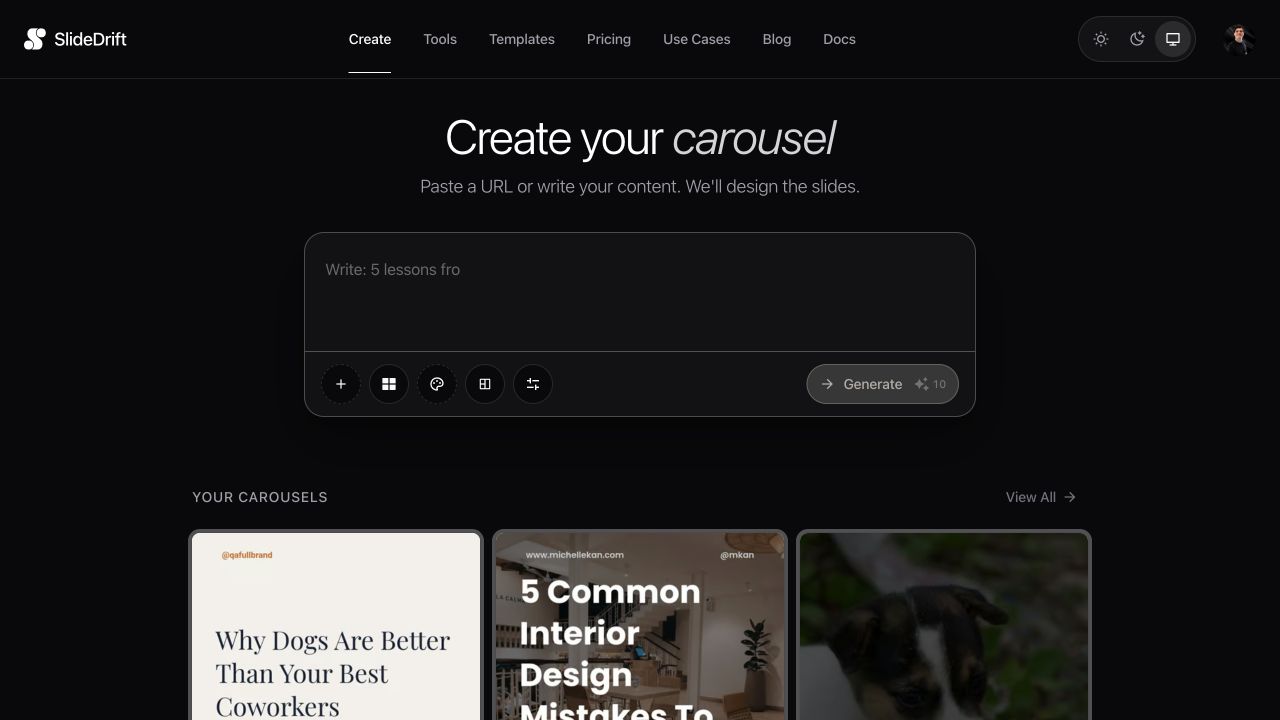
Turn these podcast notes into an 8-slide LinkedIn carousel for B2B agency owners. Focus on the guest's reporting framework. Keep the tone practical and concise. Include one guest quote and end with a CTA to listen to the full episode.If you paste a transcript, add boundaries:
Use only the section about client reporting. Ignore the intro, sponsor read, and closing banter.Treat the generated deck as a draft. Check every quote against the transcript, confirm the speaker, and remove any claim that the source does not support.
Step 6: Add the episode CTA
The final slide can point readers to the episode, but the carousel should still be useful by itself.
Good CTA:
Save this reporting framework. Listen to episode 42 for the full conversation.
Weak CTA:
Listen to our podcast.
The first version gives value before asking for attention.
Step 7: Write the LinkedIn caption
Use this caption template:
In this week's episode, [guest] said something worth turning into a framework:

"[short quote]"

I pulled out the practical version in this carousel:
-> [point 1]
-> [point 2]
-> [point 3]

Full episode: [where to find it]Step 8: Create multiple posts from one episode
One podcast episode can become:
- One carousel from the main framework.
- One text post from the strongest quote.
- One short clip from the best story.
- One checklist from the practical steps.
- One newsletter from the full argument.
Use the carousel for the content that benefits from sequence.

Use the checklist before publishing the final carousel.
Final check before you publish
- The carousel teaches one angle rather than summarizing the full episode.
- Every claim and quote has a timestamp, transcript line, or show-note source.
- Guest quotes are accurate, attributed, and used with permission where required.
- Each slide has one job and the smallest text is readable on a phone.
- The exported PDF opens correctly and every page is in the right order.
- The final slide gives value before pointing readers to the full episode.
Final takeaway
Podcast notes are valuable because they already contain real conversation and specific insight. Do not bury that inside a long transcript. Choose one angle, structure it into slides, and turn the episode into a saveable LinkedIn carousel.
Use SlideDrift to generate the draft from your notes, then edit the deck and follow the PDF export guide before uploading it to LinkedIn.
Related reading
For adjacent repurposing workflows, see how to repurpose a blog post into a LinkedIn carousel or create a LinkedIn carousel from notes.
FAQ
Can I turn a full podcast transcript into a carousel?
Yes, but it usually works better to use a focused transcript excerpt or add instructions telling SlideDrift which section to use.
Should a podcast carousel summarize the whole episode?
Usually no. Choose one useful angle, such as a framework, story, checklist, or guest insight.
Can I include guest quotes in the carousel?
Yes, if you have the right to use them. Use one or two strong quotes rather than turning the entire deck into quotations.
What should the final slide say?
End with a useful CTA such as "save this framework" plus a pointer to the full episode if relevant.
Can SlideDrift create carousels from podcast notes?
Yes. Paste notes, outlines, or transcript excerpts into SlideDrift, add direction, and generate an editable carousel.
Turn your podcast notes into slides
Ready to make one? Start with a URL, notes, or a short outline in SlideDrift, then export the finished carousel as a PDF for LinkedIn.