AuthoredUp Alternative for Drafting and Visuals: AuthoredUp vs SlideDrift
Looking for an AuthoredUp alternative? Compare AuthoredUp and SlideDrift for drafting posts from notes, branded carousels and scheduling from one calendar.

If you write your own LinkedIn posts, AuthoredUp is a good formatting and preview tool. The search for an AuthoredUp alternative usually starts when writing is no longer the whole job: you want a first draft from your notes, carousels in your brand, and one calendar for both. That's what SlideDrift does, and you can keep AuthoredUp for polishing text beside it.
We make SlideDrift, so every claim below is sourced and dated.
Which should you choose?
Choose SlideDrift if you start from notes, call summaries or articles and want SlideDrift to draft the post, including carousels in your colours, fonts and logo, and single-image graphics.
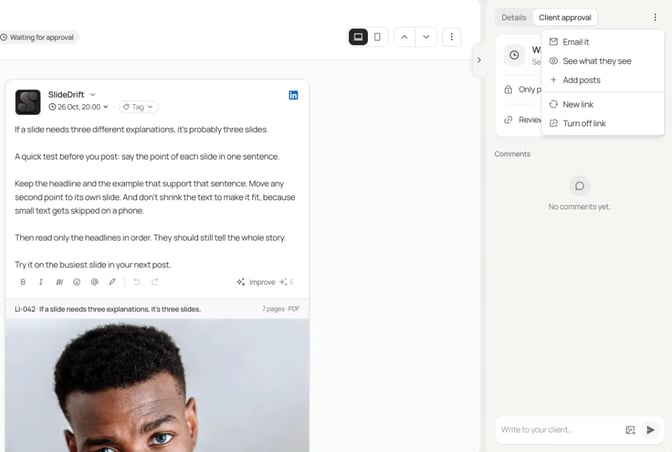
Choose SlideDrift if you want to schedule carousels, polls and text from its web app, or have a client approve or ask for changes on a batch of posts before they go out.
Choose AuthoredUp if you write every post yourself, mostly text, and what you want is formatting, hook ideas, a readability check and a preview before you post. Its Individual plan is $19.95 a month and includes the Company Pages you admin.
Choose both if you like how AuthoredUp polishes your text but now need visuals. Write and format the text post as you do now, and use SlideDrift for the carousel and the schedule.
The carousel below, made in SlideDrift, is a quick test for each idea: does it stay a text post, or does it earn slides?
SlideDriftCreate your ownCarousel transcriptShowHide


- 01Carousel or text post? Neither format is right for every idea. Choose by what the idea needs: your voice, or steps in order.
- 02Text for one sharp idea. Use a text post when one paragraph holds the idea and your voice matters most: an opinion, a story, a question.
- 03Slides when order matters. Use a carousel for frameworks, checklists and guides: points that build in order and are worth saving.
- 04Test it in text first. Post the premise as text. Expand the part people respond to into a carousel only when steps or examples help.
- 05Compare like with like. LinkedIn reports member and Page posts differently. Compare posts from the same account with the same goal. Same account; Same goal.
- 06Text for voice. Slides for order. Before your next post, ask: can one paragraph carry it, or does the reader need steps?
Paste your notes, see them as a carousel
SlideDrift drafts the slides from your notes, a post or a link. Edit them, then export the PDF to post.
AuthoredUp and SlideDrift side by side
| AuthoredUp | SlideDrift | |
|---|---|---|
| Built for | Writing, formatting and checking your own LinkedIn posts | Turning your material into LinkedIn posts, carousels and graphics in your brand, then scheduling them |
| Who writes the first draft | You do; its Coauthor AI assistant is in closed beta | SlideDrift drafts from your notes, a link or an idea; you edit |
| Carousels and graphics | Design isn't mentioned on its homepage or pricing page; you can attach a document to a post | Carousels in your Brand Kit, and single-image graphics |
| Formatting and preview | Bold, italic, lists, hook and ending templates, readability grade, desktop and mobile preview | Desktop or mobile feed preview in the scheduler; our free LinkedIn text formatter for bold and italic |
| Scheduling | Calendar across profiles, pages and groups; scheduling runs through its Chrome extension | In the web app's Schedule page; no extension needed |
| Company Pages | Unlimited, on every plan | Pro and Agency |
| Client sign-off | Read-only link to share a draft for review | Review link for a batch of posts; the reviewer approves or asks for changes |
| Cheapest paid plan | Individual: $19.95 a month | Starter: $29 a month |
The two overlap less than the search suggests. AuthoredUp helps you write better text. SlideDrift helps you make the post from what you already have, including the parts that aren't text.
AuthoredUp vs SlideDrift feature comparison
✓ means the product's own pages list it, ✗ means they don't. Both were checked in October 2026.
| Feature | AuthoredUp | SlideDrift |
|---|---|---|
| Write and format text posts | ✓ | ✓ text post drafts |
| Hook and ending templates | ✓ | Free hook tools |
| Readability grade | ✓ | ✗ |
| AI first draft from your notes | Closed beta | ✓ |
| Draft from an article link | ✗ | ✓ |
| Carousels from your notes | ✗ | ✓ |
| Single-image graphics | ✗ | ✓ |
| Brand Kit: colours, fonts, logo | ✗ | ✓ |
| Attach a document or poll | ✓ | ✓ |
| Schedule posts | ✓ via extension | ✓ in web app |
| Company Pages | ✓ every plan | ✓ Pro and Agency |
| Planned comments after posting | Not listed | ✓ up to four |
| Draft review link | ✓ read-only | ✓ approve or ask for changes |
| Analytics | ✓ incl. past posts | ✓ connected accounts |
SlideDrift posts natively only to LinkedIn, but you can export any carousel as a PDF or PNG in square (1:1), portrait (4:5) or stories (9:16) size and post it on other platforms.
Same job in both tools
The job: you've just had a client call. Turn your notes into one text post and one 7-slide carousel for next week, on your own profile.
In AuthoredUp
Input: your notes, and a blank editor.
- Write the text post yourself in AuthoredUp's editor.
- Add bold or italic where it helps, try a hook from its library and check the readability grade.
- Preview the post as it will look in the feed on desktop and mobile.
- Schedule it in AuthoredUp. Its pricing page says scheduling runs through the Chrome extension.
- Design the carousel in another tool, such as PowerPoint, export it as a PDF and attach it to a post as a document.
Output: a polished text post on the calendar, and a carousel designed separately.
In SlideDrift
Input: the same notes, pasted as they are.
- On Home, paste your notes and choose Post ideas. Answer the short questions about your audience and what you want readers to do next.
- Pick the drafts you want: here, one text post and one carousel. Drafting the ideas uses no credits; making the carousel uses credits, shown before you confirm.
- Open the carousel and edit it. Your Brand Kit sets the colours, fonts and logo, and the past post you gave it as a writing style guides the voice.
- In Schedule, drag both drafts onto a time, check the desktop or mobile feed preview and schedule them. Add a first comment under After it posts if you want one.
Output: a text post and a carousel in your brand, both on one calendar.
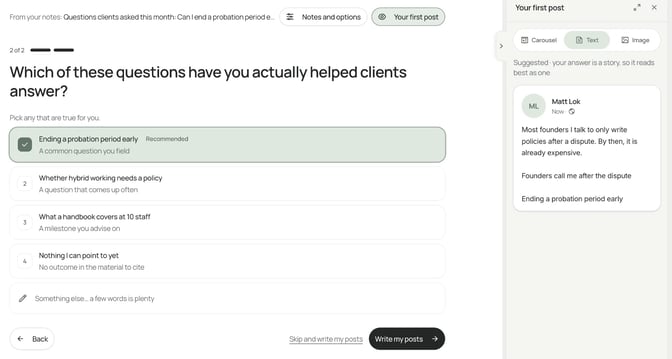
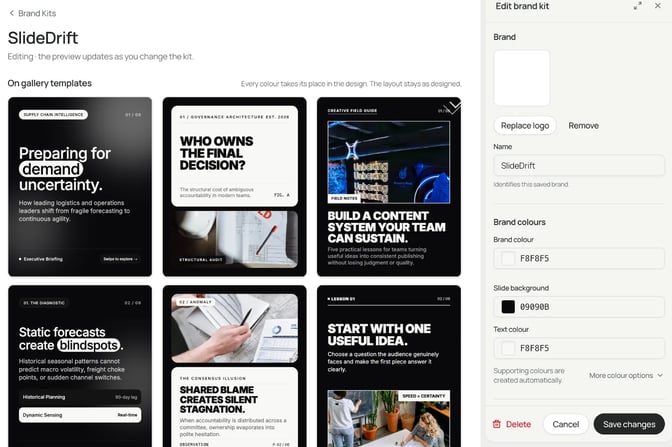
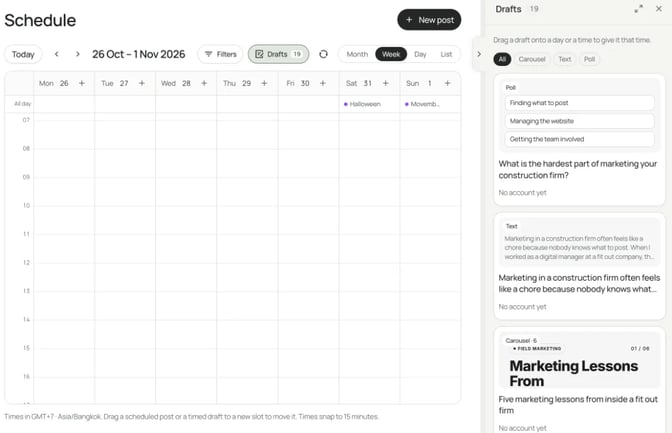
The text post is where AuthoredUp is strongest, because you're writing every word and its checks help. The carousel is where the steps pull apart: with AuthoredUp the design happens in a second tool, in SlideDrift it's drafted from the same notes. For the carousel steps in more detail, see how to create a LinkedIn carousel from notes.
Scheduling and sign-off
Both tools schedule posts. AuthoredUp's editor and drafts work on its web platform and in its Chrome extension, its calendar shows scheduled and published content across profiles, pages and groups, and its scheduling runs through the extension.
SlideDrift schedules from its web app. You choose Carousel, Image, Images, Video, Poll or Text, write the post text, pick the account and the time, and check the desktop or mobile preview. SlideDrift's own Chrome extension is optional: it sends an article or selected text to Create, and you don't need it to schedule.
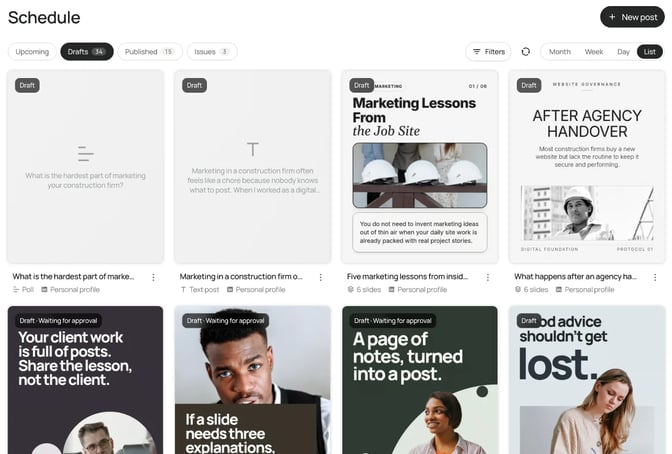
Both tools also have a way to get a draft in front of a client. AuthoredUp makes a read-only link to share a draft for review, and the reviewer doesn't need AuthoredUp. SlideDrift's Client approval makes one review link for up to 20 posts. It works for 14 days, the reviewer doesn't need an account, and they approve each post or ask for changes.
For the wider field of schedulers, from LinkedIn's own to Buffer, see the best LinkedIn scheduling tools.
What a month costs in each
Take one adviser posting on their own profile: four text posts and four carousels a month. Prices are from each product's own pricing page.
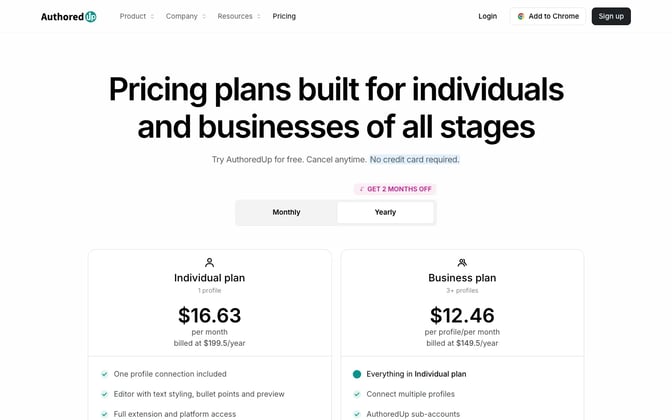
AuthoredUp Individual, $19.95 a month ($16.63 a month billed yearly). You write and format the four text posts in its editor and schedule them through its extension. You can add a document to a post, but AuthoredUp's homepage and pricing page don't mention carousel design, so plan on making the carousels in another tool and adding its price.
SlideDrift Starter, $29 a month, with 1,000 credits a month. Post ideas drafts the text posts and the carousels from your notes. Drafting the ideas uses no credits, text drafts are free, and each carousel made from Post ideas costs 30 credits. Scheduling is free, text posts publish without credits, and a carousel uses 20 credits when it publishes without the SlideDrift banner. Starter includes one personal profile; Company Pages need Pro, at $59 a month.
Keeping both: $19.95 plus $29 a month. AuthoredUp Individual for the text you write yourself, and SlideDrift Starter for drafts from your notes, carousels and scheduling. This suits people who like AuthoredUp's hook templates and readability grade and don't want to give them up.
On price alone, AuthoredUp is cheaper for text-only posting, and the company pages you admin are free on every AuthoredUp plan. SlideDrift's extra cost buys drafts from your notes and carousels in your Brand Kit.
What switching involves
Adding SlideDrift beside AuthoredUp. Nothing has to move. Start the seven-day trial (a card is needed, and Stripe charges $0 when it starts), import your website into a Brand Kit and paste one past post as your writing style. Connect your LinkedIn profile in Schedule. Keep scheduling text posts in AuthoredUp if you prefer, and check both calendars so posts don't land on the same day.
Moving fully to SlideDrift. Copy any text posts still queued in AuthoredUp into SlideDrift's Schedule as text posts, then cancel them in AuthoredUp. Your past posts stay on LinkedIn. AuthoredUp's pricing page says its extension pulls in your past LinkedIn posts with their analytics, going back years, and it offers a CSV export, so export that history first if you want to keep it. If you post to a Company Page, choose Pro.
Staying with AuthoredUp. If you rarely need visuals, you may not need to switch at all. Our guide to LinkedIn carousels vs text posts helps you decide when an idea needs slides.
How we compared them
Prepared by Matt Lok, with every fact on this page checked on 21 October 2026. SlideDrift facts come from its public docs and pricing page. AuthoredUp facts come from its homepage and pricing page; we did not test AuthoredUp hands-on for this comparison, and its steps above come from what its own pages describe. Both products change often, so check prices before you buy.
Weighing other tools for writing and engagement too? See our Taplio alternatives, which covers AuthoredUp alongside six others. Before you schedule any text post, the free LinkedIn post preview shows roughly where the "see more" fold falls.
FAQ
What is a good AuthoredUp alternative for carousels?
SlideDrift, if you want carousels drafted from your notes in your own colours, fonts and logo, and scheduled from the same place. AuthoredUp's homepage and pricing page don't mention carousel design, so with AuthoredUp you'd design carousels in another tool and attach them as a document.
Does AuthoredUp write posts with AI?
Its pricing page lists Coauthor, an AI writing assistant that learns your voice from your own posts, as currently in closed beta. Its core is helping you format and improve posts you write yourself, with hook and ending templates and a readability grade. Check its site for what the beta covers before you decide.
Can I use AuthoredUp and SlideDrift together?
Yes. You can write and polish text posts in AuthoredUp and use SlideDrift for drafts from notes, carousels and graphics. Both can post to your profile, so check both calendars to avoid two posts on one day.
Do I need a Chrome extension to schedule with SlideDrift?
No. SlideDrift schedules from its web app on a paid plan or trial. Its optional Chrome extension only sends an article or selected text to Create.
Does SlideDrift post to Company Pages?
Yes, on Pro or Agency. Pro connects 3 LinkedIn accounts and Agency 10, and both can use those for personal profiles or Company Pages. Starter connects one personal profile.
Is AuthoredUp cheaper than SlideDrift?
Yes, to start. AuthoredUp Individual is $19.95 a month and SlideDrift Starter is $29. SlideDrift's plan includes drafting from your notes, carousels in your Brand Kit, graphics and client approval links.
Try your notes in SlideDrift
Paste the notes from your last client call and see what SlideDrift drafts: a text post, a carousel, or both.
Turn your notes into posts
Paste your notes or a link, and SlideDrift drafts LinkedIn posts and carousels in your brand. Edit them, export a PDF, or schedule them on a paid plan.


Brief for this carousel
Turn my notes below into a 7-slide LinkedIn carousel for owners of small professional-services firms. Slide 1 makes one specific promise. Slides 2 to 6 each carry one point from the notes in plain words, keeping any numbers exactly as written. Slide 7 gives the main lesson and one question for the comments. Use only facts from my notes.