Best Taplio Alternatives in 2026: The Buyer's Shortlist
Seven Taplio alternatives ranked for LinkedIn experts: SlideDrift, Supergrow, AuthoredUp, Buffer, Typegrow, Canva and Hootsuite, with prices checked in October.

Taplio alternatives, ranked for people who sell their expertise: SlideDrift first. If the slow part of your LinkedIn week is making the post itself, SlideDrift turns your notes and links into designed carousels, graphics and text posts in your brand, with client sign-off and scheduling. Supergrow is the closest swap for Taplio's writing and engagement tools. AuthoredUp suits people who write every word themselves, and Buffer suits posting to several networks.
We make SlideDrift, so every claim below is sourced and dated.
Key takeaways
- SlideDrift is the pick if your posts need to look designed and carry your brand: carousels, graphics, text posts and polls from your own notes, with client approval links, from $29 a month.
- Supergrow is the closest like-for-like swap for Taplio's AI writing, scheduling and Engage tools, from $39 a month.
- AuthoredUp suits people who write their own posts, at $19.95 a month, with unlimited Company Pages free on every plan.
- Typegrow is the best free option right now, and Buffer's free plan schedules to 3 channels.
- Count accounts and sign-off before comparing prices. Buffer bills per channel, Hootsuite per user, and approvals sit on higher plans at Supergrow, Buffer, Hootsuite and Canva.
Before you start a trial, here's a 10-minute test to run on your top two, as a carousel made in SlideDrift.
SlideDriftCreate your ownCarousel transcriptShowHide


- 01The 10-minute test. Test any carousel generator in 10 minutes. Every tool's demo looks good. Run these five checks on your own material before you pay: a real source, the first slide, one edit, your brand and the exported PDF. Use the same source in every tool you test.
- 02Test 01, bring your own source. Start from a real source. Paste an article, a newsletter or notes you'd actually post about. A one-line topic shows what the tool invents; your own material shows what it understands.
- 03Test 02, the hook check. Judge slide one first. Does the first slide make a specific promise to one reader? If it could introduce any post, the tool wrote a title, not a hook. A good hook: specific, one reader, one promise.
- 04Test 03, no full regeneration. Edit one slide without starting over. Change a headline, swap an image and reorder two slides. If fixing one slide means regenerating the whole deck, every draft becomes a gamble.
- 05Test 04, your brand settings. Apply your brand once, then reuse it. Save your fonts, colors and logo once, and check they land on every slide of the next carousel without fixing anything by hand.
- 06Test 05, the final check. Export the PDF and open it on a phone. Every page the same size, text readable at phone size, slides in the right order. Pick the tool that passes all five on your own material.
What a Taplio alternative is (and isn't)
Taplio describes itself as an all-in-one AI tool for LinkedIn growth. Its AI writer learns your voice from your posts, its scheduler posts at your best times, Engage builds a feed of people to comment on, and lead outreach sends connection requests and auto-DMs. It also has a carousel generator that starts from a post, a link or an idea and applies your saved colours, fonts and logo.

Its pricing page lists Starter at $39 a month, Growth at $69 and Pro at $199, billed monthly. Starter covers scheduling and analytics, AI writing starts on Growth, and lead outreach comes with Pro. Every plan starts with a 7-day free trial with full Pro access.
A Taplio alternative replaces one or more of those jobs: writing, design, scheduling or engagement. If you only use some of them, the right swap is the tool that does those jobs better.
It isn't one tool that copies all of Taplio. If automated DMs are the part you rely on, check each tool's outreach features before you switch. This list is about making and posting content.
How we ranked these Taplio alternatives
We judged each tool on what you can check on its own website:
- Design quality of the finished post. How a carousel or graphic looks when it's done: type you can read on a phone, one idea per slide and a consistent look. We show each tool's public pages and examples, signed out, so you can judge.
- Which Taplio job it replaces. Writing, design, scheduling or engagement, and how well.
- Brand and voice. Whether it saves your colours, fonts and logo, or learns how you write.
- Profiles and Company Pages. Whether it posts to both, and on which plan.
- Sign-off. Whether a client or colleague can approve a post before it goes out, and on which plan.
- Price of the plan you'd need. Not the cheapest plan, but the one that covers your accounts and approvals.
Competitor facts come from each vendor's own pages and SlideDrift's from its docs, all read on the day of this update. Prices are in US dollars unless a vendor shows local currency.
The shortlist: seven Taplio alternatives
1. SlideDrift, best for designed LinkedIn posts from your own material
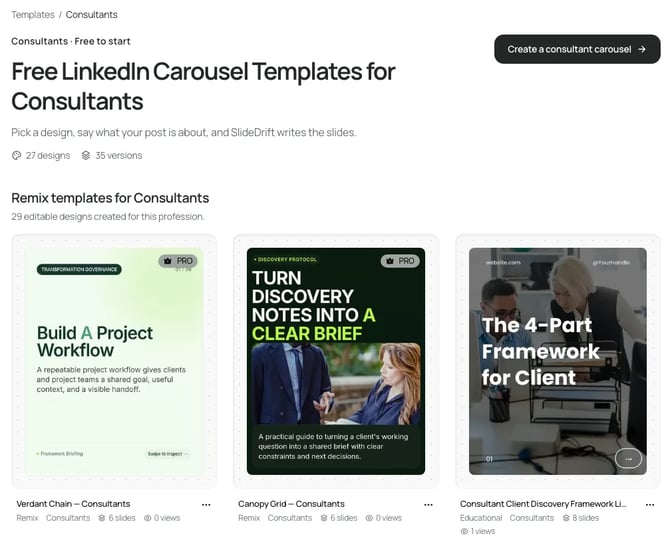
SlideDrift is a LinkedIn content studio. You paste notes, a link or half an idea on Home and choose what to make: post ideas, a carousel, a graphic or a photo in a set style. Post ideas gives you a mix of carousel, image, text and poll drafts, and text, image and poll drafts use no credits.

Where it differs most from Taplio is design. SlideDrift's Remix designs are complete looks shown on real example slides before you use them, and your Brand Kit puts your colours, fonts and logo on every carousel. You can import the kit from your website.
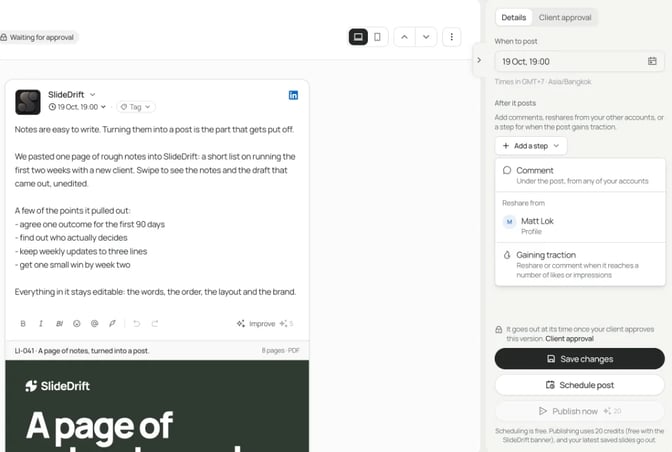
Scheduling covers carousel, image, multi-image, video, poll and text posts. Under After it posts you can add a first comment, up to three later comments and reshares from your other accounts. A Client approval link holds up to 20 posts for 14 days and needs no SlideDrift account, and Only post once it's approved holds a post until the reviewer says yes.
SlideDrift posts natively only to LinkedIn. For other platforms, export PDF or PNG in square 1:1, portrait 4:5 or stories 9:16 and upload it there. It also has no engagement feed or DM outreach, so keep a tool for those if you use them.
Prices: Free with 200 credits, Starter $29 a month for 1 personal profile, Pro $59 for 3 accounts including Company Pages, and Agency $199 for 10. The seven-day trial asks for a card and charges $0 at the start. More in our Taplio vs SlideDrift comparison.
Best suited for: consultants, advisers, accountants and founders whose posts need to look designed and on brand, and who want sign-off and scheduling in the same place.
2. Supergrow, best for a like-for-like swap of Taplio's writing tools
Supergrow builds a voice profile from an interview with an AI interviewer, then turns YouTube videos, blog posts and PDFs into LinkedIn posts. Scheduling covers a calendar, a queue and first comments, and Engage uses Focus Mode and AI comments so you can engage without scrolling the feed.
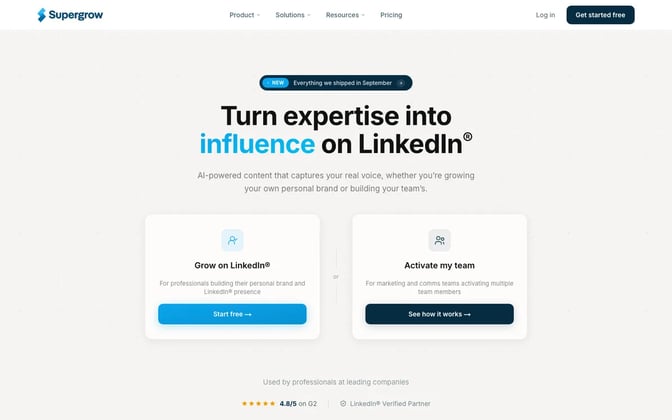
Its pricing page lists a carousel maker and an MCP connection on every plan. Pro is $39 a month, or $31 billed annually, for 1 account. Approval workflows need Teams, at $199 a month for 5 accounts. The pricing page lists no free plan, and every plan includes a 7-day free trial. Neither page mentions Company Pages.
Best suited for: people who mostly post text, want it to sound like them, and want Taplio's mix of writing, scheduling and engagement from another tool.
3. AuthoredUp, best for people who write their own posts
AuthoredUp is a web app and a Chrome extension. You format posts with bold, italic and emojis, add hooks and endings from templates, check a readability grade and preview the post before it goes out. Analytics track impressions and engagement.
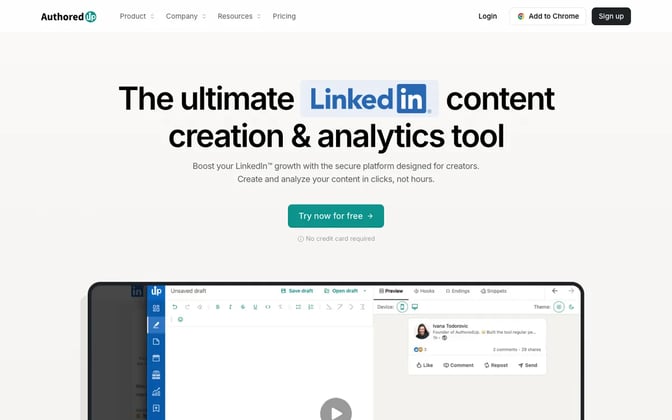
Its pricing page puts Individual at $19.95 a month, or $16.63 billed yearly. Business is $14.95 per profile a month with a minimum of 3. Unlimited Company Pages are free on every plan, scheduling runs through the extension, and the free trial needs no card. Its AI writer, Coauthor, is in closed beta, and the pricing page doesn't mention carousels.
Best suited for: experts who write every word themselves and care how the post reads in the feed.
4. Buffer, best for a simple scheduler across several networks
Buffer's LinkedIn page says it schedules text-only, image, GIF, PDF, video, link preview and carousel posts to LinkedIn profiles and Company Pages. An AI assistant helps with ideas and drafts.
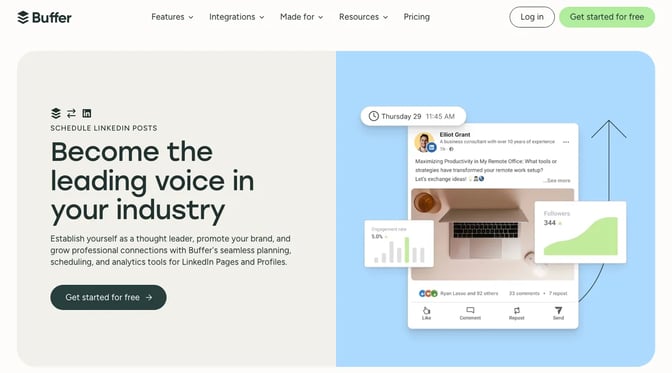
The free plan covers up to 3 channels and 10 scheduled posts per channel. On its pricing page, Essentials is $5 a month per channel billed yearly ($60 a year), and Team is $10 ($120 a year) with a 14-day trial. Approval workflows are on Team only, and first comments come with Essentials and Team. Its LinkedIn page covers scheduling carousels, not making them.
Best suited for: solo professionals who post the same content to LinkedIn and a few other networks and want a calm, cheap scheduler.
5. Typegrow, best free option for an AI writer and scheduler
Typegrow lists an AI writer, a scheduler for posts and carousels, a carousel maker, a hook generator and a post preview, with no browser extension to install. Its help page says you can schedule up to 50 days ahead and post from Company Pages you sync in Settings.
Its pricing page says it's free with no card required, and that a paid plan is in the works. Managing several accounts in one login is listed as coming soon. Our Typegrow vs SlideDrift comparison covers its carousels.
Best suited for: people growing a personal brand who want to try an AI writer and scheduler before paying for one.
6. Canva, best for designing every slide by hand
Canva's pricing page lists 1 Brand Kit on Free (3 colours only) and 5 on Pro, which also adds social content scheduling. Its Content Planner help page lists LinkedIn among the platforms you can schedule to.
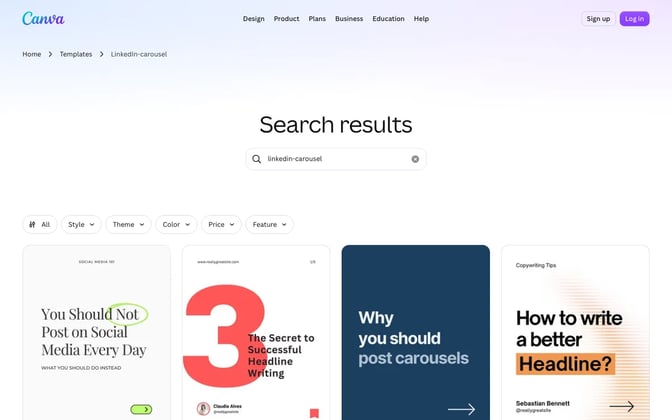
You build each carousel yourself from a template, and Design Approvals aren't on Free or Pro; they come with the Business plan. Prices show in your local currency, and Pro has a free trial. Our Canva vs SlideDrift comparison goes into carousels.
Best suited for: people who enjoy design and want to place every heading and photo themselves.
7. Hootsuite, best for marketing teams that also run LinkedIn ads
Hootsuite's LinkedIn page describes a drag-and-drop calendar, Best Time to Publish, OwlyWriter AI for drafting, and analytics for profile and Page posts, with LinkedIn ad campaigns next to organic posts.
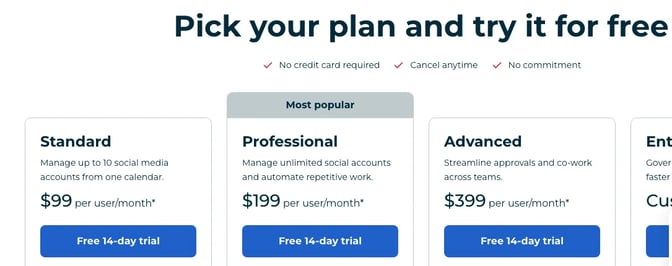
Its plans page starts Standard at $99 per user a month, billed annually, for 10 social accounts. Professional is $199 and Advanced is $399, and review and approval starts on Advanced. The 14-day trial needs no card.
Best suited for: marketing teams that run several networks and paid LinkedIn campaigns from one place.
Taplio alternatives comparison
| Tool | Taplio job it replaces | Company Pages | Sign-off | Free plan or trial | Starting price |
|---|---|---|---|---|---|
| Taplio | (the original) | Not mentioned | Client roles for teams | 7-day trial | $39 a month |
| SlideDrift | Making and scheduling posts | Pro and Agency | Approval links on paid plans | Free plan; 7-day trial | $29 a month |
| Supergrow | Writing, scheduling, engagement | Not mentioned | Teams plan | 7-day trial | $39 a month |
| AuthoredUp | Writing and formatting | Free on every plan | Not listed | Free trial, no card | $19.95 a month |
| Buffer | Scheduling | ✓ | Team plan | Free plan; 14-day trial | $5 a month per channel, billed yearly |
| Typegrow | Writing and scheduling | ✓ | Not listed | Free for now | Free |
| Canva | Design | LinkedIn Pages on Pro | Business plan | Free plan; Pro trial | Local currency |
| Hootsuite | Scheduling, analytics, ads | ✓ | Advanced plan | 14-day trial | $99 per user a month, billed annually |
Taplio alternatives feature matrix
✓ means the tool's own pages list it, ✗ means it isn't offered, "Trial" means a free trial but no free plan, and "Not listed" means we couldn't find it.
| Feature | SlideDrift | Taplio | Supergrow | AuthoredUp | Buffer | Typegrow |
|---|---|---|---|---|---|---|
| AI post drafts | ✓ Post ideas | ✓ Growth | ✓ | Beta | ✓ | ✓ |
| Carousel maker | ✓ | ✓ | ✓ | Not listed | Schedules only | ✓ |
| Designed templates on example slides | ✓ | Not listed | Not listed | Not listed | Not listed | Not listed |
| Saved brand colours, fonts, logo | ✓ Brand Kit | ✓ | Not listed | Not listed | Not listed | Not listed |
| LinkedIn scheduling | ✓ paid plans | ✓ | ✓ | ✓ extension | ✓ | ✓ |
| Company Pages | ✓ Pro | Not listed | Not listed | ✓ | ✓ | ✓ |
| Client or team approval | ✓ | Client roles | Teams | Not listed | Team | Not listed |
| First comment | ✓ | Not listed | ✓ | Not listed | ✓ paid plans | Not listed |
| Engagement feed | ✗ | ✓ | ✓ | Not listed | Not listed | Not listed |
| DM outreach | ✗ | ✓ Pro | Not listed | Not listed | Not listed | Not listed |
| Free plan | ✓ | Trial | Trial | Trial | ✓ | ✓ |
Which Taplio alternative fits your work
| If you need | Pick | Why |
|---|---|---|
| Designed carousels and graphics in your brand, with client sign-off | SlideDrift | Templates, Brand Kit and approval links |
| Taplio's writing, scheduling and engagement mix from another tool | Supergrow | Voice profile, Engage and first comments |
| Help formatting posts you write yourself | AuthoredUp | Hooks, readability and preview |
| One scheduler for LinkedIn and other networks | Buffer | Free plan, then per-channel pricing |
| An AI writer and scheduler at no cost | Typegrow | Free for now |
| Full control over every slide | Canva | You design each page |
| A marketing team with LinkedIn ads | Hootsuite | Ads next to organic posts |
What results look like: one consultant's month
Here's a made-up example to show how the price changes once you count accounts and sign-off. Priya is an independent HR consultant. She posts from her own profile and her firm's Company Page: a case-study carousel each week, two text posts a week, and every case study needs the client's approval first.
| Tool | Plan she'd need | Monthly price | What's left to sort |
|---|---|---|---|
| SlideDrift | Pro | $59 | Nothing for this job; no engagement feed |
| Taplio | Growth | $69 | Company Pages not mentioned; a client role, but no approval step described |
| Supergrow | Teams | $199 ($189 billed annually) | Company Pages not mentioned |
| Buffer | Team, 2 channels | $10 per channel, billed yearly | No carousel maker listed |
| Hootsuite | Advanced | $399 per user, billed annually | Carousels not mentioned on its plans page |
On SlideDrift Pro, the weekly carousels come from Pro templates at 30 credits each. Publishing each one without the banner costs 20 credits, and text posts use none. That's a small part of the plan's 5,000 credits a month.
The hours matter more than the price gap. Run one real set of notes through your top two and time the path to a post you'd publish.
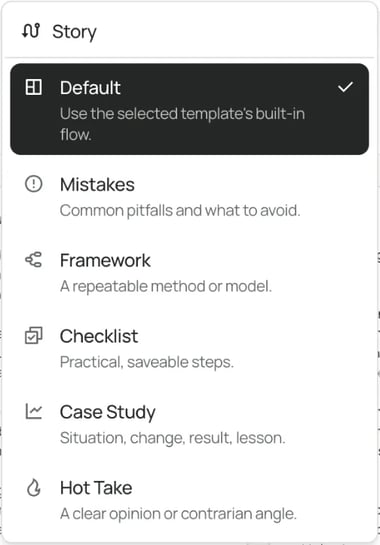
Our guide to turning a case study into a LinkedIn carousel covers what goes on each slide. For text posts, the free LinkedIn post generator shows what a first draft from your notes looks like.
Side by side: what the finished post looks like
Not all carousels are equal. Here are public examples from Taplio and Canva, signed out, above carousel covers made in SlideDrift.
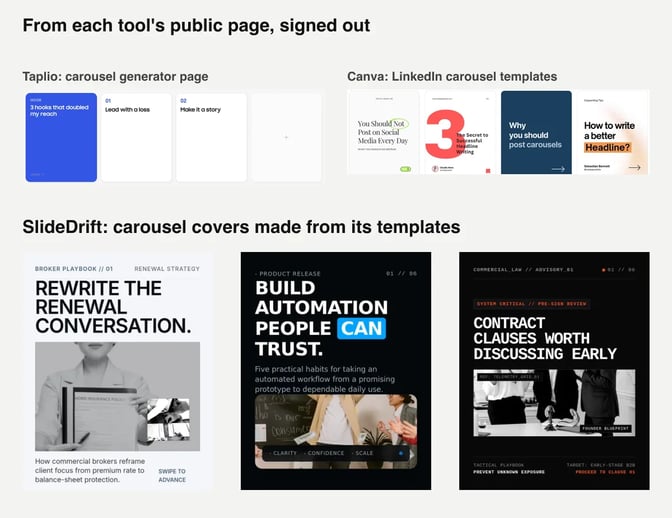
Judge them as your reader would, on a phone: can you read the headline at a glance, and does it look like it came from a firm you'd hire? For scheduling tools in more depth, read the best LinkedIn scheduling tools and how to schedule LinkedIn posts.
FAQ
What is a good alternative to Taplio?
It depends on the job. SlideDrift suits experts who want designed carousels and graphics in their brand, with sign-off. Supergrow is the closest match to Taplio's writing and engagement tools. AuthoredUp suits people who write their own posts, and Buffer suits posting to several networks.
Is there a free alternative to Taplio?
Yes. Typegrow says it's free to use for now. Buffer's free plan schedules to up to 3 channels, Canva's free plan covers design, and SlideDrift's free plan gives 200 credits, with LinkedIn scheduling on paid plans.
Which Taplio alternatives post to LinkedIn Company Pages?
AuthoredUp includes unlimited Company Pages on every plan. Buffer, Typegrow and Hootsuite post to Pages, and SlideDrift does on Pro or Agency. Taplio and Supergrow don't mention Pages on their pricing pages, so ask before you rely on them.
Which tools let a client approve a post first?
SlideDrift's approval links come with scheduling on paid plans and need no account for the reviewer. Supergrow puts approvals on Teams, Buffer on Team, Hootsuite on Advanced and Canva on Business.
Can I keep Taplio and add another tool?
Yes. You can keep Taplio for Engage and outreach and make your carousels elsewhere. Export the carousel as a PDF and post it as a LinkedIn document post, or schedule it from the other tool.
Do any Taplio alternatives post to Instagram or X too?
Buffer, Hootsuite and Canva schedule to several networks. SlideDrift posts only to LinkedIn, but you can export PDF or PNG in 1:1, 4:5 or 9:16 and post it on other platforms.
Does SlideDrift do lead outreach like Taplio?
No. SlideDrift makes, approves and schedules LinkedIn posts. If automated DMs matter to you, keep a tool built for outreach alongside it.
Make your next post in SlideDrift
Paste your notes or a link, pick a design and your Brand Kit, then edit the draft before you export it or schedule it with a client review link. Here's a brief for a case-study carousel:
SlideDrift brief
Make a 7-slide LinkedIn carousel case study for founders of growing companies.
Topic: how a growing software company rebuilt its onboarding plan for new hires.
Tone: practical and plain, no hype.
Open with the problem the founder faced. Give one step of the work per slide. End with the lesson other founders can apply and a question for the comments.

[Paste your project notes here]Make a post in your brand
Paste your notes or a link, and SlideDrift drafts the post in your brand. Edit it, then export it, or schedule it to LinkedIn with a client review link on a paid plan.


Brief for this carousel
Make a 6-slide LinkedIn carousel on choosing a Taplio alternative. A cover (pick the tool by the part of LinkedIn that takes your time), then one question per slide: who writes the post, does it need to look designed and on brand, profile or Company Page, does a client need to sign off, and what the plan you'd actually need costs. End with: run the same notes through your top two before you pay.