Taplio Alternative for Carousels: Choose by the Post You Get
Looking for a Taplio alternative for carousels? Judge each tool by the finished post: design, brand, structure and edits. A 20-minute test and a worked example.

If you want a Taplio alternative for carousels, judge each tool by the finished post, not the feature list. Open the carousel it makes from your own notes and ask five things: does it look designed, is it in your brand, does the story hold together, can you fix one slide without starting again, and can it go out in the size and place you need. SlideDrift is built for that output: designed carousels and graphics in your Brand Kit, edited slide by slide, then scheduled to LinkedIn or exported.
We make SlideDrift, so weigh that. Facts about other tools come from their own sites, with the date we checked.
Why the finished post is the right test
Most LinkedIn tools now write text well enough. The gap shows up when the post has to be a carousel: a cover someone stops for, a slide per point, your colours and fonts, and nothing to fix in another app before it goes out.
Two tools can both "make carousels" and hand you very different things. One gives you a text draft dropped onto a plain layout. Another gives you a designed deck you'd be happy to post under your name. A feature table can't show that difference. The carousel itself can.
That's why this guide doesn't list tools. If you want the full list, our Taplio alternatives guide compares seven of them with prices and Company Page support. And if you've already narrowed it down to two, the Taplio vs SlideDrift comparison goes through them side by side. This page is the test to run once you have a shortlist.
SlideDriftCreate your ownCarousel transcriptShowHide


- 01Taplio vs SlideDrift, checked October 2026. Two carousel tools, two different jobs. Taplio grows your whole LinkedIn presence. SlideDrift makes the carousel itself. Here's how to tell which you need.
- 0201, Taplio, the growth suite. Writing, scheduling, analytics and engagement, with a carousel generator inside. Paste a post, an article or YouTube link, or an idea, apply your brand, then export a PDF or schedule it. Plans from $39 a month, with a 7-day trial.
- 0302, SlideDrift, carousels first. Built around the carousel itself. Start from a link, notes or a PDF, then edit: Remix designs and templates with a full slide editor; brand kits that apply your fonts, colors and logo to every carousel; PDF export, or LinkedIn scheduling on paid plans. Free to start, paid plans from $29 a month.
- 0403, the free versions. Starting prices: $29 and $39. SlideDrift from $29 a month, Taplio from $39. Both have a 7-day trial. Taplio's free carousel tool adds a watermark; SlideDrift's free plan has 200 credits and a small banner on exports.
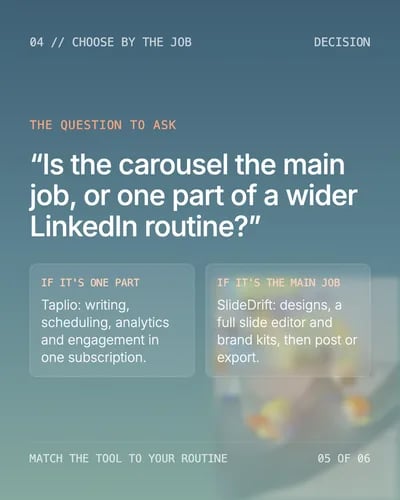
- 0504, choose by the job. The question to ask: is the carousel the main job, or one part of a wider LinkedIn routine? If it's one part, Taplio: writing, scheduling, analytics and engagement in one subscription. If it's the main job, SlideDrift: designs, a full slide editor and brand kits, then post or export.
- 06The test. Run one real source through both. Paste the same notes into each tool. Count the facts that survive, the slides you rewrite and the steps left before posting.
The five-point output test
Run every tool on your shortlist through the same five questions. Score each one yes, partly or no.
- Does it look designed? Look at the cover at thumbnail size. Is there a clear focal point, a type scale that reads on a phone, and real layouts rather than the same box on every slide?
- Is it in your brand? Your colours, fonts and logo should be on every slide without you adding them by hand. Check what happens to a dark brand colour on text: is it still readable?
- Does the story hold together? A carousel is a sequence. Slide one makes a promise, the middle keeps it one point at a time, and the last slide lands a lesson or a question.
- Can you fix one slide? You'll always change something. Rewrite one headline, swap one image and reorder two slides. If any of those means starting again, count it.
- Can it go where you need? Check the sizes (square, portrait, stories), whether it posts to a Company Page, and whether someone else has to approve it first.
The free LinkedIn carousel size guide covers the dimensions, and the LinkedIn carousel checklist covers the finer points before you post.
Where Taplio fits
Taplio calls itself an all-in-one AI tool for LinkedIn growth and personal branding. Its carousel generator starts from a post, an article or YouTube link, or an idea, applies your saved colors, fonts and logo, and exports a PDF or adds the carousel to your queue (checked October 2026).
So Taplio does make branded carousels. The question for you is whether the carousel is one part of a wider routine, with writing, scheduling and engagement in one subscription, or the main thing you need help with. Its pricing page lists Starter at $39 a month, Growth at $69 and Pro at $199, with a 7-day trial.
Run Taplio through the same five-point test as everything else. If its carousels pass for you, the rest of its suite may be worth keeping. If you're looking because the carousel is the slow part, the next section shows what a visual-first tool does differently.
How SlideDrift makes a designed carousel
SlideDrift is a LinkedIn content studio. It makes carousels, graphics and other LinkedIn posts from your material, in your brand, then schedules them to LinkedIn or exports them. Its headline strength is the designed carousel.
Start from what you already have
You paste notes, a link or half an idea into Home and choose what to make: post ideas, a carousel, a graphic or a photo style.

Pick the story shape
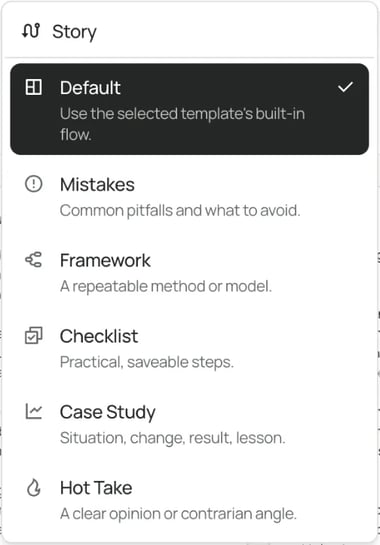
Before it drafts, you can pick a story mode, so the same notes become a checklist, a mistakes post, a framework, a case study or a hot take. That's question three of the test, settled up front.
Choose a design, not just a colour
Templates include Standard layouts and Remix designs: designed systems shown on real example slides. With a Remix design you can keep its own slides and have your content written in, or build new slides in that look. Either way, every slide stays editable.
Your Brand Kit holds your colours, heading and body fonts, logo, profile photo, name, handle and writing style. Paste your website and SlideDrift fills in the logo, colours and fonts for you. On Remix designs, each colour is restyled by its job and hard-to-read text is switched to a readable colour. Our guide to using Brand Kits on LinkedIn carousels goes further.
Edit, approve, then post or export
In the editor you change words, slides, design and images, one slide at a time. On a paid plan you can send a client review link for up to 20 posts that needs no SlideDrift account, and hold the post until it's approved.
SlideDrift posts natively to LinkedIn only, to profiles on every paid plan and to Company Pages on Pro or Agency. You can also export PDF or PNG in square (1:1), portrait (4:5) or stories (9:16) sizes and post them on other platforms.
Worked example: one set of notes, judged by the finished post
Priya is a made-up fractional finance director. She's used a text-first tool for a year and wants one carousel a fortnight from her client notes, in her own colours, without opening a design app.
Her notes from three client month-end reviews:
Worked example
Priya's notes
- All three clients close in 12 to 15 working days.
- Two still rebuild the same spreadsheet by hand each month.
- Bank reconciliations start only once every invoice is in.
- Nobody owns the accruals list, so it's chased on day 10.
- The client that fixed ownership first now closes in 7 days.
She pastes the same notes into each tool on her shortlist, asks for a seven-slide carousel and scores each result on the five-point test:
| Question | What Priya checks | What passes |
|---|---|---|
| Designed? | The cover at thumbnail size | One clear promise, readable on a phone |
| In her brand? | Colours, fonts and logo on every slide | Nothing added by hand |
| Story holds? | Slide order | Promise, three signs, a fix each, a question |
| Fix one slide? | Rewrite slide 4's headline | Changed in place, the rest untouched |
| Goes where she needs? | Portrait PDF and LinkedIn scheduling | Both, with no extra app |
Here's a designed carousel made in SlideDrift with a Remix design. It's the kind of finished deck Priya is comparing against, rather than a first text draft.
If you want to try Priya's test with your own notes, here's a brief to start from:
SlideDrift brief
Make a 7-slide LinkedIn carousel for finance directors at mid-sized firms.
Topic: three signs your month-end close is too slow, and the fix for each.
Tone: practical and plain, no hype.
Open with one specific promise. Give one sign and its fix per slide. End with what changes when the close is faster and a question for the comments.

[Paste your notes here]For more on turning client work into slides, see turning a case study into a LinkedIn carousel. If a first draft comes back flat, our LinkedIn post design guide shows what to change.
A 20-minute test you can run today
You don't need a long trial to decide. Give each tool 20 minutes:
- 5 minutes: set up your brand. Upload your logo, colours and fonts, or let the tool read them from your website.
- 5 minutes: paste the same real notes and ask for the same slide count.
- 5 minutes: make three edits. Rewrite one headline, swap one image and move one slide.
- 5 minutes: export a portrait PDF and look at it on your phone.
Then count three things: facts from your notes that survived, slides you rewrote, and steps left before you could post. The tool with the fewest fixes is the one to keep.
FAQ
What is a good Taplio alternative for carousels?
Pick the tool whose finished carousel needs the least fixing. Run the same notes through each one and score the result on design, brand, story, edits and where it can go. SlideDrift is built for designed carousels in your brand, scheduled to LinkedIn or exported.
Does Taplio make carousels?
Yes. Taplio's carousel generator starts from a post, a link or an idea, applies your saved colors, fonts and logo, and exports a PDF or adds it to your queue (checked October 2026).
How is a visual-first tool different from an AI writer?
An AI writer gives you text to post or paste into a design. A visual-first tool gives you the designed post itself, with your brand on every slide, ready to edit, schedule or export.
Can I keep Taplio and use another tool for carousels?
Yes. Some people keep a writing and engagement tool and use a separate tool for the carousels. Our Taplio alternatives guide shows which tools cover which part.
Can SlideDrift post carousels to other networks?
It posts natively to LinkedIn. For other networks, export PDF or PNG in square (1:1), portrait (4:5) or stories (9:16) sizes and post them anywhere.
Make a designed carousel in SlideDrift
Paste the notes you'd give any tool, pick a story mode and a design, and see the finished post before you decide.
Make a carousel in your brand
Paste your notes or a link, and SlideDrift drafts a designed carousel in your Brand Kit. Edit it slide by slide, then export it, or schedule it to LinkedIn on a paid plan.


Brief for this carousel
Make a 7-slide LinkedIn carousel for finance directors at mid-sized firms on three signs their month-end close is too slow. A cover with one specific promise, one slide per sign with a fix, a slide on what changes when the close is faster, and a closing question for the comments.