Supergrow Alternative for Branded Carousels: Supergrow vs SlideDrift
Want a Supergrow alternative for carousels? Supergrow vs SlideDrift on designs, Brand Kits, slide editing, export and price, for experts who post on LinkedIn.

If Supergrow writes well in your voice but your carousels need to match your brand and be easy to fix slide by slide, SlideDrift is the Supergrow alternative to test. Supergrow is a LinkedIn writing and growth tool with a carousel maker inside. SlideDrift is a LinkedIn content studio built around the carousel: designed templates, Brand Kits and a full slide editor.
Prepared by Matt Lok at SlideDrift, from SlideDrift's docs and Supergrow's own website. Facts were last checked on October 22, 2026.
Which should you choose?
Choose by the part of LinkedIn that takes most of your time.
Choose Supergrow if most of your posts are text and you want them to sound like you. It builds a voice profile, offers AI interviews that turn a conversation into post drafts, and turns YouTube videos, blog posts and PDFs into posts. Its pricing page lists a carousel maker as one feature among many.
Choose SlideDrift if carousels carry your expertise and they have to look finished: your logo, colours and fonts on every slide, designs that don't look like everyone else's, and an editor where you fix one slide without regenerating the deck.
Choose both if you write text posts in Supergrow and make the carousels in SlideDrift. They don't conflict: SlideDrift exports a PDF you can post from anywhere, and it can also schedule the carousel itself.
SlideDriftCreate your ownCarousel transcriptShowHide


- 01The 10-minute test. Test any carousel generator in 10 minutes. Every tool's demo looks good. Run these five checks on your own material before you pay: a real source, the first slide, one edit, your brand and the exported PDF. Use the same source in every tool you test.
- 02Test 01, bring your own source. Start from a real source. Paste an article, a newsletter or notes you'd actually post about. A one-line topic shows what the tool invents; your own material shows what it understands.
- 03Test 02, the hook check. Judge slide one first. Does the first slide make a specific promise to one reader? If it could introduce any post, the tool wrote a title, not a hook. A good hook: specific, one reader, one promise.
- 04Test 03, no full regeneration. Edit one slide without starting over. Change a headline, swap an image and reorder two slides. If fixing one slide means regenerating the whole deck, every draft becomes a gamble.
- 05Test 04, your brand settings. Apply your brand once, then reuse it. Save your fonts, colors and logo once, and check they land on every slide of the next carousel without fixing anything by hand.
- 06Test 05, the final check. Export the PDF and open it on a phone. Every page the same size, text readable at phone size, slides in the right order. Pick the tool that passes all five on your own material.
Supergrow in brief
Supergrow focuses on writing. It builds a voice profile, drafts posts from interviews with an AI interviewer, turns long content into LinkedIn posts, and schedules them with a calendar, a queue and first comments. Its pricing page also lists a carousel maker, an Engage tool, profile analytics and an MCP connection for Claude or ChatGPT.
There's no free plan, and the 7-day trial is the way to test it. Approval workflows come with the Teams and Enterprise plans, not Pro.
That's a strong mix for someone whose LinkedIn is mostly text. For a wider look at writing-first tools, see our Taplio alternatives guide, which reviews Supergrow next to six others.
Why experts look for a Supergrow alternative for carousels
The reasons are usually about the slides, not the words:
- The carousel has to look like the firm. A consultant's or lawyer's carousel sits next to their website and proposals. Generic slides undercut the expertise in them.
- One wrong slide shouldn't cost the whole deck. If fixing a headline means regenerating, every draft becomes a gamble.
- Several brands or clients. Advisers who post for a firm and themselves, or agencies with clients, need more than one saved brand.
- Someone has to sign off. A partner or client often needs to approve the carousel before it goes out.
If none of these apply, you may not need an alternative. If two or more do, test the carousel side properly.
The same carousel in both tools
The fair test is one real source, one carousel, run through both. Here is what that looks like in SlideDrift, step by step.
1. Start from your own material. Paste notes, a link or a PDF on Home and pick Carousel. A PDF needs a paid plan or a trial.

2. Pick your Brand Kit before you generate. The kit holds your logo, colours, heading and body fonts and an optional writing style. You can also import it from your website.
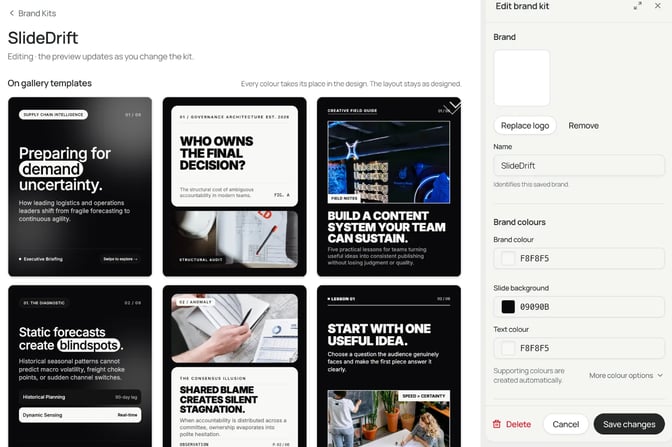
3. Edit, then export. Change one slide, reorder two, and export the PDF.
In Supergrow, run the same notes through its carousel maker during the trial. Then compare three things on both results: how many of your facts survived, how many slides you had to fix by hand, and whether the finished slides look like your brand without manual restyling.
Design quality: templates and Remix designs
Not all carousels are equal. A reader decides in the feed whether a carousel looks worth opening, so the design is part of the message.
SlideDrift's Templates library has Standard templates and Remix designs, and you can filter by profession. Standard templates give a predictable, reusable layout. Remix designs are fuller visual systems; you can keep a design's own slides and fill them with your content, or have SlideDrift build new slides in that look.
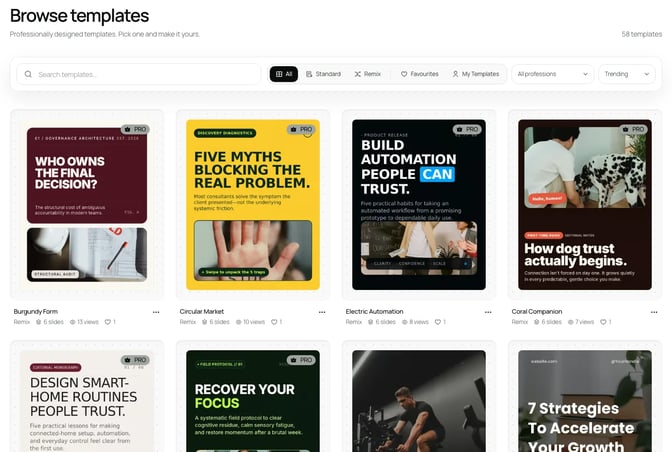
Designs range from clean editorial layouts to bold black-and-white styles, so a case study and a framework don't have to look the same.
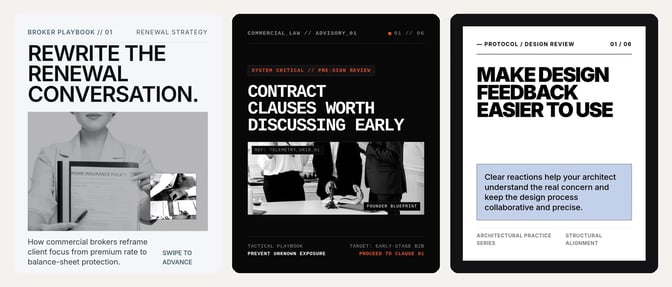
When you test Supergrow's carousel maker, look at the same things: how many layouts you can choose from, whether two carousels in a row look different, and whether a cover stands out at thumbnail size.
Branding: one look on every carousel
A Brand Kit is where SlideDrift's branding lives. Apply it on Home before generating, or later from the editor's Brand panel.
On a Remix design, the kit restyles the whole design. Every colour has a job, such as the page, a card, a panel, text or an accent, and takes the kit's colour for that job. Text stays readable on its new background, and the layout keeps its margins. Your logo stays visible too: on a slide where a dark logo would disappear, SlideDrift shows a one-colour version.
Plans set how many kits you keep: 1 on Free and Starter, 5 on Pro and 25 on Agency. That matters if you post for a firm and for yourself, or for clients. The guide on how to use Brand Kits for LinkedIn carousels walks through the setup, including several brands at once.
Editing: fix one slide, keep the rest
This is where carousel tools differ most, and where a demo tells you least.
In SlideDrift's editor you can edit text on the canvas, format part of a sentence, add, duplicate, delete and reorder slides, and see the whole deck in Slide overview. AI can rewrite a selected slide or give a Remix slide a new design with the same content. Optional blocks, such as badges, quote cards or stat cards, can be hidden, restored or deleted without breaking the layout.
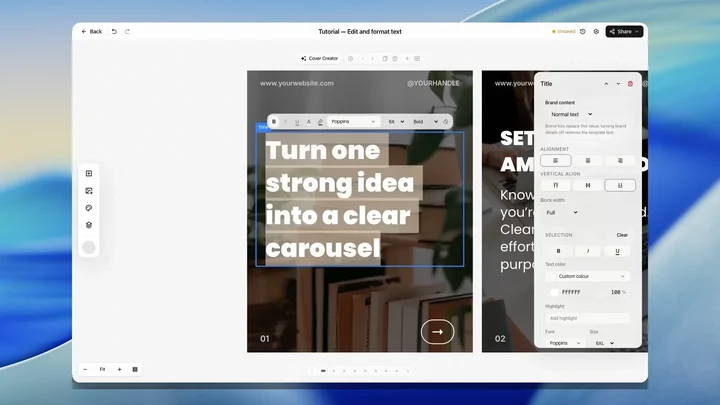
Two details matter for careful work. Undo returns a slide to how it was before an AI edit. And if you change a slide while an AI edit is running, SlideDrift keeps your newer work rather than overwriting it.
For a full walkthrough of the editor, see the Edit slides docs. Before you post, run the finished deck through the LinkedIn carousel checklist and preview the caption with the free LinkedIn post preview tool.
Decision table
| What you need | Supergrow | SlideDrift |
|---|---|---|
| Built around | Writing LinkedIn posts in your voice, with growth tools | The carousel: designs, branding and slide editing |
| Voice | A voice profile, Content DNA and AI interviews | A past post saved under Writing style in the Brand Kit |
| Starting material | YouTube videos, blog posts and PDFs, for posts | Notes, a public link or a PDF (paid plans or trial), for carousels |
| Carousel designs | A carousel maker on its pricing page; test the range in the trial | Standard templates and Remix designs, filtered by profession |
| Branding | Test whether your fonts, colours and logo carry over | Brand Kits: 1 on Free and Starter, 5 on Pro, 25 on Agency |
| Editing one slide | Test it in the trial on a real carousel | Edit, reorder, duplicate or redesign one slide without regenerating |
| Sign-off | Approval workflows on Teams and Enterprise | Client approval links: up to 20 posts, 14 days, no account needed |
| Free start | No free plan; 7-day trial | Free plan; 7-day trial of a paid plan |
Feature comparison
| Feature | Supergrow | SlideDrift |
|---|---|---|
| AI interviewer that drafts posts | ✓ | ✗ |
| Carousel maker | ✓ | ✓ |
| Remix designs | Not listed | ✓ |
| Brand Kit applied to whole deck | Test in trial | ✓ |
| Several saved brands | Test in trial | ✓ |
| Edit one slide without regenerating | Test in trial | ✓ |
| Reorder and duplicate slides | Test in trial | ✓ |
| Saved custom templates | Test in trial | Pro, Agency, trial |
| PDF export | Test in trial | ✓ |
| PNG export | Test in trial | ✓ |
| Scheduling to LinkedIn | ✓ | Paid plans |
| MCP connection | ✓ | ✓ |
| Free plan | ✗ | ✓ |
"Test in trial" means Supergrow's public pages didn't settle the point when we checked. Run it yourself before you decide.
What each costs for one person
The scenario: one expert, one LinkedIn profile, carousels every week.
- Supergrow Pro is $39 a month, or $31 a month billed annually, and covers 1 account. There's no free plan; the trial lasts 7 days.
- SlideDrift Starter is $29 a month and includes 1 Brand Kit and 1 personal LinkedIn profile for scheduling.
- SlideDrift Pro is $59 a month, with 5 Brand Kits, 25 saved custom templates and up to 3 LinkedIn accounts, including Company Pages.
SlideDrift's Free plan has no monthly price, so you can make and edit a carousel before paying; free exports carry the SlideDrift banner. Each eligible account can start one seven-day trial of a paid plan. It needs a card, Stripe charges $0 at the start, and cancelling before the end date avoids the first charge. Prices are on slidedrift.com/pricing.
Switching from Supergrow to SlideDrift
You don't have to move everything. A sensible split is to keep Supergrow for text posts if its voice suits you, and move carousels to SlideDrift.
- Make your Brand Kit first. Import it from your website or fill it in: logo, colours, heading and body fonts. Add a past post under Writing style so drafts sound closer to you.
- Rebuild one recent carousel. Paste the notes or the article it came from. Compare the result with the Supergrow version side by side.
- Save the look you like as a template on Pro, Agency or a trial, so the next carousel starts there.
- Decide how you post. SlideDrift posts natively only to LinkedIn, where it schedules carousels on paid plans. It also exports PDF or PNG in square (1:1), portrait (4:5) and stories (9:16) sizes, so you can post the same carousel on other platforms or upload it through any scheduler.
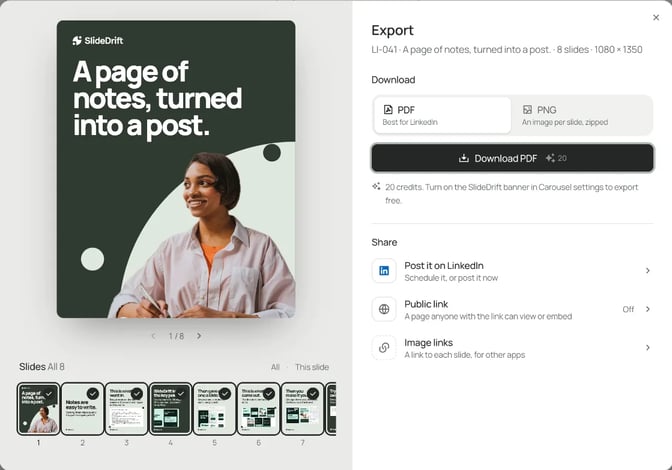
There's nothing to migrate from Supergrow's side for carousels: you bring the source material, not the old slides.
FAQ
What is a good Supergrow alternative for LinkedIn carousels?
If carousels are your main format and they have to match your brand, test SlideDrift. It's built around designed templates, Brand Kits that restyle the whole deck and a slide editor. If you mostly write text posts, Supergrow's voice features may be what you need.
Is Supergrow better than SlideDrift for writing posts in my voice?
For text posts, Supergrow puts more into voice: it builds a voice profile and drafts posts from AI interviews. SlideDrift can keep a past post under Writing style in your Brand Kit, but its depth is in carousel design and editing.
Does Supergrow have a free plan?
Its pricing page showed no free plan when we checked on October 22, 2026, and offered a 7-day trial. SlideDrift has a Free plan with no monthly price, plus a seven-day trial of a paid plan.
Can I use Supergrow and SlideDrift together?
Yes. Write text posts in Supergrow and make carousels in SlideDrift. SlideDrift exports a PDF you can upload anywhere, or it can schedule the carousel to LinkedIn on a paid plan.
Can SlideDrift keep several brands apart?
Yes. Pro includes 5 Brand Kits and Agency 25, so a firm's look and a personal look, or several clients, stay separate. Free and Starter include 1.
Make your next carousel in SlideDrift
Take the notes behind your next carousel, pick your Brand Kit and a design, and edit the draft until it's yours. Then compare it with what you'd make anywhere else.
Make a branded carousel
Paste your notes or a link. SlideDrift drafts the slides in your brand; you edit them, then export a PDF or schedule the post on a paid plan.


Brief for this carousel
Make a 6-slide LinkedIn carousel with a 10-minute test for any AI carousel generator. A cover, then one test per slide: start from a real source, judge slide one, edit one slide without regenerating the deck, apply your brand once, and export the PDF and open it on a phone. End with: pick the tool that passes all five on your own material.