Best LinkedIn Carousel Maker for Agencies in 2026: The Buyer's Shortlist
Five LinkedIn carousel makers for agencies, ranked on design quality, client brand kits, client approval, accounts per plan and cost. Checked October 2026.

The best LinkedIn carousel maker for agencies is SlideDrift, if your team turns client notes, articles and PDFs into designed carousels in each client's brand and needs sign-off before anything posts. Supergrow suits agencies ghostwriting for executives, PostNitro suits clients who post on six networks, Contentdrips is the budget pick for many brands, and Taplio fits text-first teams.
We make SlideDrift, so every product claim below is sourced and dated.
Key takeaways
- SlideDrift is the pick for designed client carousels: Pro templates, 25 Brand Kits and 10 LinkedIn accounts on Agency at $199 a month, plus approval links clients open without an account.
- Agency carousels are a brand problem before a design problem. One saved kit per client stops colours and fonts drifting from post to post.
- Client sign-off belongs inside the tool. SlideDrift, Supergrow and PostNitro all list approval before publishing; check whether the client can comment on a single slide.
- PostNitro is best for clients who post the same carousel on six networks. Contentdrips is the cheapest way to hold unlimited client brands, at $26 a month.
- Run one real client brief through your top two tools before you move the whole roster.
The carousel below is a 10-minute test you can run on any of these tools, made in SlideDrift.
SlideDriftCreate your ownCarousel transcriptShowHide


- 01The 10-minute test. Test any carousel generator in 10 minutes. Every tool's demo looks good. Run these five checks on your own material before you pay: a real source, the first slide, one edit, your brand and the exported PDF. Use the same source in every tool you test.
- 02Test 01, bring your own source. Start from a real source. Paste an article, a newsletter or notes you'd actually post about. A one-line topic shows what the tool invents; your own material shows what it understands.
- 03Test 02, the hook check. Judge slide one first. Does the first slide make a specific promise to one reader? If it could introduce any post, the tool wrote a title, not a hook. A good hook: specific, one reader, one promise.
- 04Test 03, no full regeneration. Edit one slide without starting over. Change a headline, swap an image and reorder two slides. If fixing one slide means regenerating the whole deck, every draft becomes a gamble.
- 05Test 04, your brand settings. Apply your brand once, then reuse it. Save your fonts, colors and logo once, and check they land on every slide of the next carousel without fixing anything by hand.
- 06Test 05, the final check. Export the PDF and open it on a phone. Every page the same size, text readable at phone size, slides in the right order. Pick the tool that passes all five on your own material.
What a LinkedIn carousel maker for agencies is (and isn't)
A carousel maker for an agency does the same job as one for a solo consultant, then adds the parts that break when you post for ten people instead of one.
The core job is turning source material into slides. Your clients send articles, call notes, reports and half-finished ideas. A good tool drafts a carousel from that material, with one point per slide, and lays it out on a design that already works, so your team edits rather than builds.
The agency part is everything around the draft:
- A saved brand per client. Colours, fonts, logo and writing style, applied to every new carousel without a designer checking each slide.
- Client sign-off. A link the client opens, comments on and approves, so nothing posts before they say yes.
- Accounts. Several LinkedIn profiles and Company Pages connected under one plan.
- Predictable cost. A price you can quote clients when volume doubles.
It isn't a replacement for a designer on a client's big campaign, and it won't invent a client's expertise. The best output still starts from what the client knows.
On LinkedIn, a carousel is a document post. LinkedIn's help page accepts files up to 100MB and 300 pages and advises converting to PDF for the highest quality. If you post for a client's Company Page, you need a Page role that can publish; LinkedIn's Content admin role covers creating and managing posts.
How we ranked these carousel makers
We judged each tool on what an agency can check on its website before buying:
- Design quality. How finished carousels look, judged from each tool's public templates and examples, signed out: type you can read on a phone, one idea per slide, layouts that vary, and one consistent look across a deck.
- Client brands. How many saved brand kits a plan holds, what goes in them, and how fast you can set one up for a new client.
- Client sign-off. Whether a client can review and approve inside the tool, and whether publishing waits for that approval.
- Accounts and Company Pages. How many LinkedIn accounts one plan connects, and whether Company Pages are included.
- Where drafts start. A link, an article, notes or a PDF from the client, rather than a blank template.
- Cost at agency volume. The plan an agency with several clients would actually need.
Competitor facts come from each vendor's own pages, read signed out on October 21, 2026. Prices are in US dollars, billed monthly. We don't score design with a number; we show each tool's public examples so you can judge.
The shortlist: five carousel makers for agency work
1. SlideDrift, best for designed carousels across many client brands
SlideDrift is a LinkedIn content studio. It turns a client's link, notes or pasted article into an editable carousel, and on a paid plan or trial it starts from a PDF too. Pro templates are complete designs shown on real example slides before you generate, so a client sees the look before you spend time on words.
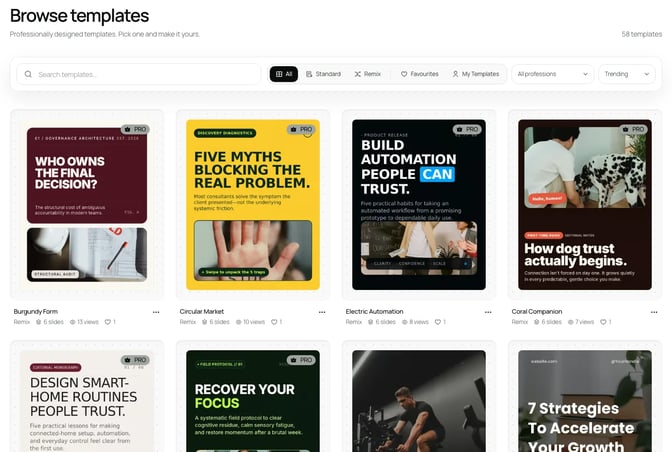
Each client gets a Brand Kit: logo, profile photo, colours, fonts, website, handle, tagline and writing guidance. Paste the client's website and SlideDrift fills the kit, usually in under a minute. On a Remix design, the kit recolours the whole layout by role and keeps text readable. Agency holds 25 kits, Pro holds 5.
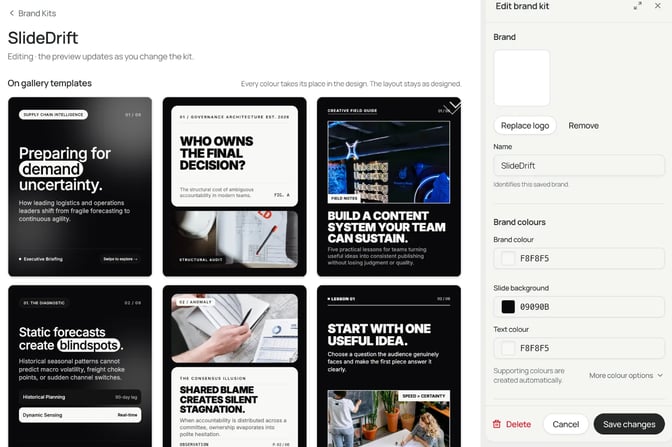
Sign-off happens in the same place. A client approval link lasts 14 days, holds up to 20 posts and needs no SlideDrift account. The client approves or asks for changes, and carousel comments are labelled by slide. Turn on Only post once it's approved and publishing waits for their yes.
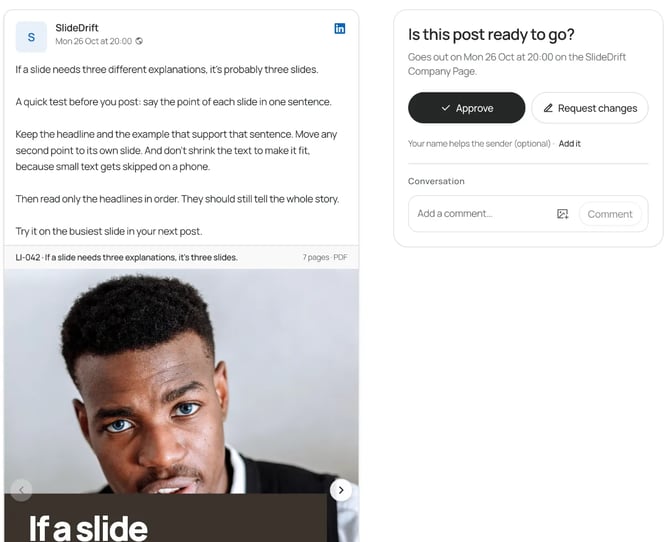
SlideDrift posts natively only to LinkedIn: Agency connects 10 accounts, personal profiles or Company Pages, and Pro connects 3. For clients on other platforms, export PDF or PNG in square 1:1, portrait 4:5 or stories 9:16 and post it anywhere. The schedule also takes text posts, polls, image, multi-image and video posts, with colour tags to group them by client.
On Pro or Agency, one post can go to several connected accounts, each with its own text and time. A carousel uses 20 credits for each account it publishes to; scheduling itself is free. Agency also saves up to 100 custom templates, so each client's house layout stays reusable, and its webhooks can tell your Zapier, Make or n8n workflow when a post publishes or fails. You can also drive SlideDrift from Claude or ChatGPT over MCP, with no API key.
The trade-off: other networks get exports rather than native posting, and saved custom templates start on Pro, not Starter. More on running clients in SlideDrift in how to create client carousels as an agency.
Best suited for: agencies and freelancers making carousels for several expert clients, such as consultants, advisers and founders, who want designed output, client sign-off and LinkedIn scheduling in one place.
2. Supergrow, best for agencies ghostwriting LinkedIn for executives
Supergrow is a LinkedIn tool for teams with a carousel maker inside. Its carousel page lists 50+ templates, brand kits of hex codes, font weights and logos saved per workspace, and several brand kits for agencies and teams. You start from a template, upload existing slides or use the Text to Carousel tab.
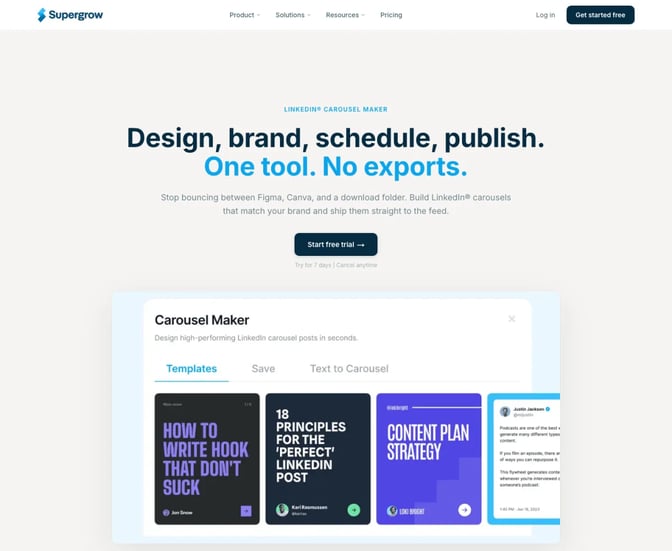
Carousels go through the same approval workflow as text posts, then publish to LinkedIn directly or join a queue. Its pricing page puts Pro at $39 a month for 1 LinkedIn account, and Teams at $199 for 5 LinkedIn accounts and up to 5 executives, with feedback and approval workflows. Larger rosters go to custom Enterprise pricing. Plans start with a 7-day free trial.
Best suited for: agencies whose main service is LinkedIn ghostwriting for a few executives, where carousels are one format among many.
3. PostNitro, best for clients who post on six networks
PostNitro drafts carousels from a topic, your own text, an article link or an X post. It lists 100+ editable templates, all 4:5, and a brand kit of fonts, colours, logo and headshots. Its homepage has a section for agencies: a workspace per client, members with their own access, and approval before anything publishes.
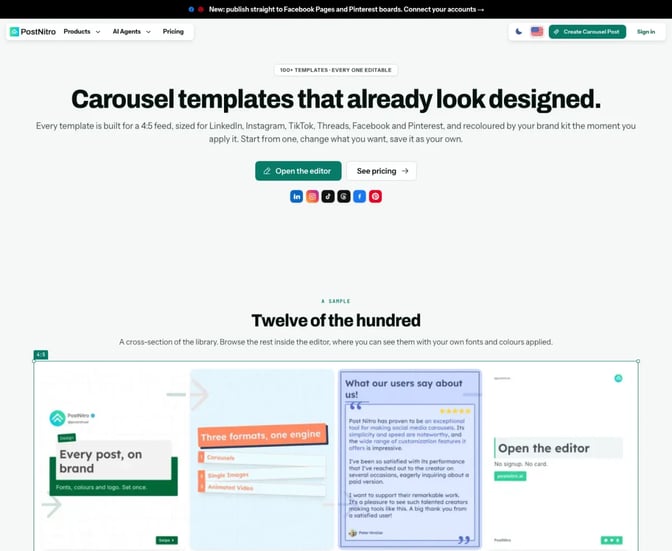
The plans page lists Team+ at $60 a month with 15 brand kits, 5 workspaces, 5 team members and 30 scheduling accounts across LinkedIn, Instagram, TikTok, Threads, Facebook and Pinterest. Starter at $15 doesn't schedule. The free plan allows 5 downloads a month with a watermark. See PostNitro vs SlideDrift for a closer look.
Best suited for: agencies whose clients want the same carousel on LinkedIn, Instagram and TikTok from one tool.
4. Contentdrips, best for many client brands on a small budget
Contentdrips fills its templates from a blog post, a URL, a YouTube or TikTok video, or a topic. Its template page lists 500+ free LinkedIn carousel templates in square and portrait sizes, and a brand kit of fonts, colours, logo and gradients. It publishes to LinkedIn profiles and Company Pages.
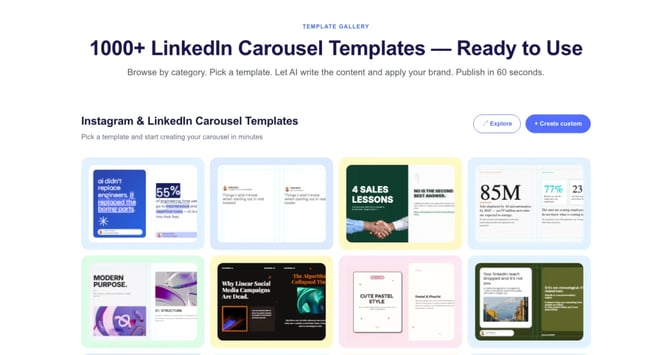
Its pricing page lists Pro at $26 billed monthly with unlimited brands, unlimited teams and 1200 AI credits, and Starter at $15 with 3 brands and 2 team members. Paid plans list CSV to Carousel, handy for batches, and Push to Zapier. Client approval isn't listed, so plan to collect sign-off elsewhere. The page shows two plan tables, so confirm the price at checkout.
Best suited for: small agencies and freelancers on a tight budget with many client brands, who handle approvals outside the tool.
5. Taplio, best for text-first LinkedIn teams
Taplio's carousel generator starts from a post, an article or YouTube link, or a rough idea, applies your colours and logo, then exports a PDF or schedules it. It sits inside Taplio's app next to post writing, scheduling and analytics.

Its pricing page lists Starter at $39, Growth at $69 and Pro at $199 a month, with a 7-day free trial. Growth lists team collaboration, and a separate team or agency option lists multiple accounts with admin, content writer and client roles, without a published price. More in Taplio vs SlideDrift.
Best suited for: agencies whose LinkedIn service is mostly text posts and engagement, with carousels as an extra.
When a design tool is still the better choice
Some client work needs a designer and a design tool such as Canva or Figma:
- The client has a strict visual system that every asset must match to the pixel.
- The carousel is part of a paid campaign with formal brand review.
- The deck relies on custom illustration or art direction.
For everyday thought leadership, the bottleneck is usually words and volume, not art direction. That's where the tools above help most. If a client keeps a designer, ask them to approve one template per client, then let your team fill it. The agency carousel templates guide covers which formats to set up first.
Agency carousel makers comparison
| Tool | Client brands | LinkedIn accounts | Client approval | Agency-size plan |
|---|---|---|---|---|
| SlideDrift | 25 Brand Kits on Agency | 10 on Agency, Company Pages included | Link, no account, comments by slide | Agency, $199 a month |
| Supergrow | Several brand kits | 5 on Teams | Feedback and approval workflows | Teams, $199 a month |
| PostNitro | 15 brand kits on Team+ | 30 scheduling accounts on Team+ | Approval before publishing | Team+, $60 a month |
| Contentdrips | Unlimited on Pro | Profiles and Company Pages | Not listed | Pro, $26 a month |
| Taplio | Colours and logo | Multiple, team option | Client role, team option | Team option, price not shown |
Agency carousel maker feature matrix
✓ means the tool's own pages list it, ✗ means it isn't offered, and "Not listed" means we couldn't find it.
| Feature | SlideDrift | Supergrow | PostNitro | Contentdrips | Taplio |
|---|---|---|---|---|---|
| Drafts from a link or article | ✓ | Text to Carousel | ✓ | ✓ | ✓ |
| Starts from a PDF | ✓ paid plans | Upload existing slides | Not listed | Not listed | Not listed |
| Designed template library | Standard and Pro | 50+ | 100+ | 500+ | Not listed |
| Several client brand kits | ✓ | ✓ | ✓ | ✓ | Not listed |
| Brand kit from a website | ✓ | Not listed | Not listed | Not listed | Not listed |
| Client approval before posting | ✓ | ✓ Teams | ✓ | Not listed | Client role |
| Comments on a single slide | ✓ | Not listed | Not listed | Not listed | Not listed |
| Company Pages | ✓ | Not listed | Not listed | ✓ | Not listed |
| Posts natively to other networks | ✗ exports | Not listed | ✓ | Not listed | |
| Zapier or webhooks | ✓ webhooks | Not listed | Not listed | Push to Zapier | Not listed |
| Free plan | ✓ | ✗ trial | ✓ watermark | ✓ | ✗ trial |
Side by side: what each tool's carousels look like
Design quality is the one thing a feature table can't show. Here are each tool's own public examples, next to slides from a carousel made in SlideDrift.
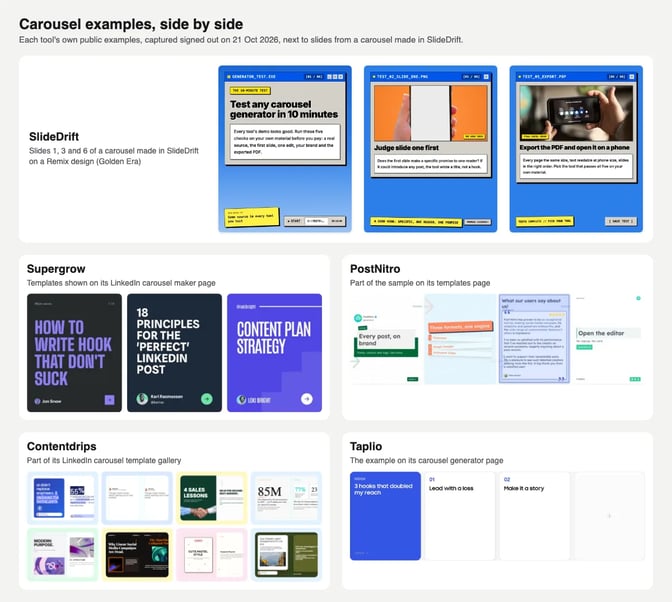
When you compare, look at three things on a phone-sized view: can you read the body text, does each slide carry one idea, and does the deck look like one system rather than a set of unrelated slides. Then ask whether the look would survive your client's colours and fonts.
Which carousel maker fits your agency
| If your agency needs | Pick | Why |
|---|---|---|
| Designed carousels for many expert clients, with sign-off and LinkedIn scheduling | SlideDrift | Pro templates, a Brand Kit per client, approval links |
| LinkedIn ghostwriting for a few executives, carousels included | Supergrow | Teams plan with approval workflows |
| Clients who post the same carousel on six networks | PostNitro | Workspaces per client and scheduling to six networks |
| Many client brands on the smallest budget | Contentdrips | Unlimited brands on Pro, $26 a month |
| Text posts first, carousels second | Taplio | Writing, scheduling and analytics in one place |
| Custom art direction for a big campaign | A designer | Pixel-level control |
What results look like: a month for a ten-client agency
Here's a worked example with a made-up agency. Northfield Content has three people and ten clients: consultants, an accounting firm and two founders. Each client gets one carousel a week on their own profile.
That's about 40 carousels a month. On a Pro design, each draft costs 30 credits, and publishing without the banner costs 20, so about 2,000 credits in total, a tenth of the Agency allowance. The rest covers revisions, text posts and new client kits.
| Tool | Plan for ten clients | Monthly price | What it covers |
|---|---|---|---|
| SlideDrift | Agency | $199 | 25 Brand Kits, 10 LinkedIn accounts, 20,000 credits |
| Supergrow | Teams covers 5; more is Enterprise | $199 for 5 | Feedback and approval workflows |
| PostNitro | Team+ | $60 | 15 brand kits, 5 workspaces, 30 scheduling accounts |
| Contentdrips | Pro | $26 | Unlimited brands; account limits not listed |
| Taplio | Team or agency option | Not shown | Client roles; ask for a quote |
The bigger cost is time. If a carousel used to take your designer half a day, the test is whether a tool's first draft gets an account manager to a post the client approves in under an hour. Run that test before you migrate:
Test a carousel maker on one real client
- Use a real client source, such as a recent article or call notes, not a one-line topic.
- Set up the client's brand once and check it lands on every slide.
- Edit one slide without regenerating the deck.
- Send it for approval the way the client would really see it.
- Export the PDF and check every page is the same size with the free carousel size checker.
Most agency carousel problems come from process, not tools. The common mistakes agencies make with carousels are worth reading before you scale.
FAQ
Which LinkedIn carousel maker is best for agencies?
SlideDrift, if you want designed carousels from client material, a Brand Kit per client, approval links and LinkedIn scheduling. Supergrow fits ghostwriting for a few executives, PostNitro fits multi-network clients, and Contentdrips is the low-cost option for many brands.
Can clients approve carousels without an account?
In SlideDrift, yes. A client approval link needs no account, lasts 14 days and holds up to 20 posts. Supergrow and PostNitro also list approval before publishing; check how their reviewers sign in.
How many client brands can one plan hold?
SlideDrift Agency holds 25 Brand Kits and Pro holds 5. PostNitro Team+ holds 15, and Contentdrips Pro lists unlimited brands.
Can I post to a client's Company Page?
Yes, with the right access. You need a Page role that can publish, such as Content admin. In SlideDrift, Company Pages need Pro or Agency, and the Page counts toward the plan's accounts.
Does SlideDrift post to Instagram or TikTok?
No. SlideDrift posts natively only to LinkedIn. Export a PDF or PNG in square 1:1, portrait 4:5 or stories 9:16, or use image links, to post on other platforms. PostNitro schedules natively to six networks.
How should an agency keep every client on brand?
Save one brand kit per client with their colours, fonts, logo and writing style, and approve one or two templates per client. Then every account manager starts from the same look.
Is Canva enough for an agency's LinkedIn carousels?
It can be, when a designer builds each deck by hand. Agencies usually switch when volume grows and the slow part becomes writing and laying out slides, not designing them.
Make your agency's next client carousel in SlideDrift
Paste a client's article, notes or link into SlideDrift, apply their Brand Kit and a Pro template, then send the draft for approval before you schedule it.
SlideDrift brief
Turn the client notes below into an 8-slide LinkedIn carousel.
Write for the client's audience: [who they help].
Make slide one a specific promise, one point per slide,
and end with one next step for the reader.

[Paste the client's notes, article or link here]Test it on one client brief
Paste a client's link, article or notes. SlideDrift drafts the carousel in their brand, you edit it, then export a PDF or send it for approval and schedule it on a paid plan.


Brief for this carousel
Make a 6-slide LinkedIn carousel for agencies choosing a carousel tool: a 10-minute test to run on one real client brief. A cover, then one test per slide: start from the client's own material, judge slide one, edit one slide without regenerating the deck, apply the client's brand once, and export the PDF and check it on a phone. End with: move your roster only to the tool that passes all five.