Best LinkedIn Scheduling Tools in 2026: A Buyer's Shortlist of 8
Eight LinkedIn scheduling tools compared on price, Company Page support, approvals and who makes the post, from SlideDrift to LinkedIn's free scheduler.
The best LinkedIn scheduling tool for experts who want to make the post and schedule it in one place is SlideDrift. It drafts the post from your notes, designs it in your brand and schedules it to LinkedIn, with a review link if a client signs off. If you post to several networks on a budget, Buffer fits. If you post now and then, LinkedIn's own scheduler is free. Every price below was checked on the vendor's own site on 21 October 2026.
Key takeaways
- SlideDrift is number 1 for experts on LinkedIn: it makes the post in your brand, then schedules it, with client review links on every paid plan.
- Buffer is the budget pick for several networks, with a free plan for up to 3 channels.
- LinkedIn's own scheduler is free and enough for occasional posts, but Pages can't schedule polls or multiple photos.
- Client approval sits on a higher plan in most tools: Buffer Team, SocialPilot Premium and SocialBee Accelerate.
- Check the billing unit, not just the headline price: Buffer charges per channel, Hootsuite per user and AuthoredUp Business per profile.
Most tools here publish a carousel you've already made. If you're trying one that makes carousels for you, the SlideDrift carousel below gives five checks to run on your own material first. They take about 10 minutes.
SlideDriftCreate your ownCarousel transcriptShowHide


- 01The 10-minute test. Test any carousel generator in 10 minutes. Every tool's demo looks good. Run these five checks on your own material before you pay: a real source, the first slide, one edit, your brand and the exported PDF. Use the same source in every tool you test.
- 02Test 01, bring your own source. Start from a real source. Paste an article, a newsletter or notes you'd actually post about. A one-line topic shows what the tool invents; your own material shows what it understands.
- 03Test 02, the hook check. Judge slide one first. Does the first slide make a specific promise to one reader? If it could introduce any post, the tool wrote a title, not a hook. A good hook: specific, one reader, one promise.
- 04Test 03, no full regeneration. Edit one slide without starting over. Change a headline, swap an image and reorder two slides. If fixing one slide means regenerating the whole deck, every draft becomes a gamble.
- 05Test 04, your brand settings. Apply your brand once, then reuse it. Save your fonts, colors and logo once, and check they land on every slide of the next carousel without fixing anything by hand.
- 06Test 05, the final check. Export the PDF and open it on a phone. Every page the same size, text readable at phone size, slides in the right order. Pick the tool that passes all five on your own material.
What a LinkedIn scheduling tool is (and isn't)
A LinkedIn scheduling tool lets you write a post now and have it go out later, at a time you pick. Most also keep a calendar of what is booked, post to a Company Page as well as your profile, and show how posts performed.
Scheduling is one of three jobs in getting a post live. The other two are making the post and checking it before it goes out.
What a scheduler is not:
- Not a content engine. Most tools here publish what you give them. Some help with the wording. Few design the carousel or image.
- Not an automation bot. Tools that auto-like or auto-connect are a different category.
- Not a replacement for LinkedIn itself. LinkedIn has its own free scheduler, covered below. A paid tool earns its fee when you need approvals, a shared calendar or help making the post.
For the how-to rather than the shortlist, see how to schedule LinkedIn posts and how to post on LinkedIn.
How we ranked these tools
We make SlideDrift, so weigh that. Each tool's facts come from its own site.
- Fit for experts on LinkedIn. Does it suit a consultant, coach, founder or accountant posting a few times a week, from a profile, a Page or both?
- Who makes the post. Does it only publish, or help write and design too?
- Design quality of the finished carousel. Scheduling tools rarely design anything. Where a tool produces the post we look at its output; where it only publishes, you bring the file.
- Company Pages, approvals and what happens after posting. First comments and client sign-off matter more once you post every week.
- Price and trial. The cheapest plan that does the job, with the free option named.
Design is the one thing a calendar can't fix, so judge it by the finished post. Here are two carousels made in SlideDrift.


The 8 LinkedIn scheduling tools
1. SlideDrift, best for experts who want to make the post and schedule it in one place
Who it's for: consultants, coaches, accountants and founders for whom making the post, not booking it, is the slow part.
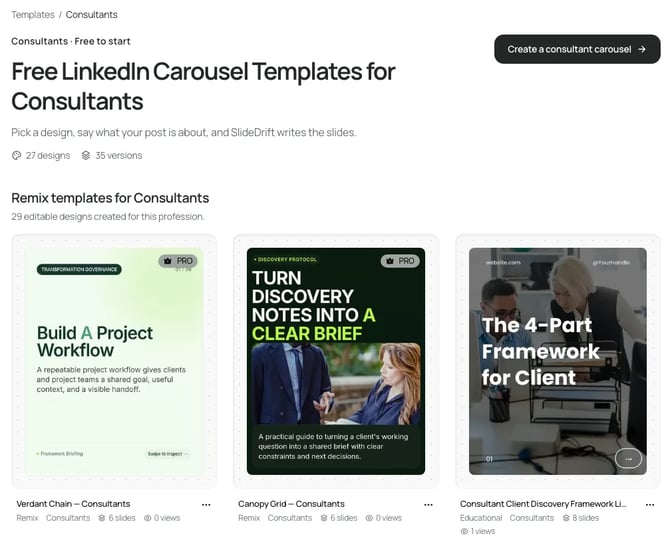
What it does well: SlideDrift is a LinkedIn content studio. Paste notes, an article link or a short idea, and Post ideas returns carousel, image, text and poll drafts. A Brand Kit puts your colours, fonts and logo on the design, so you edit a finished post instead of starting from a blank page.
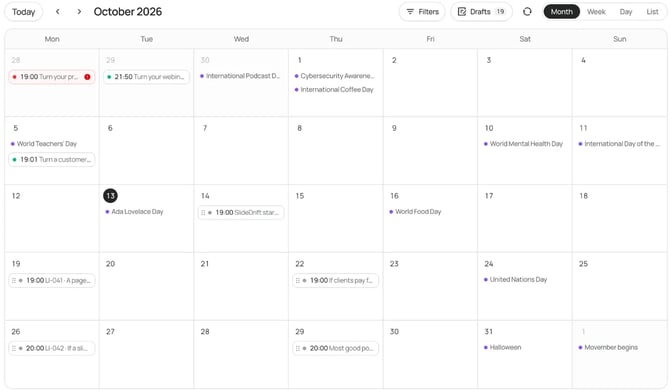
Then you schedule from a month, week or day calendar. Its scheduling guide covers carousel, image, multi-image (2 to 20 images), video, poll and text posts; for video you upload your own file. Under After it posts, you can plan a first comment, up to three later comments, reshares from your other connected accounts, and Gaining traction triggers that reshare or comment once a Company Page post reaches a number of likes or impressions.
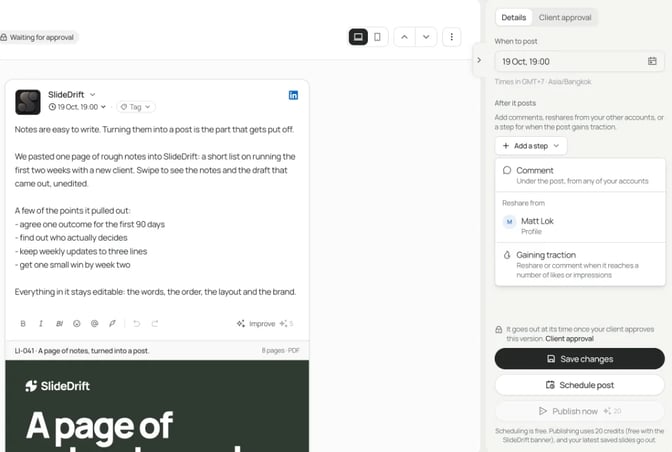
Client approval: a review link holds up to 20 posts for 14 days. The reviewer needs no account and can approve each post or ask for changes, and Only post once it's approved holds a post until they approve it.
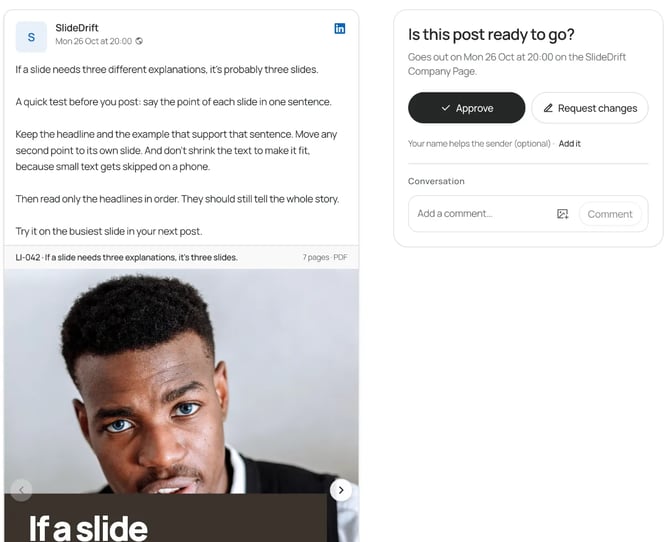
The trade-off: it posts natively only to LinkedIn. If you also post elsewhere, export PDF or PNG in square (1:1), portrait (4:5) or stories (9:16) sizes and post them anywhere, or use another tool for those networks. Scheduling needs a paid plan, and Company Pages need Pro or Agency.
Price: Starter $29 a month with one personal profile, Pro $59 with 3 LinkedIn accounts, Agency $199 with 10, per SlideDrift's billing docs. Prices checked 21 October 2026. The 7-day free trial needs a card but charges $0 at the start. See pricing for what each plan includes.
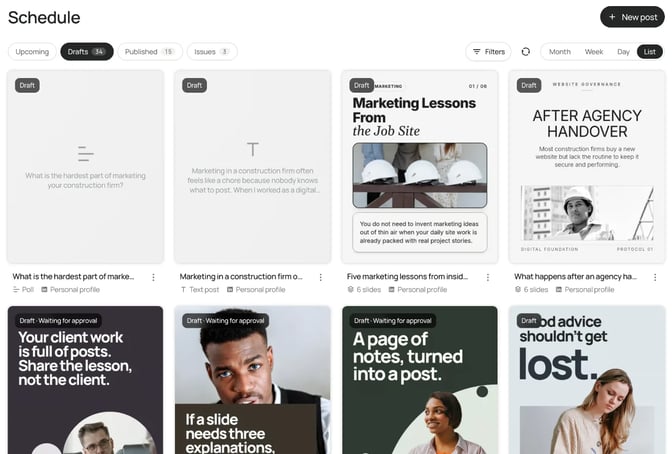
Best suited for: experts on LinkedIn who want drafting, design, approval and scheduling in one place.
2. Buffer, best budget option across several networks
Who it's for: solo professionals and small businesses posting to LinkedIn and a few other networks.
What it does well: Buffer's site lists 12 networks, including LinkedIn, Instagram, X and Threads, plus an AI Assistant for drafting. Its LinkedIn page says you can schedule to a profile and Company Pages, with text, image, GIF, PDF, video, link preview and carousel posts. The free plan connects up to 3 channels, with 10 scheduled posts per channel at a time.
The trade-off: it publishes the post; it doesn't design the carousel, so plan on making that elsewhere. Its LinkedIn page doesn't mention a first comment. Approval workflows come with the Team plan, and every connected account is billed as its own channel.
Price: free plan. Essentials from $5 a month per channel ($60 billed yearly) and Team from $10 ($120 billed yearly), both with a 14-day free trial, per Buffer's pricing page (checked 21 October 2026). The page doesn't show a separate month-to-month price, so confirm it at checkout.
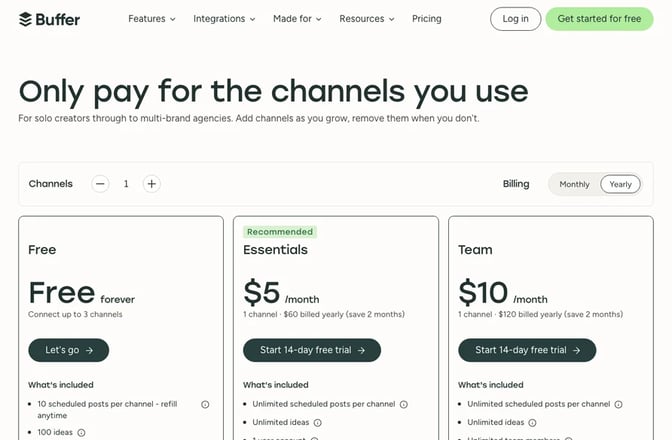
Best suited for: people who post to LinkedIn and other networks and want the lowest starting cost.
3. LinkedIn's built-in scheduler, best free option for occasional posts
Who it's for: anyone posting a few times a month from a profile or a Page they admin.
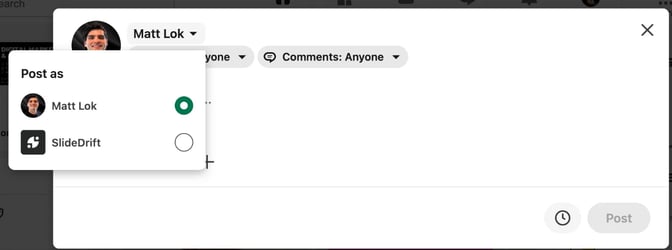
What it does well: it's free and already in the post box. Write the post, select the clock icon and pick a time. LinkedIn's help page for members says you can schedule from 10 minutes to 3 months ahead, and that Events and Jobs posts can't be scheduled.
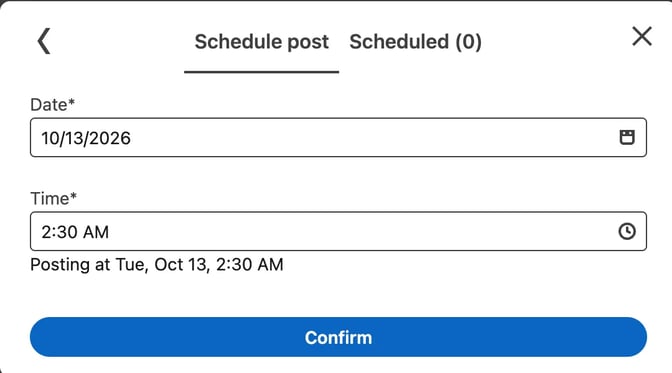
The trade-off: Pages have more limits. LinkedIn's help page for Pages says super admins and content admins can schedule from an hour to 3 months ahead, and that events, multiple photos, reshares, polls, jobs and service posts can't be scheduled. Neither help page mentions approvals, first comments or one calendar across accounts.
Price: free.
Best suited for: occasional posting from one profile or Page, at no cost.
4. AuthoredUp, best for writing your own text posts
Who it's for: people who write every word themselves and care how the post reads before "see more".
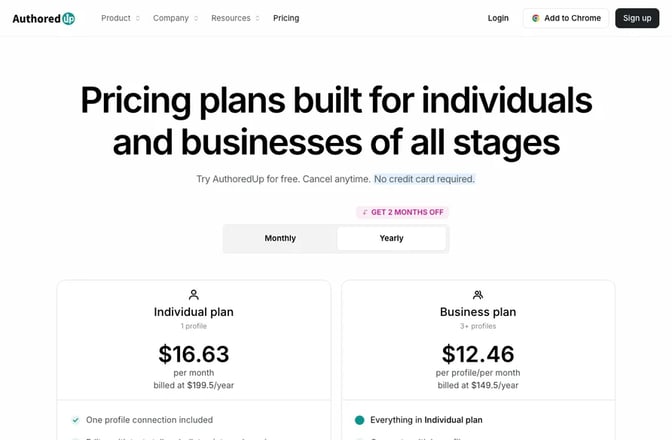
What it does well: AuthoredUp adds bold and italic formatting, a readability grade, a post preview, and hook and ending templates. A calendar assigns drafts to days, and analytics track impressions and engagement. Unlimited Company Pages are included on every plan.
The trade-off: its pricing page says scheduling runs through the Chrome extension. Its homepage doesn't mention making carousels, a first comment or client approval.
Price: Individual $19.95 a month ($16.63 billed yearly), or Business at $14.95 per profile a month with a minimum of 3. The free trial needs no card (checked 21 October 2026).
Best suited for: writers who want to format, preview and schedule text posts inside LinkedIn.
5. Taplio, best for growing a personal brand with AI writing help
Who it's for: people growing a personal profile who want AI help with posts and replies.
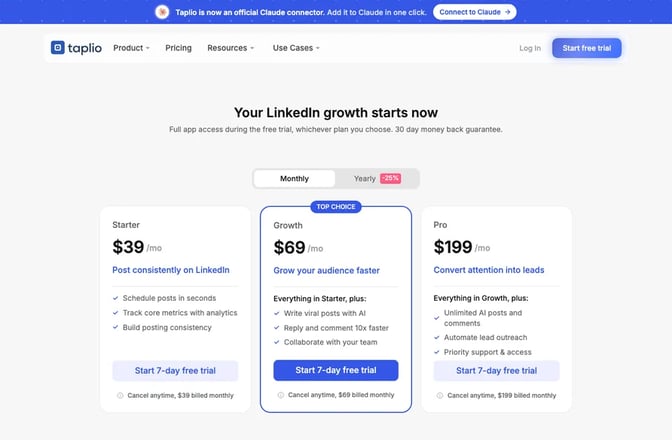
What it does well: Taplio's pricing page lists scheduling from Starter, AI post writing, faster replies and comments, and an AI carousel generator with credit limits. Pro adds lead outreach automation. See also our Taplio alternatives and Taplio vs SlideDrift.
The trade-off: the pricing page doesn't mention Company Pages, so ask Taplio before you rely on it for a Page. AI writing and faster replies start on the Growth plan.
Price: Starter $39 a month, Growth $69 and Pro $199, billed monthly. The 7-day free trial gives full Pro access (checked 21 October 2026).
Best suited for: personal-brand growth on a profile, with AI help on the writing and replies.
6. Hootsuite, best for marketing teams that run LinkedIn ads
Who it's for: marketing teams managing several networks and paid LinkedIn campaigns.
What it does well: Hootsuite's LinkedIn page describes a drag-and-drop calendar with a post preview, Best Time to Publish suggestions, OwlyWriter AI captions, and analytics for profile and Page posts. It also lets you manage LinkedIn ads next to organic posts.
The trade-off: it has the highest starting price on this list, and plans are sold per user. Its plans page says trial accounts have daily posting limits and no bulk scheduling.
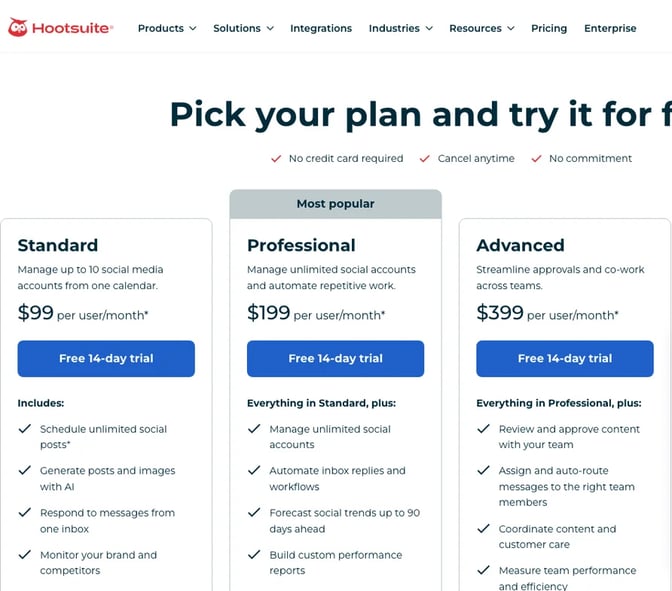
Price: Standard from $99 and Professional from $199, per user a month on yearly billing; Standard connects 10 social accounts. The 14-day trial needs no card (checked 21 October 2026).
Best suited for: teams that need organic posts and LinkedIn ads in one tool.
7. SocialPilot, best for freelancers and small agencies posting for clients
Who it's for: freelancers and small agencies running several clients' accounts across networks.
What it does well: its LinkedIn scheduler page says you choose a profile or page for each post and publish carousels of up to 30 images, documents and video, with a first comment. Every plan includes a calendar view and repeat posts.
The trade-off: client approval and white-label reports start on Premium, $100 a month billed monthly. Essentials is one user and 5 social accounts.
Price: Essentials $20 a month, or $17 billed yearly, per SocialPilot's pricing. The 14-day trial needs no card (checked 21 October 2026).

Best suited for: agencies that need client sign-off across several networks.
8. SocialBee, best for a steady mix of evergreen topics
Who it's for: small businesses with a set of topics they cover again and again.
What it does well: SocialBee's LinkedIn page covers profiles and Company Pages, with text, images, video, document carousels (PDF, DOC, DOCX, PPT or PPTX) and a scheduled first comment. You sort posts into content categories and can recycle an evergreen post so it goes out more than once.
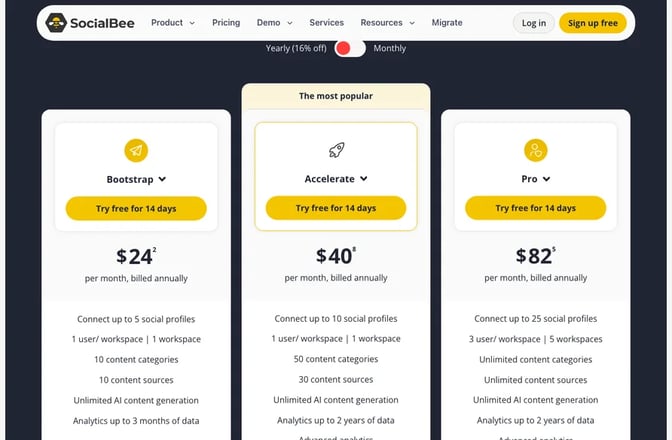
The trade-off: post approval starts on Accelerate, $49 a month billed monthly. Bootstrap connects 5 profiles for one user.
Price: Bootstrap $29 a month, or $24 billed yearly, per SocialBee's pricing. The 14-day free trial needs no card (checked 21 October 2026).
Best suited for: small teams that rotate through evergreen content categories.
LinkedIn scheduling tools comparison
| Tool | Best for | Networks | Profiles and Pages | Free plan or trial | Starting price (checked 21 Oct 2026) |
|---|---|---|---|---|---|
| SlideDrift | Making and scheduling posts together | LinkedIn; export files for others | Both; Pages on Pro or Agency | 7-day trial, card needed | $29 a month |
| Buffer | A budget all-rounder | 12, including LinkedIn | Both | Free plan; 14-day trial | From $5 a month per channel |
| LinkedIn's scheduler | Occasional posts | Both, Pages limited | Free | Free | |
| AuthoredUp | Text posts | Both | Free trial, no card | $19.95 a month | |
| Taplio | Personal-brand growth | Pages not mentioned | 7-day trial | $39 a month | |
| Hootsuite | Teams running LinkedIn ads | Several networks | Page analytics listed | 14-day trial, no card | $99 per user a month, yearly |
| SocialPilot | Freelancers and small agencies | Several networks | Both | 14-day trial, no card | $20 a month |
| SocialBee | Evergreen content mixes | Several networks | Both | 14-day trial, no card | $29 a month |
Feature comparison
A check mark means the tool's own pages say it has the feature. "Not listed" means they don't mention it, so ask before you assume. Taplio and Hootsuite are left out because their pages state too few of these rows.
| Feature | SlideDrift | Buffer | LinkedIn's scheduler | AuthoredUp | SocialPilot | SocialBee |
|---|---|---|---|---|---|---|
| Schedules to Company Pages | ✓ Pro, Agency | ✓ | ✓ | ✓ | ✓ | ✓ |
| Posts to other networks | ✗, export files | ✓ | ✗ | Not listed | ✓ | ✓ |
| Writes or drafts the post | ✓ | AI assistant | Not listed | Hooks and templates | AI Pilot | AI Copilot |
| Designs the carousel in your brand | ✓ | You bring the file | You bring the file | Not listed | You bring the file | You bring the file |
| Carousel or document posts | ✓ | ✓ | Not listed | Not listed | ✓ | ✓ |
| First comment | ✓ | Not listed | Not listed | Not listed | ✓ | ✓ |
| Client approval | ✓ Review link | Team plan | Not listed | Not listed | Premium plan | Accelerate plan |
| Free scheduling | ✗, 7-day trial | ✓ | ✓ | ✗, free trial | ✗, 14-day trial | ✗, 14-day trial |
| Repeat or recycle posts | ✓ | Not listed | Not listed | Not listed | ✓ | ✓ |
| Calendar view | ✓ | ✓ | Not listed | ✓ | ✓ | Not listed |
Which LinkedIn scheduling tool fits you
| If you... | Choose | Why |
|---|---|---|
| Are an expert who wants to draft, design and schedule in one place | SlideDrift | It makes the post in your brand, then schedules it |
| Post to LinkedIn, Instagram and X on a small budget | Buffer | Free for 3 channels, 12 networks supported |
| Post now and then from one profile | LinkedIn's scheduler | Free and already in the post box |
| Write text posts and care how they read | AuthoredUp | Formatting and preview inside LinkedIn |
| Want AI writing help to grow a profile | Taplio | AI post writing and reply tools |
| Run LinkedIn ads with your organic posts | Hootsuite | Ads and organic in one dashboard |
| Post for several clients and need sign-off | SocialPilot or SocialBee | Approval starts on Premium or Accelerate |
Three questions settle most choices: do you need approvals, do you need the post made for you, and do you post to other networks? Our guide on LinkedIn content strategy for consultants covers what to post once the tool is chosen, and best time to post on LinkedIn covers when. The free LinkedIn post preview shows where the "see more" cut falls before you schedule.
What results look like
Say you're an independent operations consultant. You post twice a week on your own profile and weekly to a client's Company Page, where you're an admin. The client's founder signs off each Page post first.
That's about 13 posts a month across 2 accounts, with an approval step. With prices checked 21 October 2026:
- LinkedIn's scheduler is free and handles both accounts, one at a time. You make the carousel elsewhere, and the founder signs off by email.
- Buffer's free plan covers both channels, since 10 scheduled posts per channel at a time is enough. For approvals, Team is from $10 a month per channel, so from $20 for two. The carousel is made elsewhere.
- SocialPilot needs Premium at $100 a month for client approval, and you still bring the carousel.
- SlideDrift Pro, at $59 a month, connects your profile and the client's Page, makes the carousel from your notes in your brand, and sends the founder a review link. With Only post once it's approved on, nothing goes out unapproved.
If you already design carousels elsewhere and the founder is happy with email, the free options are enough. If the carousel is the slow part and sign-off must be tracked, one tool that makes, reviews and schedules the post keeps it in one place.
Here is that month in SlideDrift's calendar.
Our LinkedIn ghostwriter guide covers client sign-off, and Brand Kits carry your look onto every post.
FAQ
What is the best free LinkedIn scheduling tool?
LinkedIn's own scheduler is free for profiles and Pages and schedules up to 3 months ahead. If you want one calendar across accounts, Buffer's free plan connects up to 3 channels with 10 scheduled posts per channel at a time.
Can you schedule LinkedIn posts without a third-party tool?
Yes. Write your post, select the clock icon and choose a time between 10 minutes and 3 months away. Events and Jobs posts can't be scheduled from a profile.
Can you schedule posts to a LinkedIn Company Page?
Yes. In LinkedIn, super admins and content admins can schedule Page posts from an hour to 3 months ahead, but not polls, multiple photos, reshares, events, jobs or service posts. Most tools here post to Pages too; in SlideDrift they need Pro or Agency.
Which LinkedIn scheduling tool has client approval?
SlideDrift includes review links that hold up to 20 posts for 14 days, with no account needed. Buffer has approval workflows on Team, SocialPilot from Premium and SocialBee from Accelerate.
Can I schedule carousels on LinkedIn?
Yes, in tools that accept a PDF or a set of images. Buffer, SocialPilot and SocialBee list carousel or document posts. SlideDrift makes the carousel and schedules it in the same place.
Do I need a different tool for each network?
Not necessarily. Buffer, SocialPilot and SocialBee post to several networks. SlideDrift posts natively to LinkedIn, and you can export PDF or PNG in 1:1, 4:5 or 9:16 to post elsewhere.
How far ahead can I schedule a LinkedIn post?
LinkedIn's own scheduler allows up to 3 months ahead, from a profile or a Page. Other tools set their own limits, so check the one you pick.
Make your next LinkedIn post in SlideDrift
SlideDrift turns your notes, articles and ideas into LinkedIn posts in your brand, then schedules them from one calendar, with a review link if a client needs to sign off.
SlideDrift posts natively only to LinkedIn; for other networks, export PDF or PNG in square 1:1, portrait 4:5 or stories 9:16 and post them anywhere.
Make a post to schedule
Paste your notes or a link, and SlideDrift drafts the post in your brand. Edit it, then export it, or schedule it to LinkedIn on a paid plan.


Brief for this carousel
Make a 7-slide LinkedIn carousel for owners of small professional-services firms. Topic: why projects stall at the handoff from sales to delivery, and the three fixes that work most often. Practical, plain tone. Open with the promise, give one problem or fix per slide, end with a short handoff checklist and a question for the comments.