Best Time to Post on LinkedIn: 3 Studies and a 4-Week Test
What Sprout Social, Buffer and Hootsuite found about the best time to post on LinkedIn, and a 4-week test that finds your own time from your analytics.

The best time to post on LinkedIn, according to three large studies, is a weekday in your audience's local time. All three found weekends weaker, and Wednesday is the one day they all rank near the top. They disagree on the hour. Sprout Social found Tuesday 11 a.m. to 5 p.m. and Wednesday 11 a.m. to 4 p.m., Buffer 3 to 8 p.m. on weekdays, and Hootsuite 8 to 9 a.m. on Tuesday and Wednesday. Treat those as starting points, then run a 4-week test in your own LinkedIn analytics. Your clients' habits matter more than an average across millions of posts.
What the main studies found
We checked these three on their own sites on October 21, 2026. Each comes from a social media tool company.
| Study | Published | Sample | Time zone | Best days | Best hours |
|---|---|---|---|---|---|
| Sprout Social | March 31, 2026 | Nearly 2 billion engagements across 307,000 social profiles on six networks, Nov. 27, 2025 to Feb. 27, 2026 | Local time | Tuesday to Thursday | Tuesday 11 a.m. to 5 p.m., Wednesday 11 a.m. to 4 p.m. |
| Buffer | September 9, 2026 | More than 4.8 million LinkedIn posts sent through Buffer; no date range given | Each post's local time | Wednesday, then Thursday and Friday | 3 to 8 p.m. on weekdays; top slots Wednesday 4 p.m., Friday 3 and 4 p.m. |
| Hootsuite | November 19, 2025 | Over 1 million social posts, analyzed with Critical Truth; charts labeled Q4 2024 | Localized across 118 countries | Tuesday and Wednesday | 8 to 9 a.m. in its summary; 4 to 6 a.m. in the body |
Read the small print before you copy a time:
- Sprout's sample pools six networks, not just LinkedIn.
- Hootsuite's summary and body give different hours for the same days.
- None of the three says exactly how it measured engagement, so you can't compare their figures with yours.
- Buffer's data comes from posts sent through Buffer, so it reflects people who use a scheduling tool.
Weekdays and weekends
On days, the studies agree on one thing: Saturday and Sunday did worse than weekdays. Beyond that they split. Sprout found Tuesday to Thursday the strongest, and Hootsuite Tuesday and Wednesday. Buffer ranked Wednesday first and found Monday and Tuesday the lowest, though it suggests testing early-week posts with your own followers before ruling them out.
That Tuesday gap is the clearest sign these are averages, not rules. Two large samples disagree about the same day.
By industry
None of the studies looks at consultants, coaches or founders as a group. If you want the best time to post on LinkedIn for business, these sector findings are the nearest:
- Financial services, Sprout: Tuesdays and Wednesdays, 10 a.m. to 3 p.m.
- Financial services, Hootsuite: Monday 5 p.m., Wednesday 1 p.m., Thursday 5 to 7 p.m., Friday 11 a.m. to 1 p.m.
- Real estate, legal and professional services, Hootsuite: Thursday 8 to 10 a.m., and Saturday 10 a.m. to 1 p.m.
- Technology and software, Sprout: Tuesdays and Wednesdays, 10 a.m. to 4 p.m.
Financial services gets two different answers. And Hootsuite's professional services group includes a Saturday slot that its overall results would skip.
Time zones when your clients are somewhere else
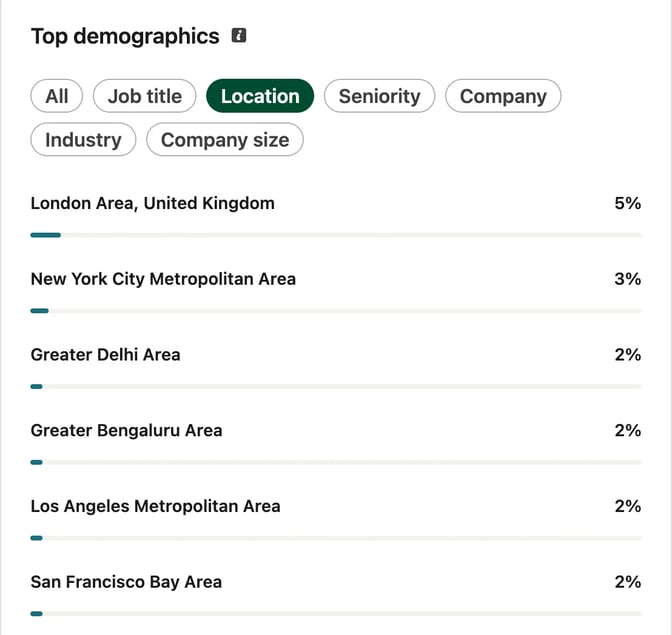
All three studies report times in the audience's local time, so "Wednesday at 4 p.m." means 4 p.m. where your readers are. Before you pick a slot, check where your followers live:
- Profile: in LinkedIn's creator analytics, open Audience analytics and switch Top demographics to Location. It shows the top five.
- Company Page: follower analytics break followers down by location, seniority, job function, industry and company size.
- One post: post analytics can show viewers' location and job title once enough different people have seen it.
If most clients sit in one other time zone, schedule for theirs. A London consultant with clients in New York would post at 2 p.m. London time to reach them at 9 a.m., for most of the year; the gap changes for a few weeks when the clocks change on different dates. If clients are split, test one slot aimed at each group.
Then check which clock LinkedIn uses. Its help page for profiles says scheduled times are converted to UTC from your device's time zone setting. Its help page for Pages says the time is based on your location. If you travel, check the zone before you schedule.
Company Page or profile
None of the three studies reports profiles and Company Pages separately. Your profile reaches your connections and followers, and a Page reaches the firm's followers, who can be a different group. Run a separate test for each.
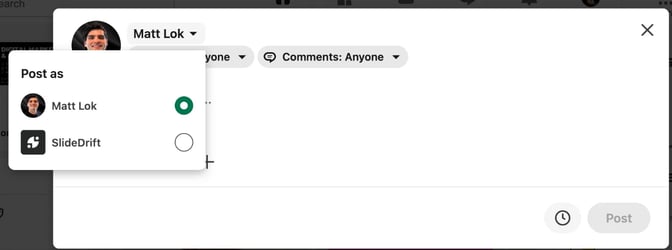
A Page's content analytics include an engagement rate, the ratio of interactions to impressions. LinkedIn counts clicks, reactions, comments and shares as interactions. Reactions and comments show in real time, but other metrics can take 48 hours. On a profile, you work the rate out yourself. If clients hire you by name, your profile is usually the one to test first. The content strategy guide for consultants covers when to post as yourself and when as the firm.
Find your own best time in 4 weeks
You need eight posts, two slots and a spreadsheet.
- Pick two slots, for example one early morning and one late afternoon or evening. Keep the hours fixed.
- Post on two days and swap the slots each week. In weeks 1 and 3, Tuesday gets slot A and Thursday gets slot B. In weeks 2 and 4, swap them, so the day doesn't decide the result.
- Keep everything else the same: one format for all eight posts, such as a document carousel, similar length and similar topics. Don't boost or reshare during the test.
- Log the time each post goes live. Buffer points out that LinkedIn's own analytics show only relative timestamps such as "3h", so write the date and time in your sheet when you post.
- Measure each post seven days after it goes out: impressions, reactions plus comments plus reposts, and your follower count on the day it went out. Small gaps between two posts can be noise, so look for clear ones.
- Work out two numbers per post. Impressions per follower is impressions ÷ followers, which shows how far the post traveled for your audience size. Engagement rate is (reactions + comments + reposts) ÷ impressions × 100, which shows how many viewers acted on it.
- Compare week by week. Each week has one post in each slot, so you get four head-to-head pairs.
A simple rule: move to a slot if it wins both numbers in at least three of the four weeks. If the results split, the hour isn't what's holding your posts back, so keep the slot that's easier to stick to and test topic or format next.
Eight posts is a small sample, so repeat the test when your audience changes. LinkedIn's engagement rate for Pages also counts clicks, so pick one formula and use it for all eight posts. The carousel performance guide has a fuller tracker with saves, sends and profile views, and how often to post covers the next question once you have a time.
Worked example: an accountant tests two slots
This example is made up. Say you're an accountant and most clients own small businesses in your town: shops, trades and cafés. They're busy during opening hours, so you guess they read LinkedIn before work or after closing. You post from your own profile.
Slot A is 7:30 a.m. and slot B is 7:30 p.m. The evening slot falls inside Buffer's 3 to 8 p.m. window and the morning one outside all three studies' headline hours. That's fine, because the test is about your clients.
| Week | Tuesday | Thursday |
|---|---|---|
| 1 | 7:30 a.m. | 7:30 p.m. |
| 2 | 7:30 p.m. | 7:30 a.m. |
| 3 | 7:30 a.m. | 7:30 p.m. |
| 4 | 7:30 p.m. | 7:30 a.m. |
The eight posts are carousels in one series and one template, each answering a question owners ask you. The carousel examples for accountants list topics that stay general education. Your sheet has one row per post, filled in seven days after each one goes out.
With made-up numbers: 900 impressions when you have 600 followers is 1.5 impressions per follower, and 27 reactions, comments and reposts on those 900 impressions is a 3% engagement rate.
After week 4, compare the four pairs. If the evening slot wins both numbers in three weeks, move your regular posts to 7:30 p.m. If it's a split, keep whichever slot is easier to stick to and test topics next.
To draft the first carousel in SlideDrift, paste a brief like this as your notes.
SlideDrift brief
Audience: Owners of small local businesses, such as shops, trades and cafés
Goal: Explain why a profitable business can still run short of cash, so owners know what to check each month
Tone: Plain, calm and practical, with no jargon

Points:
- Profit is what's left on paper after costs; cash is what's in the bank today
- Customers who pay late leave you short even in a good month
- Stock bought ahead of a busy season ties up cash
- The part of a loan repayment that pays down the loan uses cash but isn't a cost in the profit and loss
- Check three numbers monthly: cash in the bank, money owed to you, and bills due in the next 30 days

Must include: a closing slide asking owners to bring these three numbers to their next review with their accountant. General education only, with no tax advice. 7 slides.Keep the template and slide count the same for the other seven, and check each caption's opening lines in the free LinkedIn post preview before you schedule.
Schedule it so you don't have to be at your desk
A 7:30 p.m. slot is easy to miss if you post by hand. LinkedIn's own scheduler covers it: a profile post can go out from 10 minutes to 3 months ahead, and a Page post from an hour to 3 months. The guide to scheduling LinkedIn posts walks through it.
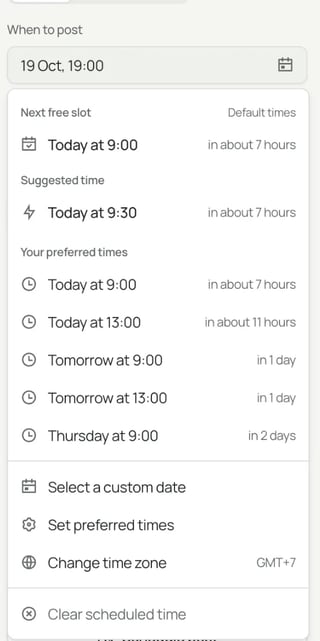
SlideDrift's Schedule page keeps the carousel, caption, account and time together. LinkedIn scheduling needs a paid plan, and posting to a Company Page needs Pro or Agency. For the test:
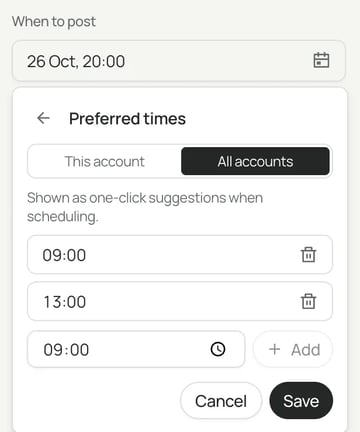
- Save your slots. In the time picker, choose Set preferred times, then This account, and enter your two slots.
- Use Next free slot. The picker starts with the earliest of that account's preferred times that has no other post for the same account within an hour of it.
- Know what Suggested time is. The picker also offers a Suggested time, which the docs describe as a general suggestion, not a time calculated from your audience's activity. Your test results come first.
- Check the time zone shown under the picker. Preferred times are saved in the browser you set them in.
Afterwards, SlideDrift's Analytics shows each post's engagement rate: likes, comments, reposts and clicks divided by impressions. It counts clicks too, so keep to the formula you chose. Profile numbers are fetched when you open a post and aren't kept for the dashboard totals, so copy them into your sheet. Still choosing a tool? See the best LinkedIn scheduling tools.
FAQ
What is the best time to post on LinkedIn?
The three big studies point to weekdays in your audience's local time, with Wednesday near the top in all three. Their hours differ: Sprout found late morning to afternoon, Buffer 3 to 8 p.m., and Hootsuite 8 to 9 a.m. Test two slots with your own followers for four weeks.
What is the best day to post on LinkedIn?
Wednesday ranks near the top in all three studies: Sprout names Tuesday to Thursday, Buffer Wednesday, and Hootsuite Tuesday and Wednesday. All three found weekends weaker than weekdays. Buffer found Tuesday among its weakest days, so test it yourself.
Is it better to post on LinkedIn in the morning or the evening?
The studies split. Hootsuite found 8 to 9 a.m. in its summary (4 to 6 a.m. in its body), Sprout late morning to afternoon, and Buffer 3 to 8 p.m. Run one morning slot against one evening slot and compare impressions per follower and engagement rate.
Should I post on LinkedIn at the weekend?
Not as your main slot, by these studies: all three found weekends weaker than weekdays. Hootsuite's real estate, legal and professional services group does list Saturday 10 a.m. to 1 p.m., so if your clients catch up at the weekend, make it your second test slot.
Does the best time differ for a Company Page and a personal profile?
None of the studies separates the two. A Page and a profile can have different followers, so test each one on its own.
Does the time zone I post in matter?
Yes. The studies report the audience's local time, and LinkedIn schedules a profile post in UTC from your device's time zone. Check where your followers live, then confirm the zone before you schedule.
Test your posting times with SlideDrift
SlideDrift is a LinkedIn content studio. Paste your notes, choose your brand profile so the slides use your colours, fonts and logo, and edit the draft. On a paid plan, save your two test slots as preferred times for the account and schedule the eight test posts, so they go out on time without you at your desk.
Draft your first test carousel
Paste your notes or a link to an article you wrote. Pick your brand profile, edit the slides in the editor, then export the PDF, or schedule the post to LinkedIn on a paid plan.


Brief for this carousel
Make a 7-slide LinkedIn carousel for small business owners that explains why a profitable business can still run short of cash. Cover the gap between profit and cash, late-paying customers, stock bought ahead of a busy season, loan repayments, and three numbers to check each month: cash in the bank, money owed to you, and bills due in 30 days. General education, no tax advice.