LinkedIn Content Strategy for Consultants: A 2-Hour Weekly Plan
A simple LinkedIn content strategy for consultants: pick three problems, set pillars, plan two posts a week, set up your profile and track inquiries.

A LinkedIn content strategy is a short set of decisions: who you post for, the three problems you want to be known for solving, where ideas come from, how often you post and how you'll tell whether it's working. With about 2 hours a week, that can mean two posts, one how-to and one point of view or proof, drawn from client questions you've already answered. Judge it by the conversations and inquiries it starts.
The one-page strategy template
Fill this in once, keep it next to your calendar, and revisit it every quarter.
One-page LinkedIn content strategy
| Decision | What to write |
|---|---|
| Reader | The one kind of buyer you want to reach, by role, company type and situation. |
| Three problems | The problems that reader pays you to solve, in their words. |
| Content pillars | One pillar per problem, plus one for proof and point of view. |
| Source material | Client questions, call notes, talks, articles and checklists. |
| Weekly rhythm | How many posts, which days, and the job each slot does. |
| Formats | Text, carousel, single image or poll, matched to each slot. |
| Next step for readers | The one action you want from the right reader: a reply, a message or a call. |
| Measures | LinkedIn's post analytics, plus your own monthly log of conversations and inquiries. |
Choose one reader and three problems
Every other decision depends on the reader. "Business owners" is too wide to write for. "Founders of 10- to 50-person B2B companies with no full-time finance lead" tells you which questions to answer and which words to use.
Then list three problems you solve for paying clients today, where you have real examples and opinions. Write them the way a client says them on a first call: "I never know how much cash we'll have next month" works better than "cash flow optimization."
Each problem becomes a content pillar, a topic you can return to every month. Add a fourth for proof and point of view: how you work, what you believe about your field, and lessons from client work you're allowed to share. The carousel ideas for consultants give hooks and slide plans you can sort into pillars like these.
Find the source material you already have
Most of your post ideas already exist in client emails, call notes and slides. Spend 30 minutes collecting them:
- Client questions: the ones you answer on calls and by email, with names removed. Each is a post.
- Call notes: the explanation you gave three times last month is worth posting once.
- Checklists and templates: anything you send clients before a meeting or project.
- Talks and webinars: slides and talking points from events, podcasts or workshops.
- Articles and newsletters: each section can become its own post, as the guide to turning one article into a month of posts shows.
Tag each item with its pillar. Use a client's story or figures only with their agreement; otherwise keep the lesson and drop the details.
Plan a two-hour week
Give each of your two weekly posts a job:
- A useful how-to, early in the week: a checklist, a framework or the steps to fix one problem. Carousels suit these because each step gets its own slide.
- A point of view or proof, later in the week: an opinion on how your field works, a pattern you see across clients, or a lesson from a project you can share.
One way to spend the 2 hours: 30 minutes picking two items from your source list, 45 minutes drafting both posts, 15 minutes reviewing and scheduling, and 30 minutes replying to comments and commenting on posts your reader reads. Keep the reply time, since replying is how a comment turns into a conversation.
Match the format to the job. Text suits opinions and short stories. Carousels, which LinkedIn calls document posts, suit steps and frameworks. A single image suits one statement or chart, and a poll suits a question for your reader.
Socialinsider's LinkedIn benchmark looked at 1.3 million posts from 16,645 business Pages. Socialinsider found that document posts averaged a 7.00% engagement rate by impressions in 2025, against 4.50% for text posts. That's an average across company Pages, not a forecast for your profile. Use it as a reason to try carousels for your how-to slot, then let your own results decide.
LinkedIn's help page on document posts says PDF gives the highest-quality upload. You can edit the description after posting, but not the document, so check every page first.
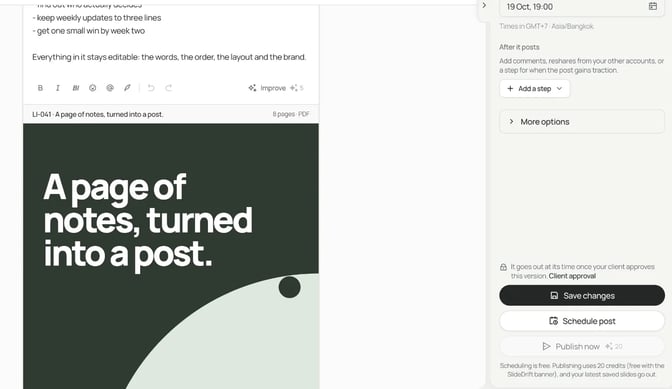
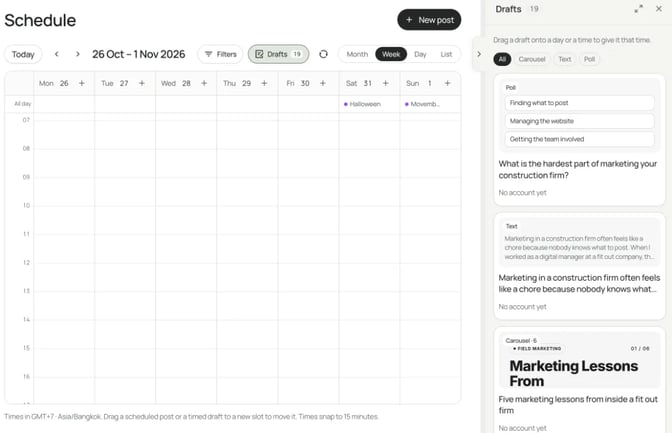
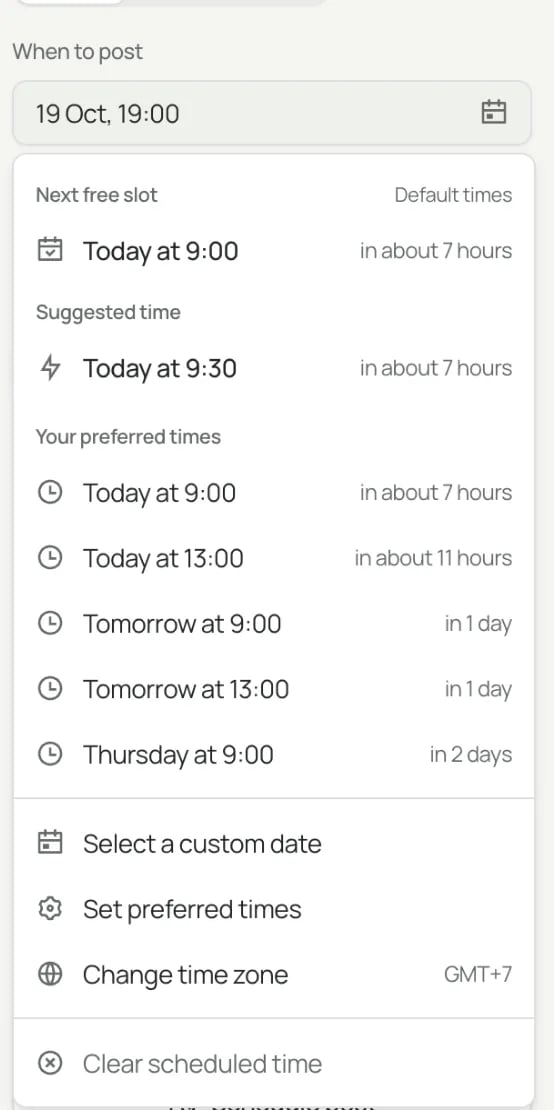
Draft both posts in one sitting. LinkedIn lets you schedule a post between 10 minutes and 3 months ahead, so a whole week can be ready by Monday. The carousel content calendar guide shows how to track each post from source to review.
Set up your profile and Company Page
A reader who likes a post opens your profile next. Check three things first:
- Headline: who you help and with what, in the words of your three problems.
- About: the reader you serve, the problems you solve, how you work and how to get in touch.
- Featured section: LinkedIn's Featured FAQ says you can feature your own posts, articles you've published on LinkedIn, and external media, documents and links. Pin your best how-to and your services page. It's only on individual profiles, and viewers must be signed in to see it.
If you run a firm or small studio, a Company Page gives the business its own presence. LinkedIn's help page on creating a Page says it's free, you need a LinkedIn account, and you become the Page's super admin. You can create one on desktop or in the iOS app, but not on Android. Fill in the overview, industry and company size, which LinkedIn requires before admins can invite connections to follow the Page.
If clients hire you by name, keep posting from your profile and use the Page to reshare your best posts and share firm news.
Measure conversations and inquiries
Track two layers each month.
LinkedIn's numbers. LinkedIn's post analytics show impressions, members reached, reactions, comments, reposts, saves, sends, profile viewers, followers gained and link visits. They also show who viewed: job title, location, company, company size, industry and seniority. LinkedIn says the numbers are estimates.
Check the audience first, because it tells you whether you're reaching your reader. For a how-to, saves, sends and comments from that reader say more than reactions. Company Page posts have their own content analytics for Page admins.
Your own log. LinkedIn can't see what happens next. Note the date, the post, who got in touch and what they asked. Count messages from target readers, introductions, calls booked and proposals sent.
After three months, give more slots to the pillar and format behind most entries. The guide to measuring carousel performance has a 30-day tracker, and the B2B lead generation guide covers the last slide's next step.
Worked example: a fractional CFO's first month
This consultant is made up for the example. Swap in your own reader, problems and material.
Illustrative example
One-page strategy: a fractional CFO
Reader: founders of 10- to 50-person B2B companies with no full-time finance lead.
Three problems: "I don't know how much cash we'll have in three months," "I'm not sure our prices cover our costs," and "A lender wants numbers I can't produce."
Pillars: cash and runway, pricing and margins, getting finance-ready, and how I work.
Source material: the 13-week cash flow template sent to new clients, onboarding call notes, a talk to a local founders' group, and two old newsletters.
Rhythm: Tuesday how-to, Thursday point of view or proof.
Next step for readers: a message to book a 30-minute finance review.
Every post in the first month comes from material the CFO already had:
| Week | Tuesday: how-to | Thursday: point of view or proof |
|---|---|---|
| 1 | Carousel: how to build a 13-week cash flow forecast (client template) | Text: why I look at cash before profit in a first meeting |
| 2 | Carousel: margin checks before you raise prices (onboarding notes) | Poll: which finance question keeps you up at night? |
| 3 | Carousel: what to have ready before you talk to a lender (the talk) | Text: a pattern from recent onboardings, with no client details |
| 4 | Single image: a labeled made-up example of profit rising while cash falls | Text: how a finance review works and how to book one |
Only the last post asks for anything. The three weeks before it earn the ask.
For the week 1 carousel, the CFO pastes the template's steps into a SlideDrift brief:
SlideDrift brief
Make a 10-slide LinkedIn carousel for founders of small B2B companies with no full-time finance lead.
Topic: how to build a 13-week cash flow forecast.
Goal: help them see a cash shortfall weeks before it happens. General education only.
Slides: a hook, why 13 weeks, one slide per step below, and a last slide inviting readers to save the post.
Tone: plain English, calm and practical.
Avoid: tax advice, promises of results, invented figures and any client details.

Steps:
1. Start with today's cash balance.
2. List the customer payments you expect, week by week.
3. List what you'll pay out each week: payroll, rent, suppliers, tax.
4. Subtract payments from receipts to get each week's net cash flow.
5. Carry each week's closing balance into the next week.
6. Mark any week where cash falls below the minimum you're comfortable with.
7. Update it every week with what actually happened.SlideDrift uses AI to draft the slides. LinkedIn's guidance on AI-assisted posts says members should review, edit and approve AI-assisted content and are accountable for what they publish, so check every slide against the template. A Brand Kit keeps new carousels close to your colors, fonts and logo.
If you have the material but not the angle, Post ideas on Home suggests a mix of carousels, image posts, text posts and polls from your notes or a link (how it works). Drafting ideas uses no credits. Before a caption goes out, check its line breaks in the LinkedIn post preview.
When you need something to post this week, pick from our LinkedIn post ideas and write it with one of the LinkedIn post templates.
FAQ
What is a LinkedIn content strategy?
It's the set of decisions behind your posts: who they're for, the topics you want to be known for, where ideas come from, how often you post, which formats you use and how you measure results.
How often should consultants post on LinkedIn?
As often as you can keep up for months without dropping client work. Two posts a week, one how-to and one point of view or proof, is a manageable start for many solo experts. Hold that pace for a quarter before adding more.
What should a consultant post about?
The problems your clients pay you to solve. Answer the questions they ask on calls, explain how you work, and share lessons from projects you're allowed to talk about. Leave out client names and figures unless the client agrees.
Should I post from my profile or a Company Page?
If clients hire you by name, post from your profile and use a Company Page to reshare posts and share firm news. The Featured section, where you pin your best posts and links, is only on individual profiles.
How do I know if my LinkedIn content strategy is working?
Check LinkedIn's post analytics to see whether you're reaching the right job titles and industries. Then keep your own log of messages, calls and proposals that started from a post; it shows which pillars and formats bring in work.
How long before I judge the strategy?
Give it a quarter at a steady pace. Then read your log: which pillars and formats led to conversations, and which led to nothing. Keep what worked, swap one pillar if it didn't, and run another quarter.
Plan your month with SlideDrift
SlideDrift is a LinkedIn content studio. Paste your notes, a checklist or a link to an article you've written, and it drafts carousels, text posts, image posts and polls in your brand. You edit them, then schedule the month on a paid plan; posting to a Company Page needs Pro or Agency.
SlideDrift publishes natively to LinkedIn. For other platforms, export PDF or PNG in square 1:1, portrait 4:5 or stories 9:16 and post them anywhere.
Turn your notes into a carousel
Paste your notes, a checklist or a link to an article you've written. SlideDrift drafts the slides in your brand; you edit them, then export the PDF or schedule the post.


Brief for this carousel
Make a 10-slide LinkedIn carousel for founders of small B2B companies with no full-time finance lead. Topic: how to build a 13-week cash flow forecast. Goal: help them see a cash shortfall weeks before it happens. One step per slide, plain English, calm and practical. End with a slide inviting readers to save the post. General education only: no tax advice, no promised results, no invented figures.