LinkedIn Ghostwriter: What They Do, Cost and How to Choose One
What a LinkedIn ghostwriter does, how pricing works, how to choose one, what to keep yourself, and a hybrid where you approve every draft before it posts.
A LinkedIn ghostwriter writes posts that you publish under your own name. A good one interviews you, drafts in your voice and sends each post for your approval. Hire one when you have the expertise but not the hours. Keep your opinions, your client stories and the final yes. This guide covers what a ghostwriter does, what one costs, how to choose, what LinkedIn expects, and a hybrid where someone else drafts and you approve every post.
Should you hire a LinkedIn ghostwriter?
Hire one if three things are true:
- You have clear views and client stories, but no time to turn them into posts every week.
- You can spare 30 to 60 minutes a week to be interviewed or to record voice notes.
- You'll read every draft before it goes out.
Wait, or write your own, if you haven't yet decided who you want to reach or what you want them to do next. A writer can't fix that for you. Start with the LinkedIn personal brand guide, then come back.
What a LinkedIn ghostwriter does
Most ghostwriting relationships follow the same loop:
- Capture. The writer interviews you, often on a regular call, or works from voice notes you record between meetings. They ask for the specifics: the client problem, the decision you made, the number that changed.
- Draft. They turn that material into posts in your voice. Depending on the scope, that can include text posts, carousels, articles and suggested replies to comments.
- Review. You read each draft, correct anything that isn't true or isn't you, and approve it.
- Publish. You post it, or it's scheduled from a tool connected to your profile.
The interviews are the real product. A writer with ten minutes of your thinking can write a specific post. A writer with no input can only write a generic one. LinkedIn's help page on AI-assisted posts makes the same point about AI: it says generic or repetitive posts are less likely to be widely distributed.
What LinkedIn ghostwriting costs
There's no standard price list. Ghostwriters usually charge in one of three ways:
- Per post. A fixed fee for each finished post. Simple to start with, but strategy and interviews may cost extra.
- Monthly retainer. A set number of posts each month, usually with calls, a content plan and editing rounds included.
- Hourly. Common for editing your drafts or coaching you to write your own.
Most price guides you'll find for LinkedIn ghostwriting are published by agencies or software vendors, so we've left their figures out. The closest independent benchmark is the Editorial Freelancers Association's 2026 rate chart. Its survey of more than 1,100 members ran from November 2025 to mid-January 2026 and covered work done in 2025. The median range for ghostwriting business and marketing copy is $87.50 to $125 an hour, and $75 to $100 an hour for blog posts.
Those figures aren't specific to LinkedIn, so use them only to sense-check an hourly quote.
What moves the price is mostly scope:
- how many posts a month and how many interview calls;
- whether strategy and a content calendar are included;
- whether the writer designs carousels or only writes text;
- whether they handle comments;
- how many rounds of edits you get.
Specialist knowledge, such as tax, law or healthcare, can cost more. Ask for the scope in writing so you can compare quotes like for like.
How to choose a LinkedIn ghostwriter
Ask for samples, then a test. Published posts are a start, but you can't tell how much the client rewrote them. Ask the writer to draft one or two posts from a voice note you send, paid if they ask. That shows you how well they hear you.
Ask about the process. How do they capture your voice: calls, voice notes, a questionnaire? How many drafts do you see before a post is final? What's the turnaround? Who decides the topics each month?
Check their industry knowledge. A writer who knows your field asks better questions and makes fewer mistakes. If you work in a regulated profession, agree who checks each post against your professional rules before it goes out. That person should be you or your firm.
Agree who owns what. The contract should say the posts, drafts and idea lists belong to you, and that what you share in interviews stays confidential. Ask what you receive if you part ways.
Keep your password. LinkedIn's User Agreement (effective November 3, 2025) says you will keep your password secret and won't share your account with anyone else. It also says you're responsible for anything that happens through your account. A ghostwriter doesn't need your login. They can send drafts for you to post, or use a scheduling tool that you connect to your profile yourself, on LinkedIn's own authorization screen.
Questions a good writer asks you
You can judge a writer by their first call. A good one asks things like:
- Who do you want to reach, and what should they do after reading?
- Which client question did you answer three times this month?
- What do you believe about your field that most people in it would dispute?
- Which stories can you share, and which details must be removed?
- What topics or claims are off limits for your profession?
If the first call is mostly about posting schedules and hashtags, and not about what you think, expect generic drafts.
What to keep in your own hands
Some parts of the work shouldn't move to anyone else, however good the writer is.
| Part of the work | Who should own it | Why |
|---|---|---|
| Opinions and positions | You | The writer sharpens how you say it. What you believe has to come from you. |
| Client stories | You | Only you know what a client agreed to share and which details identify them. |
| Claims about your results | You, checked | Every number and outcome has to be true. |
| First drafts | Writer | This is the time you're buying. |
| Final approval | You | You're responsible for what's posted under your name. |
| Replies to comments | You | Comments are people talking to you. A writer can suggest replies. |
On claims, LinkedIn's Professional Community Policies ask members to share only information that is real and authentic. They also rule out misleading information about yourself, including your qualifications, work experience and achievements. Check every number and outcome a draft attributes to you.
On approval, LinkedIn's AI guidance says you are ultimately responsible for everything you post, and it urges you to review, edit and approve AI-assisted content. The same habit applies to anything a person drafts for you.
The guide to reviewing AI-generated LinkedIn content has a five-pass review you can use on any draft, whoever wrote it.
The alternatives: your own system, or a hybrid
A full-service ghostwriter is one option. Two others suit experts who want more control or a smaller budget.
Do it yourself, with a system. Most of the cost of posting is deciding what to say. A short weekly habit removes that: note client questions as they come up, pick one a week, and plan the next month in a simple carousel content calendar. The personal branding carousel guide has formats that teach from experience without sounding self-promotional.
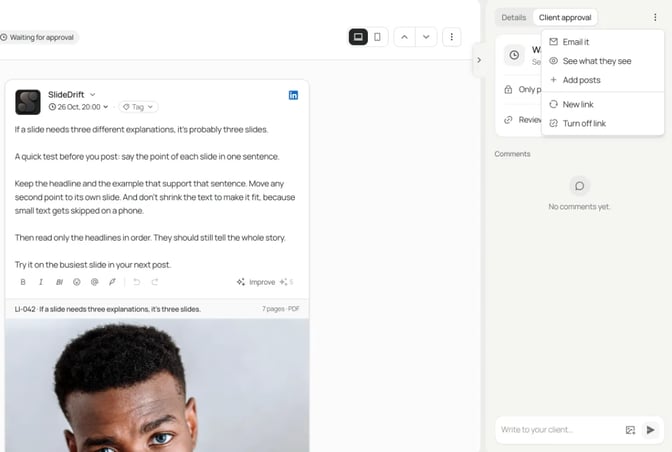
Hybrid: a writer drafts, you approve. You record the thinking. A writer or an assistant turns it into drafts, and you approve each one before it posts. SlideDrift, a LinkedIn content studio, covers the drafting and the approval:
- Drafting. It turns notes or a brief into a carousel draft in your brand, which the writer then edits. See creating from text. In a Brand Kit you can save who you help, what readers should do next, and a past post in your own words, which the kit uses as a guide to your voice.
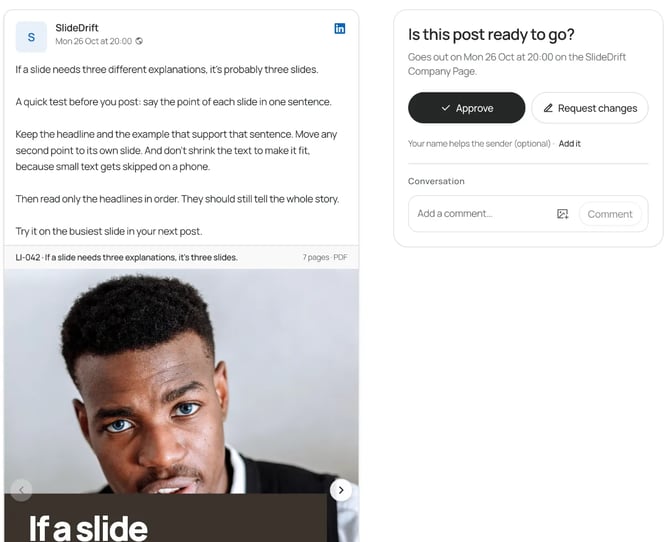
- Approval. On a paid plan, the writer puts the draft in Schedule and sends you a review link from Client approval. You see each post as it will appear on LinkedIn, approve it or request changes, and comment on a specific slide. You don't need a SlideDrift account.
- A hold. With Only post once it's approved turned on, the post doesn't go out until you've approved its current version. The LinkedIn scheduling docs explain the review link, which works for 14 days and holds up to 20 posts.
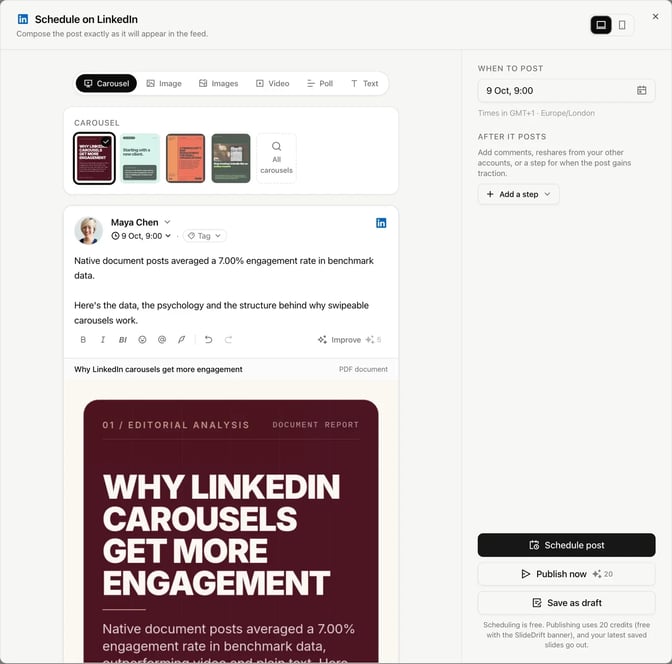
If you'd rather publish yourself, approve the draft, then download the PDF from the export dialog and upload it to LinkedIn as a document post. Scheduling from SlideDrift is for LinkedIn accounts you connect yourself; for other platforms, SlideDrift exports PDF or PNG in square 1:1, portrait 4:5 or stories 9:16, so you can post the same slides anywhere.
Worked example: a founder's voice memo becomes a carousel draft
This example is made up. Say you run a small recruiting firm. Walking back from a client meeting, you record a 10-minute voice memo about why your firm stopped taking roles without a hiring scorecard. It rambles, names two clients and makes four good points.
Your writer transcribes it with whatever tool they already use. They don't paste the raw transcript into SlideDrift, because its privacy guide asks you not to paste private messages or transcripts. Instead, they pull out the points, remove the client names, keep only figures you can stand behind, and write a short brief:
SlideDrift brief
Turn the notes below into 8 slides for a LinkedIn carousel.
Audience: founders and hiring managers at companies with 20 to 200 people
Goal: explain why we stopped taking roles without a hiring scorecard
Voice: direct and practical, first person, from a recruiter who has seen this go wrong
Avoid: client names, placement numbers, promises about hiring speed

Points:
- Most stalled searches we see start with a vague brief
- Without a scorecard, every interviewer judges a different job
- A scorecard lists the outcomes for the first year, the skills those outcomes need, and how we'll test for each one
- It takes about an hour with the hiring manager before the search starts
- Since we made it a rule, we have fewer late "this isn't quite right" moments

End with: the three questions we ask every hiring manager before we take a roleThe writer pastes the brief into Create, presses Generate, and edits the draft until each slide says one thing the memo actually said. Then they send you the review link. You read it on your phone, comment "Slide 4: it's closer to 90 minutes", and approve once it's fixed. The thinking and the approval are yours; the writer did the shaping.
For more on turning rough notes into a focused brief, see how to create a LinkedIn carousel from notes. If the stories come from client work, the confidentiality section of the consultant carousel ideas shows how to strip out what identifies a client. Before anything posts, the LinkedIn post preview tool shows how the caption reads in the feed.
If you'd rather run it yourself, LinkedIn content strategy for consultants sets up a two-hour weekly plan, and LinkedIn post templates give you a structure for each post.
FAQ
Is it OK to use a ghostwriter on LinkedIn?
LinkedIn's AI guidance says you're ultimately responsible for everything you post, and its community policies ask you to share information that is real and authentic. A ghostwriter who shapes your own ideas and stories, which you review and approve, fits within that. Claims about your results and experience have to be true, whoever wrote them.
How much does a LinkedIn ghostwriter cost?
It depends on scope: posts per month, interviews, strategy, design and comment handling. Writers charge per post, by monthly retainer or by the hour. The Editorial Freelancers Association's 2026 rate chart puts the median range for ghostwriting business and marketing copy at $87.50 to $125 an hour, though that isn't specific to LinkedIn.
Does a LinkedIn ghostwriter need my password?
No. LinkedIn's User Agreement says you should keep your password secret and not share your account. Your writer can send drafts for you to post, or schedule through a tool you connect to your profile yourself.
Should I say my posts are ghostwritten?
LinkedIn's guidance suggests telling people when AI has substantially shaped your content. It doesn't address human ghostwriters, so it's your call. A fair test: if the ideas and stories are yours and you approved every word, it's your post. If a post is mostly someone else's thinking, don't publish it under your name.
What's the difference between a ghostwriter and a LinkedIn content agency?
A ghostwriter usually works one to one on your writing. An agency may add strategy, design, scheduling and reporting, with a team behind the work. Ask either one the same questions about process, ownership and approvals.
Can I use AI instead of a ghostwriter?
You can, if you give it your own material and review every draft. AI drafts from vague input come out generic, just as a human writer's would. Feed it notes, stories and a past post of yours, then check facts, voice and claims before it posts.
Turn your notes into drafts you approve, with SlideDrift
SlideDrift is a LinkedIn content studio. Paste notes, a cleaned-up brief or a link, and it drafts a carousel in your brand that you or your writer can edit. Then export it as a PDF, or on a paid plan schedule it and send a review link so nothing posts until you've approved it.
Turn your notes into a draft
Paste notes, a cleaned-up brief or a link. SlideDrift drafts a carousel in your brand, which you can edit and export as a PDF at 1:1, 4:5 or 9:16 sizes.


Brief for this carousel
Make a 7-slide LinkedIn carousel for consultants and founders on hiring a LinkedIn ghostwriter. Cover: the answer (a ghostwriter shapes your ideas, you keep your opinions, client stories and the final yes). Then one point per slide: what the loop looks like, how pricing works (per post, retainer, hourly), five questions to ask before you sign, why you never share your password, what to keep in your own hands, and the hybrid where a writer drafts and you approve.