

Export as PDF
Download your carousel as a PDF for LinkedIn document posts.
PDF is the recommended format for LinkedIn carousel posts.
Download a PDF
- Open the carousel in the editor.
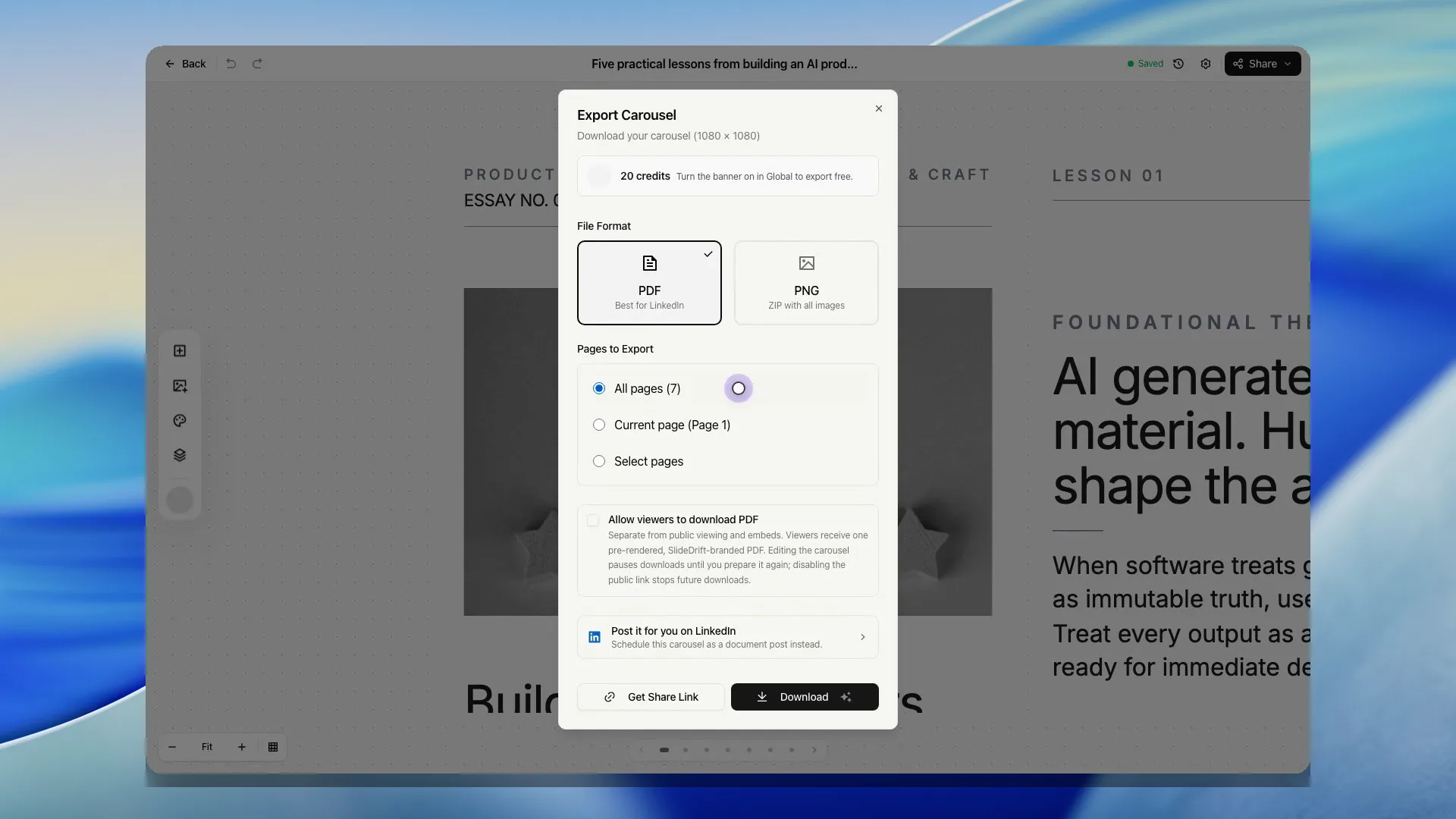
- Click Share, then Export.
- Keep PDF selected.
- Every slide starts ticked. Untick any slide you want to leave out, or choose This slide to export only the slide you're looking at.
- Click Download PDF. The button shows what the export costs.
Best use
Use PDF when you want to upload the carousel as a document post on LinkedIn.
Before uploading, open the file and check that every slide looks right.
Export after creating as a guest
If you created the carousel before signing in, choose Export, then create a free account or sign in. SlideDrift claims the guest carousel into your account, returns you to the same editor, and reopens Export so you can continue the download.
If you choose a paid plan from the guest export prompt, completing Stripe checkout also returns to that carousel with Export ready. Cancelling checkout returns to pricing without changing your account; the claimed carousel remains in your account so you can return to its editor later.
If export fails
If export fails, check:
- You are signed in.
- The carousel has slides.
- Your account can export today.
- The export service is available.
Free accounts may need to complete a verification challenge before exporting.