

Share links
Create a public viewer link, optional branded PDF download, or website embed for a carousel.
Share links let people view a carousel in the browser. Website embeds let you place the same shared carousel on another page.
The export dialog can create a public link with a carousel-specific share ID. When sharing is on, SlideDrift also provides iframe embed code for the same carousel.
Create a share link
- Open the carousel in the editor.
- Click Share, then Export.
- Under Share, choose Public link.
- Click Create public link, then copy the link.
- Send or publish the link where you want people to view the carousel.
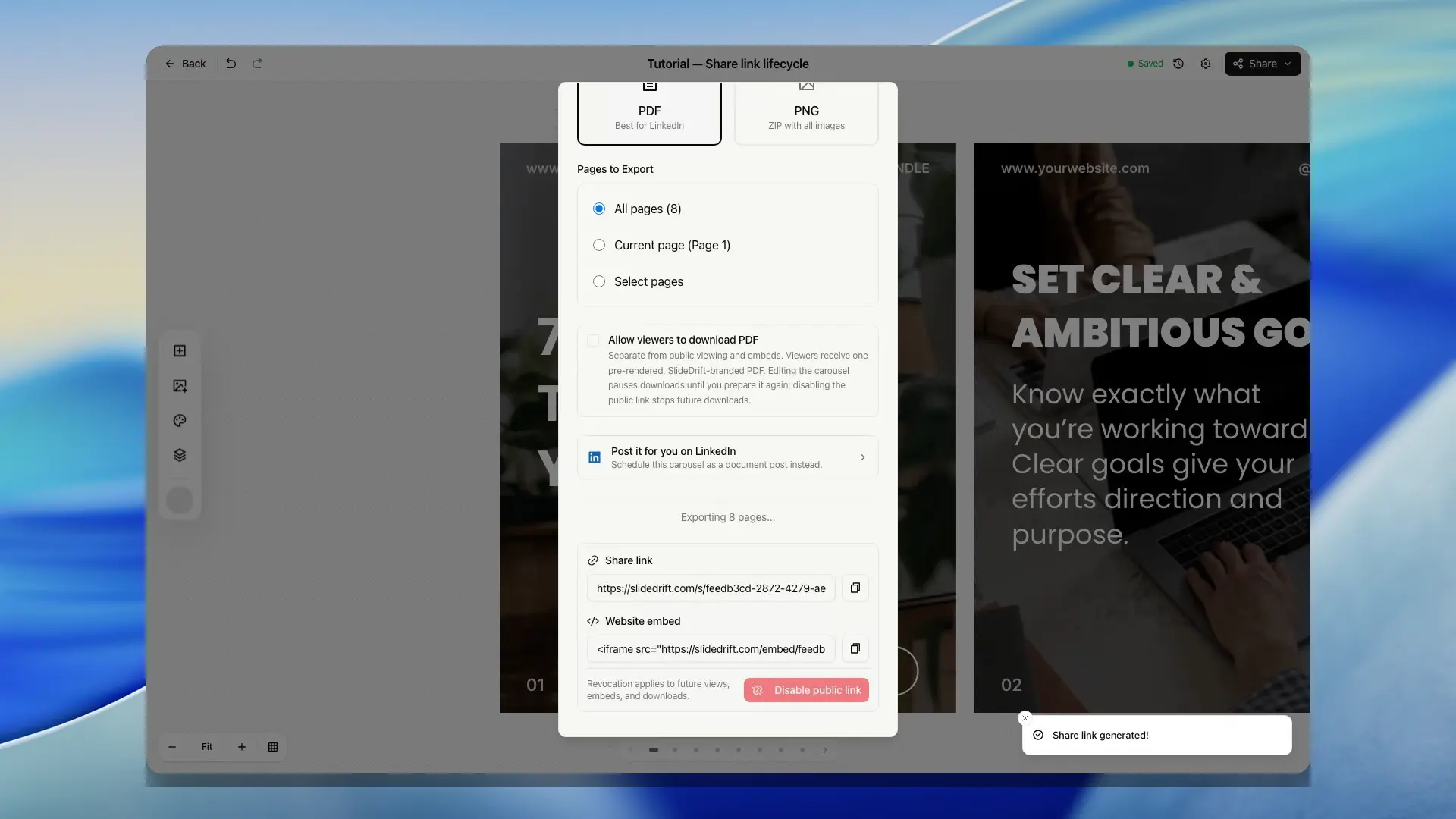
Let viewers download a PDF
You can attach one prepared, SlideDrift-branded PDF to the public share page.
- Turn on the SlideDrift banner in the editor's Carousel settings and save the carousel.
- Open Export, choose Public link, and create the link if it is not on yet.
- Select Allow viewers to download PDF.
- If there is no current branded PDF, click Prepare branded PDF. SlideDrift prepares all pages, downloads your copy, and turns on viewer downloads.
Preparing the PDF uses one normal export allowance and costs 0 credits while the SlideDrift banner is included. Viewer downloads do not use another export allowance or credits.
Editing the carousel pauses viewer downloads so an old file is not served as the latest deck. Save the edits, then prepare the branded PDF again to resume downloads. Disabling the public link also stops future PDF downloads.
If a viewer PDF cannot be downloaded, the error stays on the share page so you can keep reading the slides. Use the retry action when it is offered. Shared slides and embed navigation also fit smaller screens.
Embed a carousel
- Open the carousel in the editor.
- Click Share, then Export.
- Under Share, choose Public link, and create the link if it is not on yet.
- Click Copy code next to Website embed.
- Paste the iframe code into the page where you want the carousel to appear.
The embed view is available only when the carousel owner has enabled both sharing and embedding for that carousel.
If the embed does not appear on the destination site, confirm that the share link is still enabled, the iframe code was copied completely, and the website allows iframes from SlideDrift.
What viewers see
The public share page shows the carousel slides with navigation controls and a SlideDrift call to action. When the owner has prepared and enabled a current branded PDF, viewers also see Download branded PDF. The call to action can send viewers back to SlideDrift with referral attribution, so creators can share public carousels while keeping the viewer path into SlideDrift intact.
Embedded carousels use a compact viewer intended for pages outside SlideDrift. They are marked as noindex so the public share page remains the main viewer path.
Privacy note
Anyone with the link or embed can view the shared carousel and, when enabled, download its PDF. Do not create share links, embeds, or viewer downloads for private, confidential, or sensitive content.
If you need to revise a shared carousel, reopen the deck in the editor, make the edits, save the latest version, and regenerate or refresh the share path from Export.