

Credits and billing
Understand credits, credit costs, plan limits, and billing actions.
SlideDrift uses credits for generation, remixing, image generation, export, AI rewrite actions, and AI slide edits.
The exact credit cost is shown in the product before you run an action.
Processed PDF sources are saved to your account. Reusing one does not charge the PDF processing cost again, but generating a new carousel from it still uses the normal generation credits.
Current credit costs
- Generate carousel: 10 credits.
- Generate with a Pro template: 30 credits (Free accounts: 2 a day).
- Standard AI image: 5 credits.
- Pro AI image: 40 credits.
- AI graphic, including Cover Creator: 80 credits (paid plans only).
- Photo Style result: 80 credits per source photo (paid plans only).
- Process a PDF source: 2 credits per page, with a 20-credit minimum (paid plans and trials).
- Remix fast: 100 credits.
- Remix HQ: 300 credits.
- Export without the SlideDrift banner: 20 credits.
- Publish a scheduled LinkedIn carousel without the SlideDrift banner: 20 credits, charged once LinkedIn accepts the post. Scheduling is free.
- AI rewrite actions: 5 credits.
- AI slide edits on Remix slides (Edit With AI and Reroll Slide): 5 credits per edit. An edit that fails or is interrupted uses no credits.
Plan credit amounts
- Free: 200 credits.
- Starter: 1,000 credits.
- Pro: 5,000 credits.
- Agency: 20,000 credits.
Paid plan credits reset on the billing cycle. Free credits do not reset on billing.
Plan limits
Current paid plan prices are:
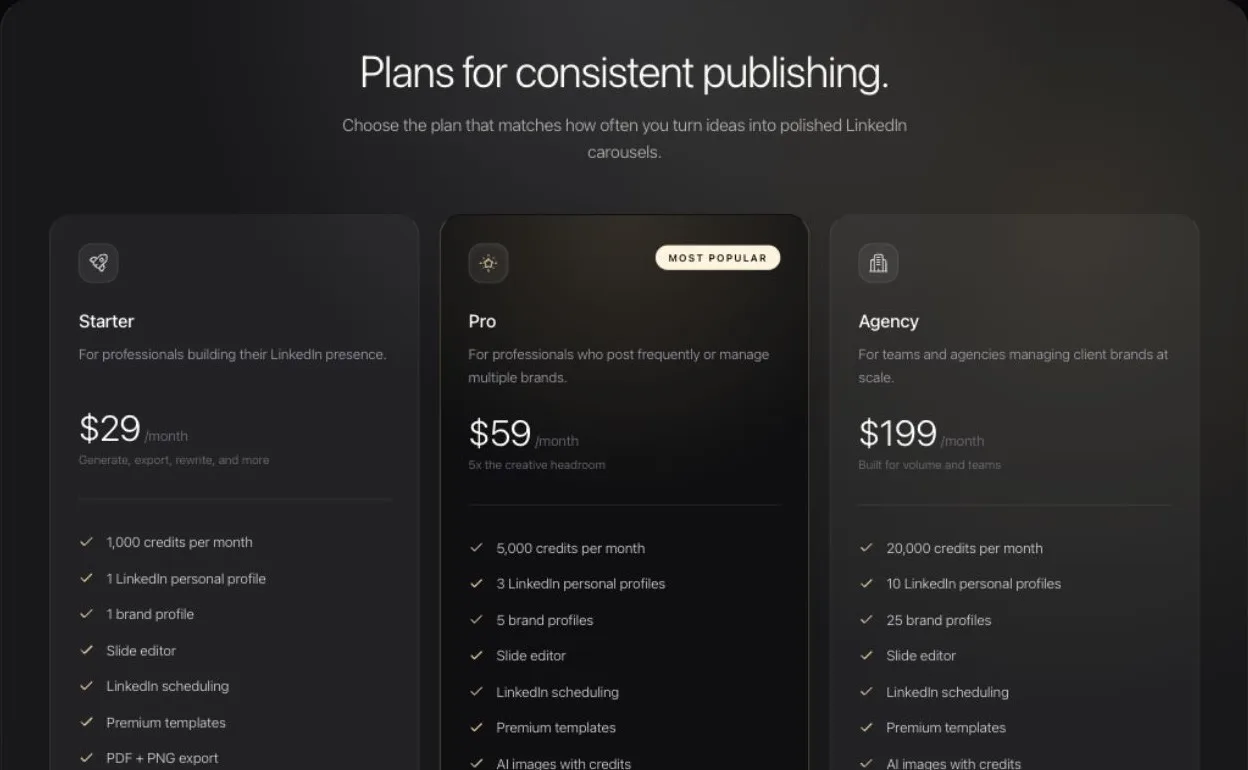
- Starter: $29/month.
- Pro: $59/month.
- Agency: $199/month.
Custom brand profile limits are:
- Free: 1 custom brand profile.
- Starter: 1 custom brand profile.
- Pro: 5 custom brand profiles.
- Agency: 25 custom brand profiles.
LinkedIn account limits are:
- Free: not included.
- Starter: 1 LinkedIn personal profile.
- Pro: 3 total LinkedIn accounts, including personal profiles and Company Pages.
- Agency: 10 total LinkedIn accounts, including personal profiles and Company Pages.
LinkedIn Company Pages require Pro or Agency. They count toward the same total LinkedIn account limit as personal profiles.
Saved custom template limits are:
- Free: not included.
- Starter: not included.
- Pro: 25 saved custom templates.
- Agency: 100 saved custom templates.
Storage for uploaded images, videos, and saved PDF sources is:
- Free: 50 MB.
- Starter: 1 GB.
- Pro: 5 GB.
- Agency: 25 GB.
AI agent connection limits for MCP are:
- Free: 1 active connection.
- Starter: 2 active connections.
- Pro: 5 active connections.
- Agency: 20 active connections.
Export limits are daily safety limits. Free accounts can export watermarked files up to the free daily limit. Paid plans have higher daily export limits and can remove the SlideDrift banner when exporting.
Plan limits are enforced where the action happens. For example, LinkedIn scheduling checks connected account limits before using another LinkedIn profile or Company Page, and saved custom templates check the current plan before saving another reusable template.
If an account reaches a plan limit, SlideDrift should explain the relevant plan requirement before continuing.
Credit history
Signed-in users can open the credits page to see remaining credits, usage this cycle, current plan, and recent credit activity.
Each activity row names what used the credits, such as Generate or Graphic or Photo Style. A carousel post that LinkedIn publishes appears as Export or publish, like an export.
Seven-day trial
Each eligible account can start one seven-day trial. A card is required, but Stripe charges $0 when the trial starts. Choose Starter, Pro, or Agency as the plan that should begin when the trial ends. Cancel before the end date to avoid the first charge.
Trial credits are separate from Free credits:
- Starter trial: 250 trial credits.
- Pro trial: 1,250 trial credits.
- Agency trial: 1,250 trial credits.
Trial credits do not refill. Unused trial credits expire when the trial ends, while your Free credits remain available if you return to Free.
The trial includes premium templates, unbranded exports, Pro AI images, up to 5 brand profiles, 3 LinkedIn accounts including Company Pages, 25 custom templates, 5 AI connections, 20 exports per day, and 1 GB of storage. Some AI helpers use 5 trial credits, and normal generation or export actions show their credit cost before they run.
Open Manage trial from the account menu to:
- Change the plan that begins after the trial without changing the trial credits or end date.
- Start the paid plan immediately and receive its monthly credits after payment succeeds.
- Update the payment card.
- Cancel renewal while keeping trial access until the shown end date.
If the trial ends without a paid plan, your carousels, brand kits, and saved work remain. Plan limits apply again, so new uploads or other paid actions may wait until you subscribe or move back within the Free limits.
Billing
Billing actions use Stripe. Depending on your account state, SlideDrift can send you to checkout or the billing portal.
During checkout, Stripe may ask for billing details, a phone number, or card authentication such as 3D Secure. If too many checkout attempts happen in a short period, wait a few minutes and try again.
If you close checkout before subscribing, the pricing page confirms that no account changes were made. If you choose a different plan while a previous checkout is still open, SlideDrift uses the latest plan choice when it is safe to switch sessions; otherwise it asks you to finish or close the existing checkout first.
If checkout shows a promotion code field for another eligible offer, enter the code before subscribing. Promotion codes are handled by Stripe and may be limited by plan, campaign, redemption count, or expiration date.
If a subscription renewal is overdue, SlideDrift marks the subscription as Payment overdue and shows a billing alert in the workspace, Create page, and carousel library. Use Resolve payment to open Stripe's payment page when one is available. If Stripe does not provide a direct payment link, open the billing portal instead.
Your bank may require authentication before Stripe can complete the renewal. Follow the payment alert to confirm the payment and restore paid access. A failed payment, dispute, or serious payment risk may restrict paid access until the billing issue is resolved.
Cancelled paid plans
When you cancel a paid plan at the end of its billing period, your account menu, Credit History, credit indicator, and plan page show Ends with the access end date instead of a renewal or credit-reset date. You keep paid access until that date. If you resume the subscription, the normal renewal and reset dates return.
Common upgrade blockers
- You are trying to save more custom brand profiles than your plan includes.
- You are trying to save custom templates without a Pro or Agency plan.
- You are trying to connect or use more LinkedIn profiles or Company Pages than your plan includes.
- You are trying to connect another AI assistant after reaching your plan's active MCP connection limit.
- You need a no-banner export but are on a free plan or do not have enough credits for the action shown.
- A checkout session needs Stripe verification, card authentication, or a valid eligible promotion code before the subscription can complete.