LinkedIn Content Creator: What It Means and How to Become One
What a LinkedIn content creator does, which creator tools LinkedIn gives every member, and a two-post weekly routine for experts who sell their expertise.
A LinkedIn content creator is anyone who posts on LinkedIn regularly to build an audience around their work. The phrase also covers people paid to make LinkedIn posts for a company or an executive. For consultants, lawyers, accountants and coaches, it doesn't take a following or a special mode. It takes a clear reader, a weekly routine and posts that answer real client questions.
- What it means: the three ways people use the term, and which one fits you.
- LinkedIn's creator tools: what every member gets now that creator mode is gone.
- How to become one: profile, topics, formats and a two-post week.
- Making it pay: clients first, sponsored posts second.
- A worked example: a tax adviser's first month.
What a LinkedIn content creator is
People mean three different things when they search for this.
- A member who posts to build an audience. They write about their field every week, and their profile is set up so readers can follow them. This is the meaning this guide focuses on.
- A job or freelance role. Companies hire LinkedIn content creators to write and design posts for the company Page or for a founder. If that's what you're looking for, the LinkedIn ghostwriter guide covers what the work involves and what it costs.
- LinkedIn's own label. LinkedIn uses "creator" for its creator tools and creator analytics. They're open to members, not only to people with large followings.
For someone who sells expertise, the first meaning is the useful one. You don't need to become an influencer. You need the right 500 people to see your thinking often enough that they call you when the problem comes up.
Do you still need creator mode?
No. LinkedIn's update on creator mode announced that the creator mode switch would be removed in March 2024. You now choose Follow or Connect as the main button on your profile. Pick Follow if you want buyers to see your posts without sending a connection request.
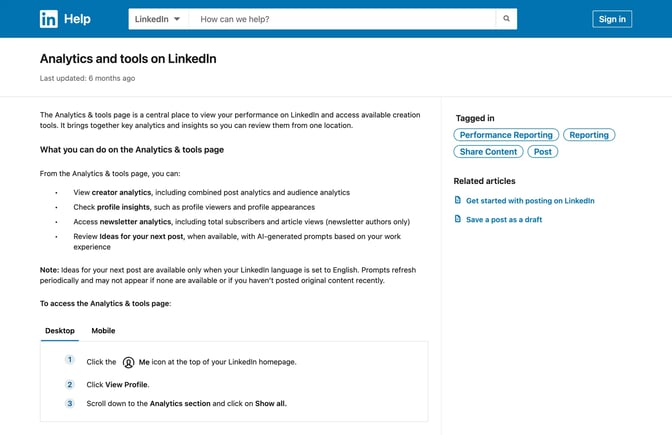
The tools that came with creator mode moved to Analytics & tools on your profile. LinkedIn's Analytics & tools help page describes it as a central place to see your performance and reach the creation tools available to you: creator analytics for your posts and audience, profile insights, newsletter analytics if you write one, and ideas for your next post when LinkedIn has them.
The creator tools worth using first
You don't need all of them. Three earn their place for most experts.
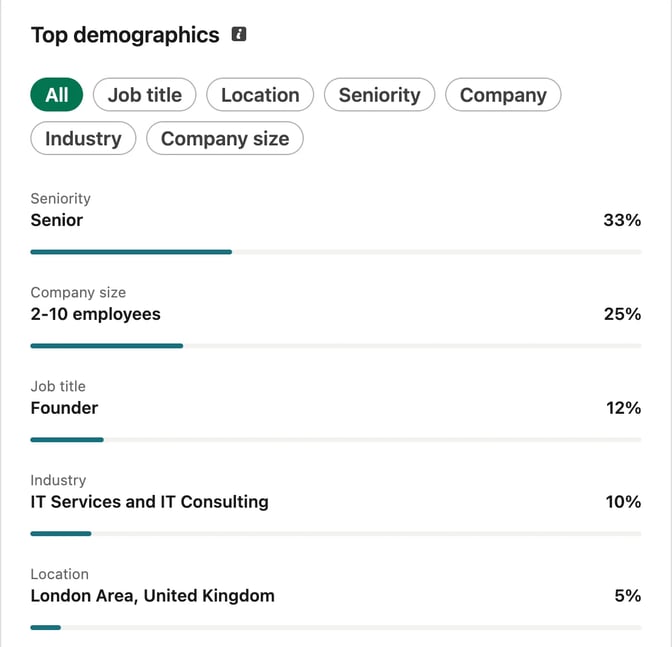
Post and audience analytics. These tell you who's reading, not only how many. LinkedIn's post analytics page explains each number, and our guide to LinkedIn impressions covers which ones matter when you sell your expertise. Check the audience's job titles and company sizes once a month. If they don't match your buyers, change your topics before you change your posting rhythm.
Newsletters. A LinkedIn newsletter notifies subscribers when you publish a new edition, as LinkedIn's newsletter FAQ explains. A normal post only reaches people the feed shows it to. LinkedIn's newsletter access criteria ask for more than 150 followers or connections, recent original content and good standing under its policies. Start one once you can commit to a schedule, such as one issue a month.
The Follow button. It's a small change with a clear effect: strangers who like a post can follow you in one tap, without waiting for you to accept a connection request.
LinkedIn Live and audio events are worth trying later, when you have something to discuss with an audience in real time, such as a Q&A after a rule change.
How to become a LinkedIn content creator
The steps below assume you have client work and a point of view, but no posting habit yet.
1. Pick one reader and three problems
Write one sentence: "I help [reader] with [problem]." Then list three problems that reader brings to you again and again. Those three problems are your topics for the next quarter. The LinkedIn content strategy for consultants walks through this in more detail.
2. Fix your profile before you post more
Readers check your profile before they follow. Make the headline say who you help, put the same sentence at the top of your About section, and add one piece of proof to Featured. The personal brand guide has a checklist for each part.
3. Collect material you already have
You already answer questions every week. Keep a running note of:
- questions clients asked, in their words
- mistakes you fixed this month
- decisions you'd make differently now
- before-and-after examples you can share without naming anyone
Ten of these is a month of posts. If the list runs dry, the LinkedIn post ideas give you 40 more starting points.
4. Choose two formats
Most experts do well with two formats: a short text post for opinions and stories, and a carousel for steps, checklists and frameworks. The how to post on LinkedIn guide explains each format and when it suits.
Don't add video, newsletters and polls in the first month. Get the two-post week working first.
5. Post twice a week and reply to every comment
A routine you can keep beats a burst you can't. Two posts a week is enough to be remembered and small enough to fit around client work. Reply to comments on the day you post, and leave thoughtful comments on posts your buyers read. A thoughtful comment on a buyer's post is often where a conversation starts.
A two-post weekly routine
Here's a routine that takes about two hours a week once it's running.
| When | What | Time |
|---|---|---|
| Monday | Pick two items from your notes and write a hook for each | 20 minutes |
| Tuesday | Write the text post, preview it and post it | 30 minutes |
| Wednesday | Reply to comments, comment on five buyers' posts | 15 minutes |
| Thursday | Turn the second idea into a carousel and post it | 45 minutes |
| Friday | Note what people asked in comments for next week | 10 minutes |
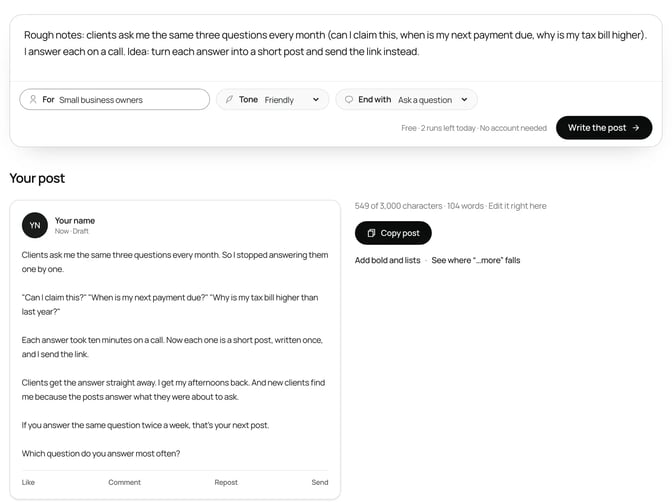
For the hooks, the free LinkedIn hook generator gives you ten opening lines to compare. To get from notes to a first draft faster, the free LinkedIn post generator takes a topic or your own notes, plus a tone and audience, and shapes them into a post you can edit. It keeps your points, so the post still sounds like your work.
Before you post, paste the draft into the free LinkedIn post preview to check roughly where the "see more" cut falls in a mobile-style layout.
What makes creator posts work for experts
LinkedIn's page on how the feed ranks posts lists whether a post "provides knowledge or advice" among its signals. That suits experts. You don't need to be entertaining. You need to be useful to a specific reader.
Three habits make the difference:
- Specific over general. "Three clauses I check in every commercial lease" beats "Why contracts matter."
- Your own detail. A figure, a client question or a mistake you've seen. LinkedIn's guidance on AI-assisted posts says generic content without a clear point of view is less likely to be widely distributed.
- One idea per post. If a post needs three headings, it's probably a carousel or two posts.
Confidentiality comes first. Change details so no client could be recognised, and don't share anything from a client file, even anonymised, unless they've agreed.
Making it pay
For most experts, the money comes from clients, not from LinkedIn. Posts make you the obvious person to call. Count inquiries, conversations and profile views from your buyers, not likes.
There's a second route once you have a following. LinkedIn's Thought Leader Ads let a company sponsor a member's public post as an ad, and the member approves each request. Some companies use this to promote posts by their own experts or by creators their buyers trust. Treat it as a bonus. If sponsored posts start to crowd out your own thinking, your audience will notice.
Should you hire a LinkedIn content creator instead?
Hiring makes sense when you have the ideas but not the time to shape them. A good writer or designer interviews you, drafts posts in your voice and handles the formatting. You stay responsible for what's posted under your name, so keep approval with you.
A middle path is to keep the ideas and the final read yourself and use tools for the rest: notes into drafts, drafts into carousels, carousels into a schedule. The LinkedIn ghostwriter guide compares the options and what each one costs in money and time.
Worked example: a tax adviser's first month
Priya is a made-up tax adviser who works with small business owners. She has never posted regularly. Her one sentence: "I help owners of small businesses keep their tax simple and their records ready."
Week 1. She switches her profile's main button to Follow, rewrites her headline to match her sentence and adds a short checklist to Featured. From last month's emails she lists twelve client questions.
Week 2. Her text post opens with a client question in their words: "A client asked why their tax bill went up when their profit didn't." The post gives three reasons in plain words. Her carousel covers the four VAT records she asks every client to keep. Here's her brief:
SlideDrift brief
Make a 6-slide LinkedIn carousel for owners of small businesses.
Goal: show them the four VAT records to keep before a tax inspection, so they aren't caught out.
Structure: a hook slide ("Four records that make a VAT inspection boring"), why missing records cost more than the tax, one slide for each record, and a closing question for readers.
Tone: calm, practical and plain. General information, not advice for any one business.
Avoid: invented statistics, client names and promises about tax savings.Week 3. Two comments on the carousel ask about records for online sales. That becomes next week's text post. She checks her audience analytics: most new followers run small firms, which is who she wants.
Week 4. One reader messages her to ask about a review of their records. It's one conversation, from eight posts. She keeps the routine, and adds a monthly newsletter once her account shows it as available.
None of Priya's posts went viral. They didn't need to. Each one reached the people who might hire her and gave them a reason to remember her name.
FAQ
What does a LinkedIn content creator do?
They post regularly on LinkedIn to build an audience around a topic: text posts, carousels, newsletters or video. The term also covers people paid to make posts for a company or an executive.
Do you need creator mode to be a content creator on LinkedIn?
No. LinkedIn removed the creator mode switch in March 2024. Creator tools now sit under Analytics & tools on your profile, and you choose Follow or Connect as your main profile button.
How many followers do you need to be a LinkedIn creator?
None to start. Some tools have thresholds: LinkedIn's newsletter access criteria ask for more than 150 followers or connections, recent original content and good standing under its policies.
Do LinkedIn content creators get paid?
Not for posting itself. Experts usually earn through the clients their posts bring in. Companies can also sponsor a member's public post through Thought Leader Ads, with the member's approval.
How often should a LinkedIn content creator post?
Often enough to be remembered and seldom enough to keep the quality up. Two posts a week is a sustainable start for someone with client work.
Can I use AI as a LinkedIn content creator?
Yes, for drafts. You're responsible for what you post, and LinkedIn says generic content spreads less, so rewrite drafts with details only you would know.
Make your next post in SlideDrift
You already have the material: the questions clients ask you every week. Start with one of them and SlideDrift drafts a carousel for you to edit.
Turn a client question into a carousel
Paste your notes or a link to something you've written. SlideDrift drafts the slides in your brand; you edit them, then export the PDF or schedule the post.


Brief for this carousel
Make a 6-slide LinkedIn carousel for owners of small businesses on the four VAT records to keep before a tax inspection. A hook slide, why missing records cost more than the tax, one slide per record, and a closing question for readers.