What Are Impressions on LinkedIn? Your Post Numbers Explained
What LinkedIn counts as an impression, how it differs from members reached, where to find your numbers and which ones matter when you sell your expertise.
What are impressions on LinkedIn? One impression is one time your post was shown on someone's screen. LinkedIn's post analytics help page defines it as the "number of times your post was shown on LinkedIn," so a person who scrolls past twice adds two. Members reached counts different people instead. Both are estimates, and neither tells you whether the right people read the post.
What LinkedIn counts as an impression
LinkedIn counts an impression each time your post is shown. Its help page says "the numbers in your post analytics are estimates and may not be precise," and that your post analytics are private to you. Two details catch people out:
- Your own views count. LinkedIn's guide to viewing post analytics says "your own views, social engagements, link engagements, saves, and sends are counted towards the analytics of your content."
- Page posts have a threshold. LinkedIn's content analytics for LinkedIn Pages counts a view only when the post is at least 50 percent on screen for 300 milliseconds or more, or when it's clicked.
An impression means a post appeared. It doesn't mean anyone read the first line, opened the carousel or knew who wrote it.
Impressions vs members reached vs views
| Number | What LinkedIn counts | Use it to ask |
|---|---|---|
| Impressions | Times the post was shown, repeats included | How often did it appear? |
| Members reached | Distinct members and Pages that saw it, repeats left out | How many people saw it? |
| Video views | Times a video was watched for two or more continuous seconds, replays included | Did people start watching? |
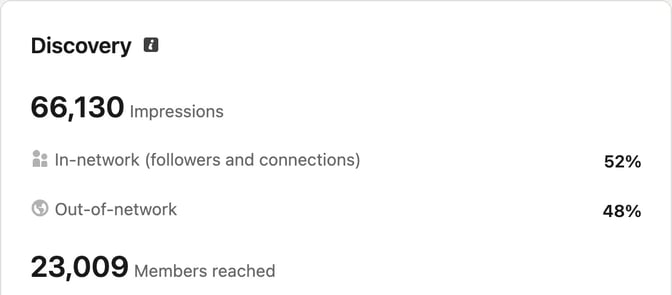
LinkedIn defines members reached as the "number of distinct members and Pages that saw your post," an estimate that "does not include repeat views." So members reached can't be higher than impressions. Divide impressions by members reached to see how often each person saw the post on average.
Video views and article views have their own definitions, and profile views are about your profile. When someone says a post "got 3,000 views," they usually mean impressions.
Post analytics also split impressions into in network (people who follow you or are connected to you) and out of network (people who don't). A high out-of-network share means the post traveled beyond the people who already know you.
Where to find your impressions
On your profile, for one post. LinkedIn's steps for desktop: open the Me menu, choose Posts & Activity under Manage, pick the tab for your content type, then click the impressions count in the lower-left corner of the post or the analytics option in the lower-right corner. On the phone app, open your profile, scroll to Activity, tap to show all posts and tap the impressions count on the post.
On your profile, across posts. Combined post analytics live in Analytics & tools. You can pick a range from the past 7 days to the past 365 days. Engagements there include reactions, comments, saves, sends and reposts, and the graph fills in up to yesterday.
On a Company Page. LinkedIn's steps to access Page analytics: go to your Page admin view, choose Analytics in the left menu and pick Content. LinkedIn says Page metrics can take 48 hours to show, except reactions and comments, which appear in real time.
How long the numbers last. LinkedIn keeps members reached for 400 days and demographic breakdowns for 180 days, so note anything you want to compare later.
If you publish through SlideDrift, Analytics shows how a connected account's posts did over periods from 7 days to 12 months, including how carousels compare with your other posts. Company Page posts get stored numbers from a check 48 hours after they go live; profile results are fetched when you open a post and aren't kept for the totals. The scheduling guide has the details. Scheduling needs a paid plan, and Company Pages need Pro or Agency.
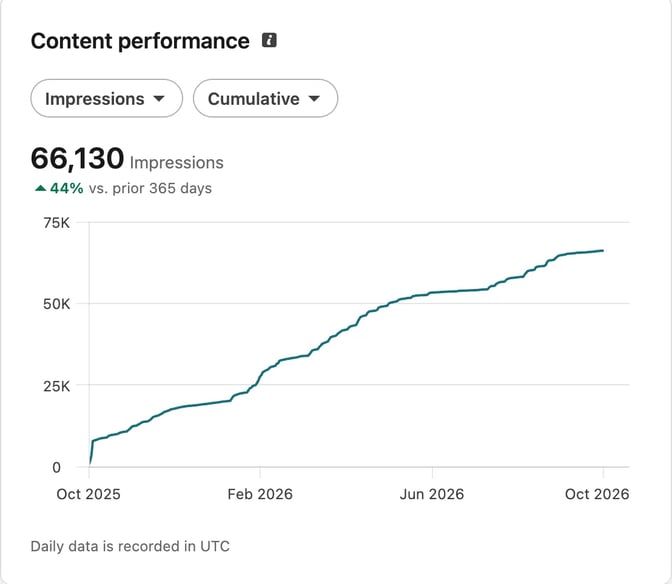
Why your impressions go up and down
LinkedIn's page on how it ranks content lists the signals it uses. They include "how often a post is viewed or engaged with," "what the post is about and whether it provides knowledge or advice," how recent the content is, and whether it comes from someone the reader follows or is connected to. The same page says feed distribution isn't influenced by payments to LinkedIn, apart from clearly labeled promoted content.
So a post on a topic your network cares about, which starts a conversation early, can be shown to more people. A side topic, or a post that gets little response, may reach only a small slice of your followers. LinkedIn's guidance on AI-assisted posts adds that content that feels generic or repetitive, or lacks a clear point of view, is less likely to be widely distributed.
Timing plays a part too, because recency is one of the signals. The best time to post on LinkedIn covers how to find your own window.
What's a good number of impressions on LinkedIn?
There isn't one number that fits everyone. Impressions depend on your audience, the topic and the format, and LinkedIn doesn't publish a benchmark for profiles. The closest published figures are for company Pages. Socialinsider's 2026 LinkedIn benchmark, published on March 16, 2026, covers 1.3 million posts from 16,645 business Pages posted between January 2024 and December 2025. It found Pages with 1,000 to 5,000 followers averaged 525 impressions on document posts and 300 on text posts. That's an average across company Pages, not a target for your profile.
A more useful test is a ratio you work out from your own posts:
- Engagement rate = engagements ÷ impressions × 100. LinkedIn's Page analytics describes engagement rate as the ratio of interactions per impressions, with interactions including clicks, reactions, comments and shares. For a profile post, add up reactions, comments, reposts, saves and sends.
- Reach per follower = members reached ÷ your followers, a rough share of your audience the post got to.
- Your own median. Compare each post with the middle value of your last ten, not with someone else's screenshot.
For people who sell their expertise, a few other numbers say more than impressions:
- Comments from the kind of person you want to work with.
- Saves and sends, which suggest the post was useful enough to keep or pass on.
- Profile viewers from this post and followers gained from this post, both on the post analytics page.
- Inquiries: messages, calls and proposals that started from a post. LinkedIn doesn't track these, so keep your own log, as the content strategy for consultants suggests.
Worked example: a fractional CFO compares two posts
A fractional CFO who works with founder-led companies posts twice in one week. The person and the numbers below are made up to show the method.
- Post A, text: an opinion on why profitable companies still run short of cash.
- Post B, carousel: the steps to build a 13-week cash flow forecast.
| Post A (text) | Post B (carousel) | |
|---|---|---|
| Impressions | 3,200 | 1,800 |
| Members reached | 2,100 | 1,250 |
| Reactions | 41 | 38 |
| Comments | 6 | 17 |
| Reposts | 2 | 5 |
| Saves | 4 | 29 |
| Sends | 3 | 11 |
| Engagements | 56 | 100 |
| Engagement rate | 1.8% | 5.6% |
| Profile viewers from this post | 5 | 22 |
The text post was shown almost twice as often. Each person saw it about 1.5 times (3,200 ÷ 2,100), and the carousel about 1.4 times. On impressions alone, Post A wins.
The carousel did more of the CFO's job. Its engagement rate is three times higher, saves and sends suggest founders kept it, and 22 people went on to the CFO's profile. The CFO's own log shows one message that week, from a founder who saw Post B and asked about a forecast.
Two posts don't prove a format works better. The CFO's next step is to test the topic separately from the format: post the cash-gap opinion as a carousel and the forecast steps as a short text post, then compare the same ratios over a month.
Here's the brief for Post B, ready to adapt:
SlideDrift brief
Turn the notes below into 8 slides for a LinkedIn carousel aimed at founders of companies with 10 to 50 staff.
Goal: show them how to build a 13-week cash flow forecast so they see a cash gap early enough to act. General education only.
Structure: a hook, why profit and cash differ, one slide per step, and a closing slide inviting questions in the comments.
Tone: plain, calm and practical. Explain any finance term in one line.
Avoid: promises of savings, tax advice, and client names or figures.

Notes:
- start with the opening cash balance
- list expected receipts week by week, using realistic payment dates, not invoice dates
- list fixed payments: payroll, rent, loan repayments, tax
- add variable costs
- work out the weekly net change and closing balance
- flag any week that falls below your minimum cash level
- update it every Friday against actualsHow to raise impressions honestly
LinkedIn's Professional Community Policies say not to "artificially increase engagement with your content" and ask members not to agree ahead of time to like or re-share each other's content. That rules out engagement pods. What's left is the plain work:
- Write about what your reader is stuck on. LinkedIn looks at whether a post "provides knowledge or advice." Client questions make good topics; the LinkedIn post ideas list has 40 to start from.
- Put the point in the first lines. People see only the opening before "see more." The free LinkedIn post preview shows roughly where that cut falls.
- Pick the format that fits the idea. Steps and frameworks suit carousels, opinions suit text. How to post on LinkedIn covers each format.
- Reply to comments while the post is new. How often a post is engaged with is one of LinkedIn's signals, and so is how constructive or professional the conversation is.
- Keep a steady schedule and compare each post with your own median, so one quiet week doesn't send you chasing tricks. The LinkedIn personal brand guide has a simple routine.
FAQ
What is the difference between impressions and members reached on LinkedIn?
Impressions count every time a post was shown, including repeat showings to the same person. Members reached counts the distinct members and Pages that saw it, with repeats left out. Both are estimates, and members reached is never higher than impressions.
Do my own views count as impressions on LinkedIn?
Yes. LinkedIn says your own views, engagements, saves and sends count toward your post analytics, so avoid reopening a new post over and over.
What is a good number of impressions for a LinkedIn post?
There's no universal figure. Socialinsider's 2026 benchmark found company Pages with 1,000 to 5,000 followers averaged 525 impressions on document posts and 300 on text posts. For a profile, compare each post with your own median and its engagement rate.
Why did my LinkedIn impressions drop suddenly?
LinkedIn decides who sees a post using signals such as the topic, how recent it is, your connections and the engagement it gets. A different topic, a quiet start or a post that reads as generic can all mean fewer people see it. Look at several weeks before deciding something changed.
Who can see my LinkedIn post analytics?
LinkedIn says the analytics for posts on your profile are private to you. For a Company Page, analytics are available to Page admins in the Page admin view.
How long does it take for LinkedIn impressions to update?
For Company Pages, LinkedIn says metrics can take 48 hours to show, except reactions and comments, which appear in real time. On a profile, the combined analytics graph fills in up to yesterday.
Track what each post does in SlideDrift
SlideDrift is a LinkedIn content studio: it drafts posts from your notes in your brand, schedules and publishes them, and shows how each connected account's posts did. Paste your notes or a link to something you've written, edit the draft, then export the PDF or schedule the post on a paid plan.
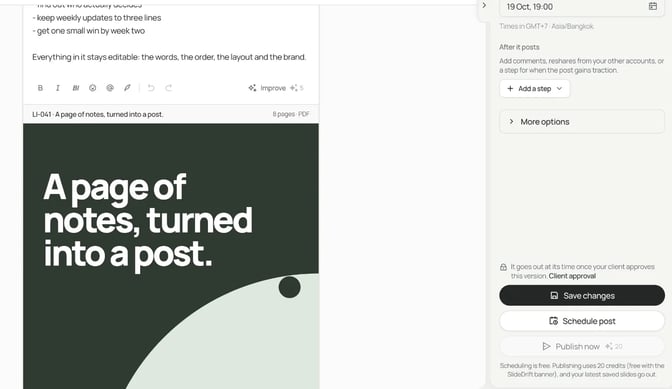
SlideDrift publishes natively to LinkedIn. For other platforms, export PDF or PNG in square 1:1, portrait 4:5 or stories 9:16 and post them anywhere.
Turn your notes into a post
Paste your notes or a link to something you've written. SlideDrift drafts the slides in your brand; you edit them, then export the PDF or schedule the post.


Brief for this carousel
Make a 7-slide LinkedIn carousel for consultants and coaches on reading post analytics. A cover with the answer (an impression is one time a post was shown; members reached counts distinct people), then one point per slide: where to find the numbers, why engagement rate beats raw impressions, which numbers matter for selling expertise, and a closing slide asking which number the reader tracks.