LinkedIn Hook Ideas: 50 Examples of First Lines for Your Posts
50 LinkedIn hook ideas in ten types, with examples for consultants, lawyers, accountants and coaches, fill-in formulas and the hooks to avoid.
The best LinkedIn hook ideas name a specific reader, problem or moment in the first line, then make the second line worth reading. A hook is the opening line or two of a post, the part people see before they tap "see more." Below are 50 hook ideas in ten types, written for consultants, lawyers, accountants, coaches and advisers.
- 50 hook ideas: ten types, five examples each.
- Formulas and choosing: fill-in lines, and which hook suits which post.
- What to avoid: the hooks that cost you trust.
- A worked example: an HR consultant picks one of three hooks.
What a LinkedIn hook is
A hook is the first line or two of your post. On a phone, that's often all a reader sees before the text is cut off with "see more." LinkedIn doesn't publish where that cut falls and it moves with screen size and line breaks. Plan for the first two short lines to be the whole pitch.
The rest of the post still matters. LinkedIn's help page on posting and sharing updates allows up to 3,000 characters, and its page on how the feed ranks posts lists whether a post "provides knowledge or advice" among the signals it uses. A hook that gets the tap and a body that doesn't deliver leaves readers feeling tricked.
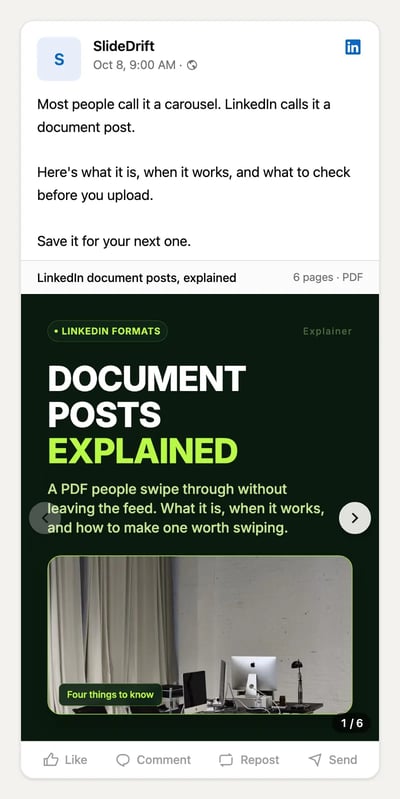
A post hook isn't a carousel cover. A text post's hook sits in the caption and has to work as a sentence. A carousel's hook is the first slide, read as a headline at thumbnail size. For first slides, see the LinkedIn carousel hook examples and the first slide examples. The two should agree when you post a carousel, but they're written differently.
A good hook does three things:
- Says who it's for, directly or through the problem it names.
- Makes one specific promise the post can keep.
- Leaves a reason to read line three, usually a gap between what the reader believes and what you're about to say.
50 LinkedIn hook ideas in ten types
The examples below were written for this article. They're illustrations, not real posts, and any numbers in them stand in for figures from your own work. Swap in the details your clients would recognise.
1. The client question
Start with a question a client actually asked, in their words. It shows you know what buyers worry about.
- "A founder asked me last week: 'When should I stop doing my own books?'"
- "The question I get in every first meeting: 'How long will this take?'"
- "'Do I really need a shareholders' agreement if we're friends?' Yes. Here's why."
- "A client asked why their tax bill went up when their profit didn't."
- "Every new manager asks me the same thing in month one: 'How do I give feedback to someone older than me?'"
2. The specific detail
A precise detail reads as experience. Use a figure, a date or a document from your own work, not a statistic you can't source.
- "One clause on page 14 cost a client six months of rent."
- "I reviewed 30 pitch decks this quarter. The same slide was missing from most of them."
- "The cheapest hour in any project is the one before the kickoff call."
- "Your runway is 14 months on paper. Your zero-cash date might be month 9."
- "Three words in an offer letter decide whether a bonus is guaranteed."
3. The mistake
Name a mistake your reader is making, or one you made. It works because it's useful and a little uncomfortable.
- "The most expensive hiring mistake I see is writing the job ad before the scorecard."
- "I priced my first consulting project by the hour. I won't do that again."
- "Most small firms send their best proposal to the wrong person."
- "If your onboarding email starts with your company history, it's already lost the reader."
- "I used to answer every client email within ten minutes. It made my work worse."
4. The myth
Say what people believe, then say it's wrong. Only use this when you can explain why in the next few lines.
- "A profitable business always has cash. It doesn't."
- "Myth: a longer contract protects you more."
- "'Our product sells itself' is the most expensive sentence in a sales meeting."
- "A coach doesn't give you answers. A good one asks better questions."
- "You don't need a rebrand. You need a clearer first sentence on your homepage."
5. The opinion
A clear view gives people something to agree or disagree with. Keep it to something you'd defend in a meeting.
- "Most strategy documents are too long to be used."
- "Annual performance reviews should be retired, not redesigned."
- "If you can't explain your service in one sentence, the problem isn't marketing."
- "Discounting your first project tells the client what you think it's worth."
- "Exit interviews are the least useful meeting in HR."
6. The before and after
Show the change in one or two lines. It works for writing, pricing, processes and anything you rework for clients.
- "Before: 'We provide innovative solutions.' After: 'We build booking systems for physio clinics.'"
- "We cut a 12-step approval process to four. Nothing broke."
- "Same proposal, one change: the price moved from page 9 to page 2."
- "Last year, month-end took us eight days. Now it takes three. Here's what changed."
- "A client's job ad got three applicants. We rewrote the first line and reposted it."
7. The moment
Open in the middle of a scene. One sentence of story earns attention faster than a summary.
- "Ten minutes into the board meeting, the CFO closed her laptop."
- "The client signed, then called me an hour later to ask what they'd agreed to."
- "I was halfway through the audit when I found the second spreadsheet."
- "The candidate asked one question at the end, and the hiring manager changed his mind."
- "My first client fired me after two weeks. It was the best feedback I've had."
8. The promise of a method
Tell readers they'll leave with something they can use. Steps, checklists and frameworks suit this hook, and they often make good carousels.
- "How I review a commercial lease in 20 minutes, in five steps."
- "The four questions I ask before quoting any project."
- "A checklist for the week before your year-end."
- "Three lines to send when a client asks for a discount."
- "How to prepare for a salary review, from someone who's run hundreds."
9. The call-out
Name the reader in the first words. It filters out people the post isn't for, which makes it more useful to the ones it is.
- "If you're a founder doing your own payroll, read this before next month."
- "For anyone starting a new management role in January:"
- "Freelancers: your contract is missing one clause."
- "If you sell to hospitals, your case study is probably too long."
- "New partners at small law firms, this one's for you."
10. The question to the reader
Ask a question your reader can't answer straight away. Avoid yes-or-no questions, and avoid questions that only exist to get comments.
- "What would your business look like if your best client left tomorrow?"
- "When did you last read your own terms and conditions?"
- "Which meeting on your calendar this week could be an email?"
- "How would a new hire describe your company after their first week?"
- "What's the one number you check before any other on a Monday morning?"
Six hook formulas you can fill in
If none of the examples fit, start from a formula and fill the brackets with your own details.
A [client type] asked me: "[their question, in their words]"
The most expensive [mistake] I see is [specific mistake].
[Common belief]. It isn't true for [reader].
Before: [old version]. After: [new version].
How I [do the task] in [number] steps.
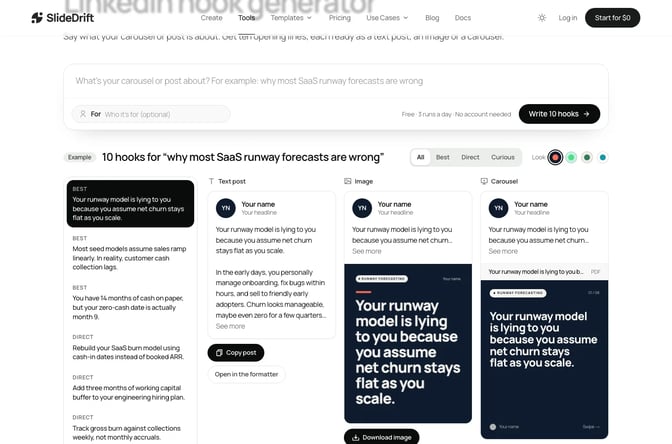
If you're [specific reader], [what to do or check] before [moment].Write three versions for each post. The first is usually the obvious one; the third tends to be the most specific. The free LinkedIn hook generator gives you ten to compare when you're stuck. Say what the post is about and, if you like, who it's for, and it returns hooks grouped as Best, Direct and Curious. Pick one to see it as a text post, an image and a carousel cover.
How to choose the right hook for the post
Start with what the post does, then pick the hook. A hook that promises a method on a post that's really an opinion will disappoint the reader.
| What the post does | Hook types that fit | Format that often suits it |
|---|---|---|
| Answers a common question | Client question, call-out | Text post or carousel |
| Teaches steps or a checklist | Promise of a method, mistake | Carousel |
| Shares a lesson from a project | Moment, specific detail | Text post |
| Corrects a costly belief | Myth, mistake | Text post or carousel |
| Starts a discussion | Opinion, question to the reader | Text post |
| Shows your work or a result | Before and after, specific detail | Single image or carousel |
If you're not sure what to post in the first place, start with the LinkedIn post ideas, then use the LinkedIn post templates to shape the one you pick.
Hooks to avoid
Some openings get a tap once and cost you trust after that.
Engagement bait. "Comment YES and I'll send it to you" or "Like if you agree" asks for a reaction instead of earning one. LinkedIn's Professional Community Policies ask members not to artificially increase engagement with their content.
Claims you can't back up. "This one trick doubled my revenue" needs proof the post doesn't have. The same policies rule out false or misleading content, and your name is on every post.
Vague openings. "Let's talk about leadership" or "Some thoughts on this week" gives the reader nothing to decide on. Name the problem instead.
Fake urgency. "Stop scrolling" or "You need to read this now" is about you, not the reader.
Generic AI phrasing. LinkedIn's guidance on AI-assisted posts says content that "feels generic, repetitive, or lacks a clear point of view" is less likely to be widely distributed. If a draft tool wrote your hook, rewrite it with a detail only you would know.
A whole first line in fake bold. LinkedIn has no bold of its own, so formatters swap in look-alike Unicode letters, which screen readers can skip or spell out. If you use the LinkedIn text formatter, bold a word or two at most and keep names and numbers plain.
Check where the cut falls
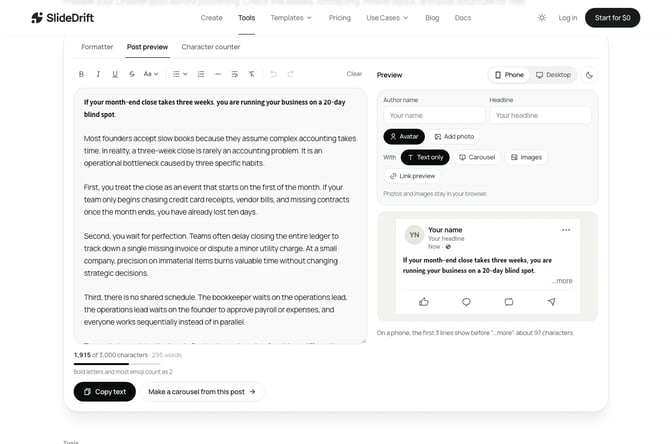
Before you post, paste the draft into the free LinkedIn post preview. It shows your line breaks and an approximate "see more" cut on desktop and mobile, so you can see whether the hook survives on a phone. If the second line falls below the cut, shorten the first one or move the line break.
Keep each of the first two lines short, and put a blank line after the hook if the next sentence changes direction. Don't open with a hashtag, a link or a mention: they take up the space your hook needs.
Worked example: an HR consultant picks a hook
Dana is a made-up HR consultant who works with companies of 20 to 200 staff. Several clients have rewritten their remote work policy twice this year, and she wants to post about the three questions she asks before anyone writes one.
She writes three hooks:
- Promise of a method: "Three questions to ask before you write a remote work policy."
- Specific detail: "Two of my clients rewrote their remote work policy twice this year. Same reason both times."
- Call-out: "If you're writing a remote work policy this quarter, start with these three questions."
She pastes each into the post preview. All three fit above the cut on mobile. Hook 1 is clear but sounds like many other posts. Hook 3 filters the audience well. Hook 2 is the most specific, and it sets up a gap: what was the reason?
She picks hook 2 and checks that the post answers it. Line three gives the reason (the policy was written before anyone agreed what problem it should solve), then the three questions follow. The close asks readers which question they'd add.
Because the post is three steps, she turns it into a carousel as well. Here's her brief:
SlideDrift brief
Make a 7-slide LinkedIn carousel for HR managers at companies with 20 to 200 staff.
Goal: show them the three questions to ask before they write a remote work policy, so they don't have to rewrite it.
Structure: a hook slide ("Most remote work policies get rewritten. Here's why."), why policies get rewritten, one slide for each question (what problem are we solving, which roles does it cover, how will we review it), a slide on what to put in writing, and a closing question for readers.
Tone: calm, practical and plain. No legal advice.
Avoid: invented statistics, client names and promises about retention.Choose a template or your Brand Kit first if you want your own look. Recreate opens Create with the brief and the slide count filled in, and nothing is generated until you press Generate. Then read every slide and swap in the phrases your clients use. The text post's hook and the carousel's first slide say the same thing, so the caption and the cover agree.
FAQ
What is a hook on LinkedIn?
A hook is the first line or two of a post, the part readers see before "see more." Its job is to tell the right reader that the rest of the post is for them and worth the tap.
How long should a LinkedIn hook be?
Short enough that the first two lines fit above the "see more" cut on a phone. LinkedIn doesn't publish where the cut falls, so check your draft in a preview tool and keep each opening line to one short sentence.
What makes a good LinkedIn hook?
It names a specific reader, problem or moment, makes one promise the post keeps, and gives a reason to read the next line. Details from your own work make hooks more believable than general claims.
Should a LinkedIn hook be a question?
It can be, if the reader can't answer it straight away and the post answers it. Avoid yes-or-no questions and questions that only exist to collect comments.
Can I use AI to write LinkedIn hooks?
Yes, as a starting point. LinkedIn says you're responsible for what you post and that generic content spreads less, so rewrite any suggestion with a detail only you would know before posting.
What's the difference between a post hook and a carousel hook?
A post hook is a sentence in the caption, read before "see more." A carousel hook is the first slide, read as a headline at thumbnail size. When you post a carousel, make the two agree.
Make your next post in SlideDrift
Once you have a hook, the rest of the post has to keep its promise. Start with the hook and your notes, and SlideDrift drafts a carousel for you to edit.
Turn your hook into a post
Paste your hook and notes, or a link to something you've written. SlideDrift drafts the slides in your brand; you edit them, then export the PDF or schedule the post.


Brief for this carousel
Make a 7-slide LinkedIn carousel for HR managers at companies with 20 to 200 staff on the three questions to ask before you write a remote work policy. A hook slide, why most policies get rewritten, one slide per question, a slide on what to put in writing, and a closing question for readers.