LinkedIn Post Examples: 12 Full Posts for Experts, and Why They Work
12 complete LinkedIn post examples for consultants, lawyers, accountants and coaches: text, image, carousel and poll posts, each with a note on why it works.
Good LinkedIn post examples share a pattern: a first line that names the reader's problem, a few short lines that only the writer could have written, and one question or next step at the end. Below are 12 complete LinkedIn post examples for people who sell their expertise, each with a short note on why it works. They cover text, image, carousel and poll posts.
- 12 full posts: four formats, twelve professions.
- The pattern: what the examples have in common.
- Make it yours: how to turn an example into your own post.
- A worked example: a financial planner rewrites a weak post.
What the examples have in common
Every post below follows the same four rules. They're worth knowing before you read, because they're what you'll copy, not the words.
- The point comes first. Readers decide from the opening lines whether to keep reading, so the first line has to earn the rest. The free LinkedIn hook generator gives you ten openings to compare.
- One idea per post. A second idea is a second post.
- A detail from real work. A clause, a meeting, a number from a client project with the names removed. LinkedIn's guidance on AI-assisted posts says content that "feels generic, repetitive, or lacks a clear point of view" is less likely to be widely distributed.
- One ask at the end. A question, or one next step. Not both.
Length varies. LinkedIn's help page on posting and sharing updates allows up to 3,000 characters, and most of these use well under a third of that.
12 LinkedIn post examples
Every example was written for this article. The people are made up, and any numbers stand in for figures from your own work. Use them for the structure, then fill them with your own clients' questions and your own lessons.
Text posts
1. The client question, from an accountant
"Should I pay myself a salary or take dividends?"
I get this question from almost every new limited company client. My answer starts with three other questions:
How much do you need to live on each month? Do you want to build up a pension through the company? Are you likely to need a mortgage in the next two years?
The answers change the split more than any tax table does. Then we look at the numbers.
What question do you wish you'd asked your accountant sooner?
Why it works: it opens with the reader's own words and shows how the accountant thinks before giving any figures. It's general enough to be safe and specific enough to be useful.
2. The lesson from a project, from a management consultant
We spent three weeks building a cost model for a client. The answer came from a 20-minute call with their warehouse manager.
She knew which product lines were losing money. Nobody had asked her.
I now book that call in week one, before anyone opens a spreadsheet.
Who's the person in your business who knows the answer but never gets asked?
Why it works: a short story with a turn, then the change the consultant made. The lesson is about the method, so no client is identifiable.
3. The myth, from an employment lawyer
Myth: if it's not in the contract, you don't have to do it.
Reality: what you've done for years without complaint can become part of the job, written down or not.
If your role has drifted from the contract, get it updated. It protects you and your employer.
This is general information, not legal advice for your situation.
Why it works: a belief many readers hold, corrected in one line, with one action. The last line keeps it responsible.
4. The opinion, from a sales trainer
Unpopular opinion: most sales scripts fail because they're written for the seller.
They list features in the order the company built them. Buyers want them in the order of their problems.
Rewrite your script starting from the three questions buyers ask most. Keep everything else for the follow-up.
Where do you disagree?
Why it works: a clear view the trainer can defend, one reason from experience and a practical fix. The question invites real disagreement, not a "yes."
5. The mistake I made, from a brand designer
My first logo client got four concepts. They picked the weakest one.
It wasn't their fault. I'd shown options I didn't believe in, to look generous.
Now I show two, and I say which one I'd choose and why.
Designers: how many concepts do you show?
Why it works: honest, short and useful to both peers and clients. Admitting the mistake makes the new rule more believable.
6. How we do it, from a recruiter
How we write a job ad before it goes live:
- Agree what the hire must deliver in six months.
- Write the first line for the candidate, not the company.
- Put the salary range in the ad.
- Cut every requirement the hiring manager can't defend.
The last step usually removes a third of the list.
What's the one requirement you'd always cut?
Why it works: a numbered process that shows how the recruiter works, with one detail that makes readers want to try it.
Single-image posts
7. The announcement, from an architect
The image: a photo of the finished building with one line of text, "Now open: a library built from the old fire station."
The Riverside library opens to the public on Saturday.
The hardest part wasn't the design. It was keeping the old station's brick walls standing while we built inside them.
Thank you to the council team and every contractor on site. Come and see it this weekend.
Why it works: the image carries the news, so the caption can tell the story behind it. It closes with one next step.
8. The before and after, from a copywriter
The image: two lines of homepage copy, "Before: We help businesses grow" and "After: We write proposals for engineering firms bidding on public contracts."
One change on a client's homepage: we named who they help and what they do for them.
Before, every visitor had to guess. After, the wrong visitors left and the right ones stayed to read.
Try it on your own first line. Could a stranger say what you do?
Why it works: the image shows the change at a glance. LinkedIn's help page on sharing photos says a post can share an image or a link, not both, so the caption doesn't need a link.
Carousel posts
9. The checklist, from an HR consultant
The carousel: seven slides, one item per slide, "Before your first hire: seven things to have in place."
Your first hire is the one most founders rush.
Here's what to have in place before they start, from the contract to the first week's plan. Seven slides, one item each.
Save it for when you need it. Which one would you have missed?
Why it works: a checklist is worth saving, and the carousel gives each item room. The caption sets it up and says what's inside.
10. The framework, from a fractional CFO
The carousel: six slides, "How to read your cash position in 10 minutes every Monday."
Most founders check their bank balance. Few check what's about to leave it.
This is the 10-minute Monday routine I give every new client: four numbers, one question, one decision.
Swipe through, then tell me what you check first.
Why it works: a promise with a time and a structure, delivered slide by slide. Carousels are posted as documents on LinkedIn, and LinkedIn's document post help page recommends PDF.
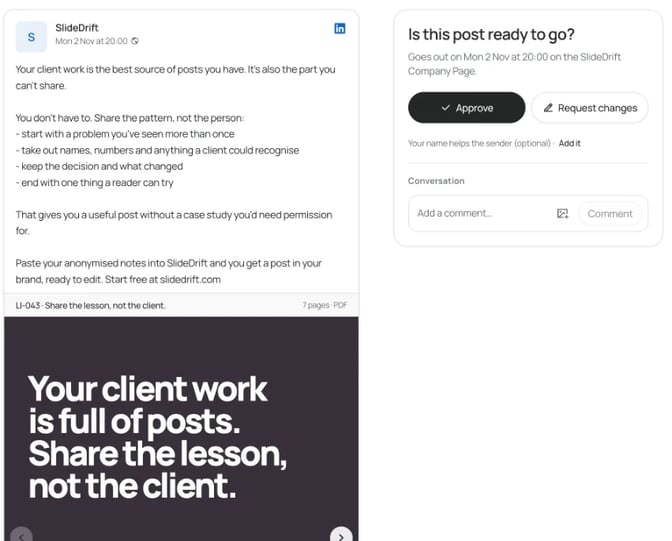
For more carousel posts by profession, see the carousel examples for accountants, HR leaders and recruiters. Here's a real post written for SlideDrift's own Company Page: a short caption that sets up the carousel, and a first slide that says the same thing in a few words.
Poll and multi-image posts
11. The poll, from a career coach
When you changed careers, what was hardest to explain in interviews?
I'll share what worked for my clients for the top answer next week.
Options: Why I left / What I bring / The pay change / The gap in my CV
Why it works: the options are real problems, and the coach promises a follow-up post, so the poll leads somewhere. LinkedIn's page on creating polls allows two to four options and runs a poll for one week by default.
12. The event recap, from an IP lawyer
The images: three photos from a startup event, the stage, a whiteboard and the room during questions.
I spent Thursday answering IP questions at a founders' meetup. The three that came up most:
- Do I own the code my freelancer wrote?
- Should I register a trademark before launch?
- Can I use a competitor's name in my ads?
I'll answer one each week, starting with the first.
Why it works: it turns a day out into three future posts and tells readers what's coming.
What makes each one work
| Example | How it opens | Format | How it ends |
|---|---|---|---|
| 1. Accountant | Client's question | Text | Question to readers |
| 2. Consultant | A turn in a story | Text | Question to readers |
| 3. Employment lawyer | Myth | Text | One action |
| 4. Sales trainer | Opinion | Text | Invites disagreement |
| 5. Brand designer | Mistake | Text | Question to peers |
| 6. Recruiter | Promise of a process | Text | Question to readers |
| 7. Architect | News | Single image | Invitation |
| 8. Copywriter | Before and after | Single image | A test to try |
| 9. HR consultant | The reader's risk | Carousel | Save prompt |
| 10. Fractional CFO | A gap in a habit | Carousel | Question to readers |
| 11. Career coach | Question | Poll | Promised follow-up |
| 12. IP lawyer | Event | Multi-image | Promised series |
For fill-in versions of these structures, see the LinkedIn post templates. For topics, the LinkedIn post ideas list has 40.
How to turn an example into your own post
- Pick the example that matches what you want the post to do, not the one from your profession. A lawyer can use the architect's announcement structure.
- Swap in one real detail. A question a client asked this month, a clause you reviewed, a meeting that changed your mind.
- Write the first line three ways and keep the most specific one.
- Choose the format. Steps and checklists suit a carousel. Opinions suit text. News suits a single image. How to post on LinkedIn walks through each format, and LinkedIn post sizes has the image dimensions.
- Check it on a phone. The free LinkedIn post preview shows line breaks and an approximate "see more" cut, and the character counter shows the length.
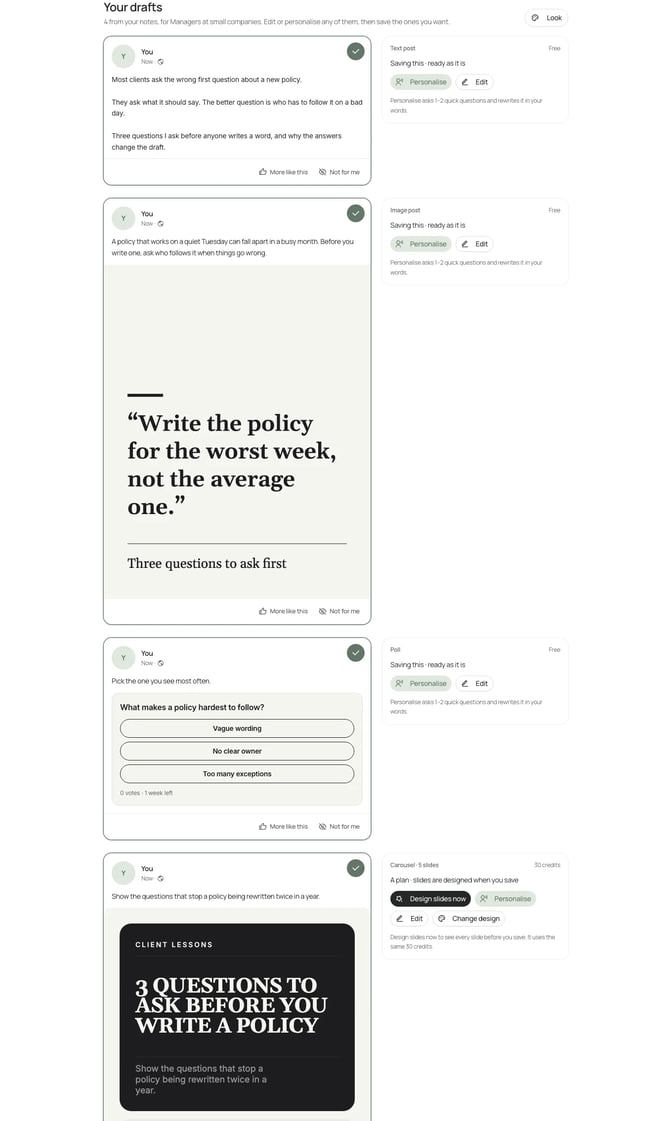
If you have notes but no draft, SlideDrift's Post ideas suggests a mix of carousels, image posts, text posts and polls from material you paste. You answer a few questions about your audience and what readers should do next, then review the drafts and tick the ones to save. Drafting ideas uses no credits, and saved posts stay drafts until you schedule them.
Worked example: a financial planner rewrites a weak post
Priya is a made-up financial planner who works with people approaching retirement. Her first draft:
Retirement planning is so important. Too many people leave it too late. If you're thinking about retiring, get in touch and let's chat about your options. #retirement #financialplanning
It's polite and says nothing a reader can use. It also ends with a sales ask before giving anything.
She picks the structure of example 1, the client question, and adds a real detail from her week:
"Can I retire at 60?"
Three clients asked me this in September. Before I look at any numbers, I ask them four things:
What will a normal month cost you once you stop working? When can you draw each pension you have? Will you work part-time for a while? What do you want the first two years to look like?
Most people can answer the last one straight away. The first one takes longer.
This is general information, not financial advice.
The new version opens with the reader's question, shows how she thinks and ends responsibly. Because it's four questions, she makes it a carousel too. Here's her brief:
SlideDrift brief
Make a 6-slide LinkedIn carousel for people in their 50s planning to retire in the next five years.
Goal: help them see the four questions to answer before choosing a retirement date.
Structure: a hook slide ("Can I retire at 60? Start with four questions."), one slide for each question (monthly costs after work, when each pension can be drawn, part-time work, the first two years), and a closing slide inviting questions in the comments.
Tone: calm, plain and reassuring. Explain any pension term in one line.
Avoid: financial advice, product names, promises about returns, invented statistics and client details.Choose a template or your Brand Kit first if you want your own look. Recreate opens Create with the brief and the slide count filled in, and nothing is generated until you press Generate. Read every slide before you export, and keep any compliance wording your firm requires.
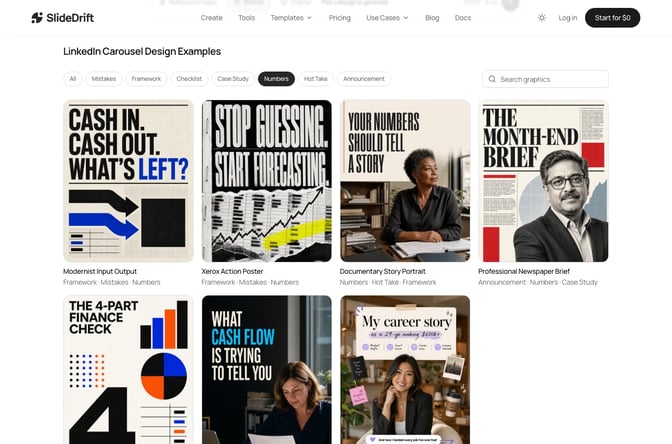
For a single-image version, such as the first question on its own as a quote card, SlideDrift's Graphics starts from a library design or your own images, as the Graphics guide describes.
FAQ
What is a good example of a LinkedIn post?
One that opens with a specific problem, shares one idea from the writer's own work and ends with one question or next step. The client question post above is a reliable example to start from.
How long should a LinkedIn post be?
LinkedIn allows up to 3,000 characters, but most of the examples here use far fewer. Length matters less than the first two lines, which decide whether people tap "see more."
What should I post on LinkedIn as a consultant or adviser?
Answer the questions clients ask you, share lessons from projects with names removed, correct common myths in your field and explain how you work. The LinkedIn post ideas list has 40 more.
Which LinkedIn post format works best?
It depends on the idea. Opinions and short lessons suit text, news suits a single image, and steps, checklists and frameworks suit a carousel. Polls work when the result leads to a follow-up post.
Can I copy these LinkedIn post examples?
Use the structure, not the words. Replace every detail with something from your own work, so the post couldn't have come from anyone else.
Make your own post in SlideDrift
Pick the example closest to what you want to say, then start from your own notes. SlideDrift drafts the carousel in your brand for you to edit.
Turn your notes into a post
Paste your notes or a link to something you've written. SlideDrift drafts the slides in your brand; you edit them, then export the PDF or schedule the post.


Brief for this carousel
Make a 6-slide LinkedIn carousel for people in their 50s planning to retire in the next five years, on the four questions to answer before choosing a retirement date. A hook slide, one slide per question, and a closing slide inviting questions in the comments. General education only, no financial advice.