LinkedIn Post Size 2026: Every Image, Document and Video Spec
Every LinkedIn post size for 2026: image, carousel, video, article, profile and Company Page, each from LinkedIn's help pages, plus why 1080 × 1350 wins.
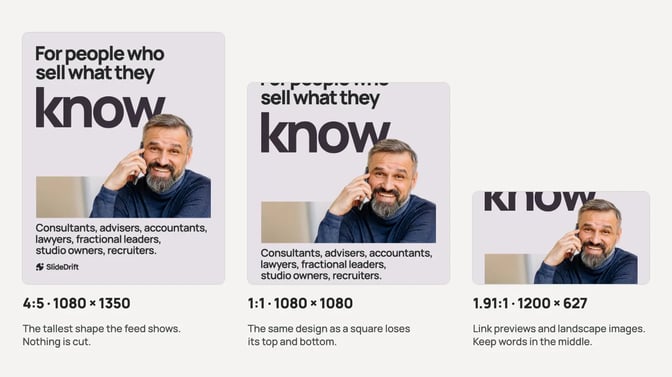
The best LinkedIn post size for an image is 1080 × 1350 px, a 4:5 portrait. LinkedIn recommends images 1080 px wide and accepts shapes from 3:1 (wide) to 4:5 (tall), so 1080 × 1350 is the tallest shape the feed shows without cropping.
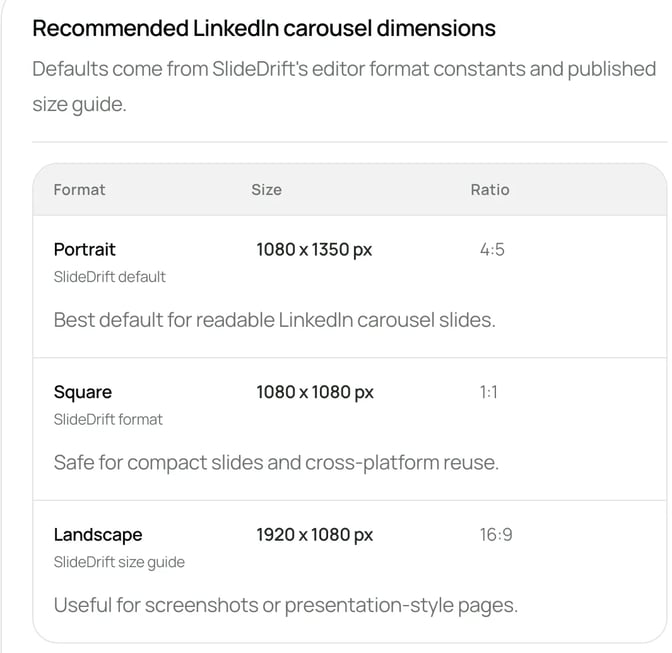
Use 1080 × 1080 px for a square and 1200 × 627 px for a wide image. A carousel has no official size: export one PDF with 1080 × 1350 px pages. Images can be up to 5 MB, and post text up to 3,000 characters.
LinkedIn post sizes at a glance
Every number below comes from LinkedIn's own help pages, which we checked in October 2026. Where LinkedIn doesn't give a number, the table says so and gives the safe choice.
| Format | Size to use | LinkedIn's limits | Source |
|---|---|---|---|
| Single image post | 1080 × 1350 px (4:5) | 1080 px wide recommended, at least 552 × 276 px, ratio 3:1 to 4:5, 5 MB | Share photos |
| Multi-image post | Not stated; use 1080 × 1350 px | Up to 20 photos, shown at most 4:5 | Share photos |
| Carousel (document post) | Not stated; use 1080 × 1350 px pages | PDF, PPT, PPTX, DOC or DOCX, 100 MB, 300 pages | Share documents |
| Video post | Not stated; any size in range | 256 × 144 to 4096 × 2304 px, 1:2.4 to 2.4:1, 75 KB to 5 GB, up to 15 minutes | Video specs |
| Post text | n/a | 3,000 characters | Post limits |
| Article cover | 1920 × 1080 px | Cropped to 16:9 | Articles |
| Newsletter cover and logo | 1920 × 1080 px and 300 × 300 px | Recommended sizes | Newsletters |
| Profile photo | 400 × 400 px or larger | Up to 7680 × 4320 px, 8 MB, PNG or JPG | Profile photos |
| Profile cover image | 1584 × 396 px | JPG or PNG, under 8 MB | Profile cover |
| Company Page logo | 400 × 400 px | At least 268 × 268 px, PNG or JPEG, 3 MB | Page images |
| Company Page cover | 1512 × 256 px | Also the minimum, PNG or JPEG, 3 MB | Page images |
| Page post with a link | 1200 × 627 px (1.91:1) | More than 200 px wide | Page images |
Image posts: use 1080 × 1350
LinkedIn's help page on sharing photos says a photo must be at least 552 × 276 px, recommends 1080 px wide, and accepts aspect ratios from 3:1 to 4:5 (width to height). If an image is outside that range, LinkedIn centers it and crops it to fit. Uploads can be up to 5 MB, and photos can't be edited after they're posted.
LinkedIn's supported file types page lists GIF, JPEG, PNG and WEBP on desktop, iOS and Android, plus HEIF/HEIC on iOS, up to 36 megapixels.
Why 4:5 portrait
LinkedIn names a width and a range of shapes, but no single best size. 1080 × 1350 is its recommended width at the tallest shape it accepts, which gives you:
- The most height in the feed. A 4:5 image fills more of a phone screen than a square or landscape one.
- No crop. Anything outside the range, such as a tall 9:16 phone screenshot, is centered and cropped, so text at the top or bottom can be lost.
- The same shape as your carousels. A carousel slide exported as an image drops straight into an image post.
Use 1080 × 1080 px for a square that you'll also post on Instagram, and 1200 × 627 px (1.91:1) for a wide image such as a chart or a screenshot of a web page. Both sit inside LinkedIn's range. The carousels vs image posts guide covers when a single image is the better format.
Multi-image posts and link posts
A multi-photo post takes up to 20 images, shown at a maximum ratio of 4:5. LinkedIn says the layout depends on the first image's orientation, so lead with your strongest portrait. Images in the bottom row may be cropped to fit.
A post can carry a link or an image, not both. On a Company Page, LinkedIn's Page image specs say a custom image for a post with a URL should be 1.91:1 (1200 × 627 px) and more than 200 px wide. A narrower image shows as a small thumbnail on the left of the post.
Carousels and document posts
A LinkedIn carousel is usually a document post, most often a PDF. LinkedIn's help page on documents gives the file rules, and no pixel size:
- PPT, PPTX, DOC, DOCX or PDF, up to 100 MB and 300 pages
- convert to PDF whenever possible for the highest quality
- make every page the same size, and flatten layered PDFs
- add a title so people know what the document covers
- videos and animations show as still images
- you can edit the description after posting, but not the document
- viewers can download the document as a PDF
LinkedIn also says you can add only one document to a post. With no official page size, use 1080 × 1350 px pages for the same reasons as image posts. The LinkedIn carousel size guide compares portrait, square and landscape pages, and the guide to document posts covers when to use one.
Carousel ads use different numbers
Many size guides mix document posts up with carousel ads. A carousel ad is a paid format made of 2 to 10 cards, with a recommended image of 1080 × 1080 px (1:1) and up to 10 MB per card. None of that applies to a document post.
Single image ads also have their own recommended sizes: 1200 × 628 px landscape, 1200 × 1200 px square and 720 × 900 px vertical. The carousel ads guide covers the paid format.
Video, article and newsletter sizes
Video
LinkedIn's video specs give a range instead of a single size: 256 × 144 to 4096 × 2304 px, an aspect ratio from 1:2.4 to 2.4:1, 75 KB to 5 GB, and up to 15 minutes. The minimum length is 3 seconds from desktop or 2 seconds from the mobile app. A vertical 4:5 video at 1080 × 1350 sits inside the range and matches your image posts.
Articles and newsletters
The article help page puts the cover image at 1920 × 1080 px and crops covers to 16:9. It accepts JPEG, JPG, PNG and WEBP, and GIFs can no longer be used as covers.
For newsletters, LinkedIn recommends a 1920 × 1080 px cover for each article and a 300 × 300 px logo.
Profile and Company Page sizes
Profile
Your profile photo can be anywhere from 400 × 400 to 7680 × 4320 px, as a PNG or JPG of up to 8 MB. GIFs aren't supported. Start from a square of at least 400 × 400.
LinkedIn calls the banner behind your photo the cover image: 1584 × 396 px, JPG or PNG, under 8 MB.
Company Page
LinkedIn's Page image specs say every Page image must be a PNG or JPEG of up to 3 MB:
- Logo: 400 × 400 px recommended, 268 × 268 px minimum
- Cover image: 1512 × 256 px, which is both the minimum and the recommended size
If your Page cover is smaller than 1512 × 256 px, re-export it at that size.
Common mistakes
- Using carousel ad sizes for a carousel post. Document posts have no pixel size; ads are a separate, paid format.
- Posting a 9:16 image. It sits outside LinkedIn's 3:1 to 4:5 range, so LinkedIn crops it around the center.
- Uploading a PNG over 5 MB. Save it as a JPEG instead.
- Mixing page sizes in a PDF. LinkedIn asks for one size on every page.
Worked example: an accountant's tip post and carousel
Say an accountant wants to explain why a profitable business can run short of cash: a tip as a single image, then a carousel later in the week. Both are made up for this example; the carousel examples for accountants cover how to keep posts like these to general education.
| Post | Content | Size and file |
|---|---|---|
| Tip image | "Your bank balance isn't your profit." | 1080 × 1350 px PNG, under 5 MB |
| Carousel | Hook, profit, cash, timing, a labeled example, three habits, next step | 1080 × 1350 px pages, one PDF, under 100 MB |
Both use the 4:5 shape, so the tip image can reuse the carousel's design. In SlideDrift, paste this brief into the Create box:
SlideDrift brief
Make a 7-slide LinkedIn carousel for small-business owners: "Why a profitable business can still run short of cash."
Goal: explain the gap between profit and cash in plain English. General education only.
Structure: a hook, profit in plain English, cash in plain English, why timing matters, a made-up example labeled as one, three cash habits, then a closing slide telling readers to review their cash position with their own accountant.
Tone: calm, plain English, practical.
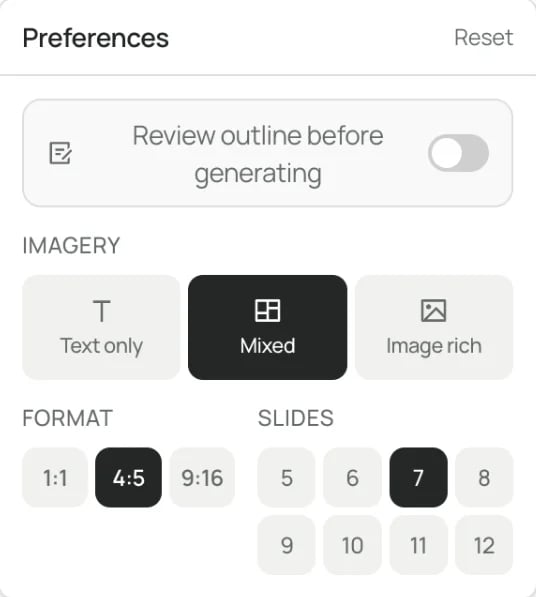
Avoid: tax advice, deadlines, thresholds, promises of savings, and any client details.Keep the format at Portrait (4:5) in Preferences. SlideDrift exports Portrait at 1080 × 1350 px, as the export guide explains.
Edit the draft, then click Share, Export and Download PDF for the carousel, as in the PDF export guide. For the tip image, choose PNG and This slide to download one slide as a 1080 × 1350 image; it comes as a ZIP, so unzip it before you upload. The guide to posting a LinkedIn carousel covers uploading the PDF yourself.
How to check before you post
You can't edit a photo or swap a document once the post is live, so check these four things first.
- Check the shape. Enter your width and height in the LinkedIn carousel size tool. It calculates the aspect ratio and compares it with common carousel sizes. For images, anything taller than 4:5 gets cropped.
- Check the file. Images up to 5 MB; documents up to 100 MB and 300 pages, with every page the same size.
- Check it in the feed. Paste your caption into the LinkedIn post preview tool. It switches between desktop and mobile-style previews and shows roughly where the see more cut falls.
- Check the length. Post text can run to 3,000 characters. The LinkedIn character counter counts it for you.
Once your sizes are right, pick a layout from our LinkedIn post templates, or follow how to post on LinkedIn for each format step by step.
FAQ
What is the best image size for a LinkedIn post?
1080 × 1350 px, a 4:5 portrait. LinkedIn recommends images 1080 px wide and accepts shapes from 3:1 to 4:5, so this is the tallest image it shows without cropping. Square 1080 × 1080 px and wide 1200 × 627 px also work.
Can I post a 1920 × 1080 image on LinkedIn?
Yes. A 16:9 image sits inside LinkedIn's 3:1 to 4:5 range, so it isn't cropped. It shows short and wide in the feed, though, so it takes up less of a phone screen than a portrait image.
Is it 1200 × 627 or 1200 × 628?
Both are 1.91:1. LinkedIn's Page image page says 1200 × 627 px for a custom image on a post with a link, and its single image ad specs say 1200 × 628 px. The one-pixel difference doesn't matter in practice.
What size is a LinkedIn carousel?
LinkedIn doesn't publish one. A carousel is a document post, and the rules LinkedIn sets are about the file: PDF, PPT, PPTX, DOC or DOCX, up to 100 MB and 300 pages, every page the same size. Use 1080 × 1350 px pages, exported as one PDF.
What size is the LinkedIn Company Page cover image?
LinkedIn's help page gives 1512 × 256 px as both the minimum and the recommended size, as a PNG or JPEG of up to 3 MB.
How big can a LinkedIn video be?
Up to 5 GB and 15 minutes, between 256 × 144 and 4096 × 2304 px. The aspect ratio can run from 1:2.4 to 2.4:1. LinkedIn sets no single recommended size, so a 4:5 video at 1080 × 1350 fits.
Make your next post at the right size in SlideDrift
SlideDrift drafts carousels from your notes in your Brand Kit's colours and fonts, and every page comes out at the format you chose, such as 1080 × 1350 px for Portrait. On a paid plan you can also schedule image, multi-image, video, poll and text posts to LinkedIn; Company Pages need Pro or Agency.
SlideDrift schedules posts to connected LinkedIn accounts. For other platforms, export PNG images in square 1:1, portrait 4:5 or stories 9:16, or use image links, and post them there.
Make a carousel at the right size
Paste your notes or a link, and SlideDrift drafts the slides in your brand at 1080 × 1350. Edit them, then export the PDF or schedule the post.


Brief for this carousel
Make a 6-slide LinkedIn carousel that works as a post size cheat sheet. A cover with the answer (1080 × 1350 px portrait), then one point per slide: image posts at 1080 × 1350, square at 1080 × 1080 and wide at 1200 × 627, the 5 MB image limit, a carousel as one PDF of up to 100 MB and 300 pages, and a phone check before posting.