LinkedIn Carousel Ads: Specs, Setup and Examples for Experts
LinkedIn carousel ads explained: card specs, the $10 daily minimum, how they differ from document posts and Document Ads, setup steps and 6 examples.

LinkedIn carousel ads are paid posts that show 2 to 10 square image cards people swipe through in the feed, and each card can link to its own page. You build one in Campaign Manager and show it to an audience you choose. Budgets start at $10 a day. They are a different thing from the free "carousels" people post, which are PDFs uploaded as document posts.
This guide covers the specs, the minimum budget, when a Document Ad or a free post fits better, the setup steps and six card structures for expert firms.
What a LinkedIn carousel ad is
LinkedIn's Carousel Ads page describes up to 10 images in one ad, each with its own link. It also says you can break down metrics such as click-through rate and impressions by individual card, so you learn which card people act on.
If you attach a Lead Gen Form, every card's button opens the same form. Without one, each card can go to a different page.
The free "carousel" many people post is a PDF uploaded as a document post. The carousel vs document post guide explains how the two differ.
LinkedIn carousel ad specs
These come from LinkedIn's Carousel Ads specifications and its specs page for advertisers, both checked in October 2026. The two pages differ in places, so the table says which is which.
| Spec | LinkedIn's rule |
|---|---|
| Number of cards | 2 to 10 |
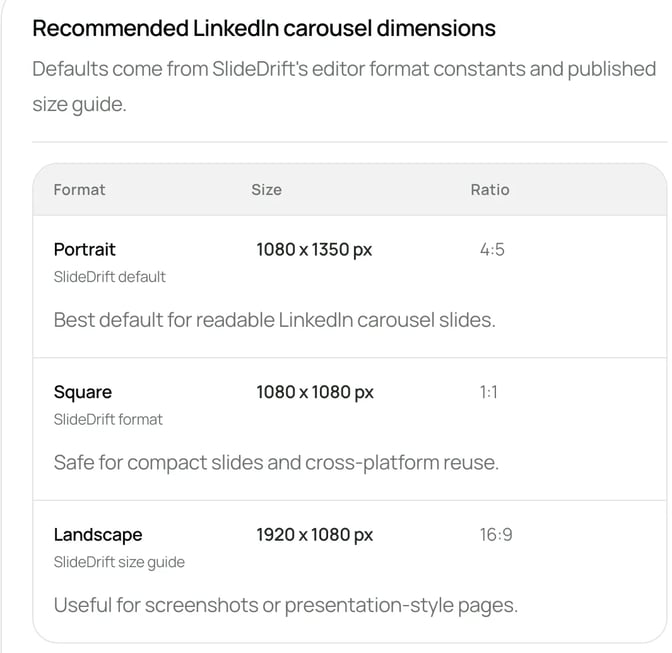
| Image size | 1080 × 1080 px at 1:1 recommended. Maximum 4320 × 4320 px |
| How cards display | The help page says images are scaled to 312 × 312 px |
| File size | Up to 10 MB per card |
| File types | The help page lists JPG, PNG and non-animated GIF. The advertiser page lists JPG or PNG, so use one of those |
| Video | Not supported |
| Introductory text | Up to 255 characters. Keep it to 150 or fewer to avoid being cut off on some devices |
| Card headline | 45 characters on the advertiser page. The help page says headlines are cut after two lines |
| Ad name | Up to 255 characters. The name only appears in Campaign Manager |
| Destination URL | Must start with http:// or https://, up to 2,000 characters |
| Editing | You can't edit the cards once the ad is saved |
The scaling line matters most. A card shown at about 312 px needs a few words in very large type. Check your text lengths in the LinkedIn character counter, and see LinkedIn post sizes for the other formats.
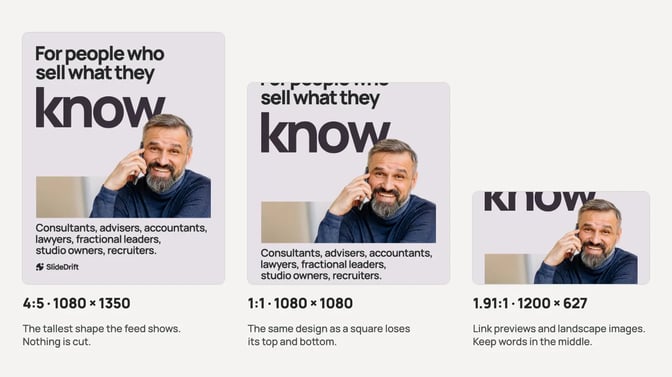
The shape matters because a portrait design squeezed into a square loses its top and bottom. This is one post shown at three shapes:
What a carousel ad costs
What you spend depends on the budget and bidding strategy you choose. What LinkedIn does publish is the minimum budget you must commit. These figures come from its budget best-practices page, checked in October 2026:
| Budget item | LinkedIn's figure |
|---|---|
| Minimum daily budget | $10, for any ad format |
| Minimum lifetime budget | $100 for a new, inactive campaign. After launch, $10 times the days scheduled |
| Default Campaign Manager suggests | $25 for new advertisers. In other currencies, the equivalent of $25 |
LinkedIn's budget help page explains the three budget types. A daily budget is an average per day, and LinkedIn says weekly spend won't go above seven times the daily amount. A lifetime budget is a total for the schedule, and LinkedIn says it is never exceeded. You can also set both, but only on a continuous schedule with no end date.
For bidding, LinkedIn's budget, schedule and bid page lists three strategies: maximum delivery, which is automated, cost cap, and manual bidding. Manual bidding can charge per click, per thousand impressions, per video view or per send, depending on the objective and format.
A small firm can test one carousel ad at the minimum. Treat the first campaign as a test of which card and audience draw clicks.
Carousel ads, document ads and document posts
A firm with one checklist, framework or case study has three ways to put it in front of people. This table uses only what LinkedIn states.
| Document post (free) | Document Ad (paid) | Carousel Ad (paid) | |
|---|---|---|---|
| What it is | A PDF or Office file people page through | A file promoted to an audience you choose | 2 to 10 square image cards |
| File limits | PDF, PPT, PPTX, DOC or DOCX, up to 100 MB and 300 pages | Same file types, up to 100 MB. LinkedIn recommends under 10 pages | JPG or PNG, up to 10 MB per card |
| Page or card shape | Not stated by LinkedIn | Vertical, horizontal or square | Square, 1:1 |
| Lead Gen Form | Not mentioned on LinkedIn's help page | Yes, can gate the content | Yes, the same form on every card |
| Links | In the post text | Not stated by LinkedIn | Each card can have its own link |
LinkedIn's help pages are the sources: document posts, Document Ads specs and the Document Ads page. The document posts guide covers the free post. The Document Ads guide covers file specs and gating a document with a form.
For most consultants, advisers and small firms, a sensible order is:
- Post it free first as a document post. Watch the saves, sends and comments in LinkedIn's post analytics, which LinkedIn says are estimates.
- Choose a Document Ad when the value is in reading the whole thing, perhaps behind a form.
- Choose a Carousel Ad when each step or service has its own page on your site, or you want to see which topic draws clicks.
How to set up a carousel ad in Campaign Manager
You need super admin, content admin or Sponsored Content poster access on your company's Page, plus creative manager access or higher on the ad account. Then follow LinkedIn's steps for carousel image ads:
- Create an ad set with one of these objectives: brand awareness, website visits, engagement, website conversions or lead generation.
- On Ads in this ad set, click Create new ad(s) and name the ad.
- Add the introductory text and a destination URL. Tick the box below the URL field only if every card should go to the same page.
- Click the upload icon on each card to add its image. Crop lets you zoom, straighten or rotate it, and the reorder icon changes the order.
- For a lead generation objective, fill in the form details: a call-to-action button and an existing or new Lead Gen Form.
- Click Save ad, with Add to ad set selected, then launch or save the ad set. LinkedIn reviews ads before they run.
You can't edit cards after saving, so check every image, headline and link before step 6.
LinkedIn's carousel ad tips suggest starting with 3 to 5 cards. The first card is in full view and the second only partly visible, so test different images on those two. If the carousel tells a story, put the main value or call to action on the final card.
6 carousel ad examples for consultancies and professional firms
These are structures to copy, not ads by real firms. Each one says what goes on the cards and where each card links.
1. Service menu. One card per service, such as advisory, implementation and training. Each names the problem it solves and links to that service's page. Card-level clicks show which service draws interest.
2. Step-by-step checklist. One card per step of a process you teach clients, each linking to your guide for that step. The worked example below uses this.
3. Case study in cards. The client's situation, what you did and the result, one card each, all linking to the full case study. Use it only with the client's agreement and results you can show.
4. Questions buyers ask. One question per card, like "What do you need from us?", each linking to the answer on your site.
5. Resource library. One card per guide or report on one theme, such as planning next year's budget, each linking to its own page.
6. Event agenda. One card per session or speaker, all linking to the same registration page.
Whatever the structure, keep one idea per card and the same layout on every card. For planning the content first, see carousels for B2B lead generation.
Worked example: an IT consultancy's security checklist
An IT consultancy that supports small professional firms sends new clients a five-step security checklist, and has a page on its site for each step. It wants office managers and partners at small firms to see it, and to learn which step they want help with.
Illustrative example
Five-card carousel ad: a security checklist
The consultancy and its pages are made up for this example. Swap in your own.
Objective: website visits, with a separate URL on each card.
Budget: $10 a day for two weeks, LinkedIn's daily minimum, to see which card draws clicks.
Introductory text (127 characters): Five security checks for small firms without in-house IT. Swipe through, then open the guide for any step you haven't done yet.
Card 1, headline (29 characters): Turn on multi-factor sign-in. Links to the firm's multi-factor sign-in guide.
Card 2, headline (30 characters): Install updates on a schedule. Links to the updates guide.
Card 3, headline (34 characters): Test a backup by restoring a file. Links to the backup guide.
Card 4, headline (39 characters): Keep admin rights on separate accounts. Links to the admin access guide.
Card 5, headline (32 characters): Make reporting a bad email easy. Links to the phishing guide, which ends with how to book a review.
Card images: the step number and a short headline in large type, the same layout on each, 1080 × 1080 PNG.
Before paying, it posts the same checklist as a free document post from its Page. To make the card images in SlideDrift, paste this brief into Create:
SlideDrift brief
Make a 5-slide LinkedIn carousel to use as the cards of a LinkedIn Carousel Ad, for office managers and partners at small professional-services firms with no in-house IT.
Each slide is one step from the checklist below and must make sense on its own, because ad cards show in the feed as small square images.
On every slide: the step number, a headline of six words or fewer, and one short line on why it matters. Very large type, plenty of space, nothing small.
Tone: plain English, calm and practical.
Avoid: a cover, a closing slide, statistics, scare tactics, prices, web addresses and buttons. The ad adds a headline and link under each card.

Checklist:
1. Turn on multi-factor sign-in for email and remote access.
2. Install updates on every laptop and phone within a set time.
3. Test a backup by restoring a real file.
4. Give admin rights only to the people who need them, on separate accounts.
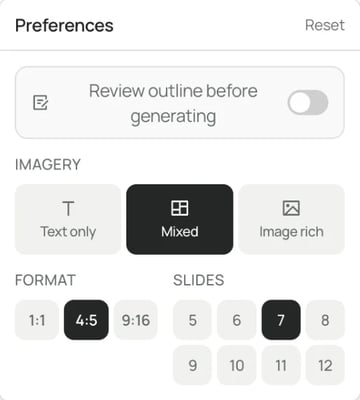
5. Make sure staff know how to report a suspicious email.Before you press Generate, open Preferences and set Format to 1:1. Square carousels export at 1080 × 1080, LinkedIn's recommended card size. Some certified Remix templates use a fixed 4:5 format, so for square cards skip those templates, and choose your brand profile if you want your colors and fonts.
Edit the draft, then click Share, then Export, choose PNG and download the ZIP, as the PNG export guide shows. Each unzipped PNG is one slide, ready to use as a card. Check each is under 10 MB. Free exports carry a small SlideDrift banner, which would sit on your ad card, so use a paid plan and remove it first.
FAQ
What size should LinkedIn carousel ad images be?
LinkedIn recommends 1080 × 1080 px at 1:1, up to 4320 × 4320 px and 10 MB per card, in JPG or PNG. Cards are scaled to 312 × 312 px, so keep text large.
How many cards can a LinkedIn carousel ad have?
Between 2 and 10. LinkedIn's carousel ad tips suggest starting with 3 to 5 and testing more from there.
How much do LinkedIn carousel ads cost?
What you spend depends on the budget and bid you set. The minimum is $10 a day, or $100 lifetime for a new campaign. Campaign Manager suggests $25 to new advertisers.
Can you add video to a LinkedIn carousel ad?
No. LinkedIn says videos can't be added to carousel image ads. Each card is a still image.
What's the difference between a carousel ad and a document ad?
A Carousel Ad is a row of square image cards, each able to link to its own page. A Document Ad promotes a file people read in the feed, optionally behind a form. The Document Ads guide covers that format.
Can you edit a LinkedIn carousel ad after it's saved?
Not the cards. LinkedIn says you can't edit carousel cards once the ad is saved, so check every image, headline and link first.
Make the cards for your carousel ad in SlideDrift
SlideDrift is a LinkedIn content studio. Paste your checklist or notes, or the public URL of a page you've written, and choose your brand profile so the slides use your colors, fonts and logo. Edit the draft, then export the slides as square PNG files, which download as a ZIP. SlideDrift exports PDF or PNG at 1:1, 4:5 or 9:16, so the same deck can also go to other platforms or be posted free as a document post. To check page sizes first, use the carousel size tool.
Make the cards for your carousel ad
Set the format to 1:1, generate the slides, then export each as a PNG card for Campaign Manager.


Brief for this carousel
Make a 5-slide square carousel that works as the cards of a LinkedIn Carousel Ad for an IT consultancy that supports small professional firms. One step from a security checklist per card: step number, a headline of six words or fewer, and one short line on why it matters. Very large type, plain English, no cover, no closing slide.