LinkedIn Document Ads: Specs, Setup and Examples for Experts
LinkedIn Document Ads explained: the specs (100 MB, 300 pages, PDF for lead gen), setup and gating in Campaign Manager, and when to boost a document post.
LinkedIn Document Ads are paid posts that put a PDF, PowerPoint or Word file in front of the people you target, who page through it in the feed. You can leave the whole file open to read and download, or show a few preview pages and ask for a Lead Gen Form to unlock the rest. You run them from a company Page in Campaign Manager, with files up to 100 MB and 300 pages.
- What it is, and how it differs from a free document post and a Carousel Ad.
- Specs: file types, size, pages, text limits and gating rules.
- Setup in Campaign Manager, and the quicker Boost button.
- When to pay, with a worked example.
What a LinkedIn document ad is
LinkedIn's help page on document ads calls them a type of Sponsored Content for promoting e-books, case studies, white papers, infographics and presentations. Members read the document in the feed, or on sites in the LinkedIn Audience Network, without clicking away.
You choose one of two set-ups:
- Open. Anyone who sees the ad can read every page and download the file.
- Gated. With a Lead Gen Form attached, members can't see or download the full document until they click Unlock full document and fill in the form. You choose how many pages they see as a preview.
Either way, every document downloads as a PDF, and links inside it only work once someone downloads it.
Document ads vs document posts vs carousel ads
A document ad is the paid version of a document post, the free upload many people call a carousel (the carousel vs document post guide explains the two names). LinkedIn also sells a separate Carousel Ad, which is a row of swipeable images. The differences that matter:
| Document post (free) | Document Ad (paid) | Carousel Ad (paid) | |
|---|---|---|---|
| Who sees it | Your network, followers or Group | The audience you target | The audience you target |
| Where it's posted from | Your profile, a Page or a Group | A LinkedIn Page, through Campaign Manager | A LinkedIn Page, through Campaign Manager |
| What you upload | One PDF, PPT, PPTX, DOC or DOCX | The same file types | 2 to 10 image cards |
| Gating with a form | No | Yes, after the preview pages | One form shared by all cards |
| Links | In the post text | Only clickable once downloaded | Each card can link to its own page |
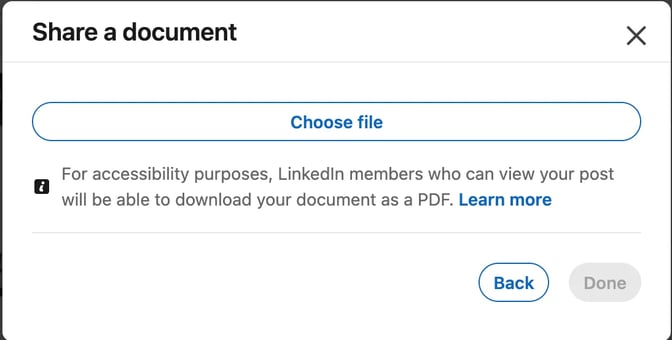
The upload rules for document posts are on LinkedIn's help page on sharing documents, which also notes that anyone who can see the post can download it as a PDF. The Carousel Ad column comes from LinkedIn's Carousel Ads specifications: JPG, PNG or non-animated GIF cards of up to 10 MB each, 1080 × 1080 px recommended, and no video.
If you post from your own profile, note that thought leader ads, which sponsor a person's post, list single image, video, newsletter or article, and event formats, with no documents. Plan to run a document ad from your firm's Company Page.
LinkedIn document ad specs
These come from LinkedIn's Document ads advertising specifications, its Document Ads specs page for advertisers and its document ads best practices.
| Spec | LinkedIn's rule |
|---|---|
| File types | PDF, DOC, DOCX, PPT, PPTX. Ads with the lead generation objective accept PDF only |
| File size | Up to 100 MB |
| Length | Up to 300 pages or 1 million words. The specs page for advertisers recommends under 10 pages |
| Page shape | Vertical, horizontal or square. The best-practices page suggests standard layouts such as Letter (8.5 × 11 in) or A4 |
| PDF set-up | Flatten or merge layers, and fit every page to the same size |
| Video and animation | Not supported; they show as static images |
| Headline | Up to 200 characters; about 70 avoids it being cut short. It starts as the file name |
| Introductory text | Up to 3,000 characters; about 150 avoids it being cut short |
| Ad name | Optional, up to 255 characters, visible only in Campaign Manager |
| Documents | You can select and upload up to five documents |
| Preview pages | Set with a slider for lead generation, website visit and website conversion ads; LinkedIn doesn't publish a range |
| Gating | Lead Gen Forms need at least one preview page, so a single-page document can't be gated |
The best-practices page also says to use PDF, avoid multiple columns and small fonts, and leave out prices, URLs and anything that changes often. Don't put calls to action in the document, because links and buttons aren't clickable in the document player; put your next step in the introductory text or the form. Check the headline and text lengths in the LinkedIn character counter.
How to set up a document ad in Campaign Manager
You need super admin, content admin or Sponsored Content poster access on the Page, plus creative manager access or higher on the ad account. Then follow LinkedIn's steps for creating document ads:
- Create an ad set and choose an objective. The help page lists brand awareness, engagement, website visits, website conversions and lead generation; LinkedIn's marketing page names only the first two and lead generation, so check what Campaign Manager offers you.
- On Ads in this ad set, add an optional ad name and the Introductory text, which appears above the document.
- Under Document, click Upload or select, upload your file and click Add to library, then Select.
- For lead generation, website visits or website conversions, move the slider to set how many pages people can preview.
- Write the Headline.
- For lead generation, choose or create a Lead Gen Form under Form details. The button reads Unlock full document. For website visits or conversions, add the destination URL and pick a call-to-action button instead.
- Click Save ad. LinkedIn reviews ads before they run.
The Lead Gen Form fills in members' profile details for them. You must add a privacy policy URL, and you can sync leads to your CRM or marketing automation tool. LinkedIn says the forms cost nothing beyond the ad itself.
The quicker route: Boost. If the document is already posted on your Page, a super admin or content admin can click Boost on it and choose a goal, an audience, a budget and how long it runs. LinkedIn's boost guide says this works only on desktop, offers fewer objective, audience and budget options than Campaign Manager, and doesn't offer the More leads goal for document posts. To gate a document, use Campaign Manager.
Once it runs, LinkedIn's document ads page says you can track what percentage of the document was viewed and the total downloads.
When to boost a document instead of posting it
For most consultants, advisers and small firms, a free document post comes first. The saves, sends and comments in your post analytics show whether it's useful. Pay to show it to more people when most of these are true:
- It has already worked. The organic post drew saves, sends or replies from the kind of people you want to work with.
- Your buyers aren't in your network yet. Targeting reaches, say, office managers at small firms in your region who have never seen your posts.
- It will still be true in six months. No prices, dates or offers that will go stale.
- Someone will follow up. A gated document produces names. Decide before launch who contacts them, and with what.
Gate it when people would trade an email address for it, like a checklist, template or short guide, and the preview pages already prove its value. Leave it open when the goal is to get your thinking in front of the right people. The B2B lead generation carousel guide shows how to plan a deck around one buyer question.
Document ad examples that suit experts: an accountant's year-end checklist, a lawyer's plain-English guide to shareholder agreements, a fractional CFO's cash-flow template explained page by page, a recruiter's scorecard for a first sales hire, or an IT consultant's security checklist, like the one below.
Worked example: an IT consultancy's security checklist
Illustrative example
An 8-page security checklist as a gated document ad
The consultancy and its checklist are made up for this example. Swap in your own.
Who it's for: office managers and partners at small professional-services firms, with no in-house IT team.
The document: an 8-page PDF. A cover, a page on how to use the checklist, six checks (one per page), and a summary page with the six checks on one sheet.
Objective: lead generation, so the file must be a PDF.
Preview: the first three pages: the cover, how to use it and the first check. The other five pages unlock after the form.
Headline (48 characters): 6 IT security checks every small firm should run
Introductory text (118 characters): Six checks we run first at every small office we support. Read the first 3 pages here, then unlock the full checklist.
Form: name, work email, company and job title, plus the firm's privacy policy URL.
Open option: run the same PDF with the engagement objective and no form, so anyone can read and download it.
There's no "book a call" page, because buttons don't work in the document player. The next step goes in the introductory text and the follow-up email.
FAQ
What file types can you use for LinkedIn Document Ads?
PDF, DOC, DOCX, PPT and PPTX, up to 100 MB and 300 pages. If you choose the lead generation objective, LinkedIn accepts PDF only. Whatever you upload, members download it as a PDF.
How many pages should a LinkedIn document ad have?
LinkedIn allows up to 300 pages, but its specs page for advertisers recommends under 10. Six to 10 pages, one idea per page, suits a checklist or short guide and leaves room for a two- or three-page preview if you gate it.
Can you gate a LinkedIn document ad with a form?
Yes. Attach a Lead Gen Form in Campaign Manager, set how many pages people can preview, and they click Unlock full document and fill in the form to see the rest. Single-page documents can't be gated, and the Boost button on a Page doesn't offer the More leads goal for document posts.
Can I turn my own document post into an ad?
If it's on your company Page, a super admin or content admin can boost it, or you can sponsor it in Campaign Manager. LinkedIn's thought leader ads, which sponsor a person's own post, don't list documents among their formats, so post the document from your Page if you plan to promote it.
Do links work inside a LinkedIn document ad?
Not in the feed. Links and buttons inside the document only work once someone downloads the PDF, so put your next step in the introductory text or the Lead Gen Form.
How much do LinkedIn Document Ads cost?
LinkedIn's document ad pages don't list a set price. You choose the budget and bidding when you set up the ad in Campaign Manager. LinkedIn says Lead Gen Forms add no cost beyond the ad itself.
Make your document ad PDF in SlideDrift
SlideDrift is a LinkedIn content studio: it turns what you know into carousels, graphics, text posts and polls in your brand. A carousel exported as a PDF is a ready-made document for an ad. Start from the checklist you already give clients. Paste this brief into Create, or press Recreate to open Create with it filled in:
SlideDrift brief
Make an 8-slide LinkedIn carousel from the security checklist below, for office managers and partners at small professional-services firms with no in-house IT.
Goal: help them check the basics and know what to ask their IT provider. General guidance only.
Structure: a cover, a slide on how to use the checklist, one slide per check, then a summary slide listing all six checks.
Tone: plain English, calm and practical. Short lines and large type that read well on a phone.
Avoid: statistics, scare tactics, product names, prices, links and any "book a call" button.

Checklist:
1. Turn on multi-factor sign-in for email and remote access.
2. Install updates on every laptop and phone within a set time.
3. Test a backup by restoring a real file.
4. Give admin rights only to the people who need them, on separate accounts.
5. Make sure staff know how to report a suspicious email.
6. Keep a one-page list of who to call if something goes wrong.Choose your Brand Kit, keep the 4:5 format in Preferences and press Generate. Edit the draft against your checklist, then click Share, then Export, then Download PDF, as the PDF export guide and the export walkthrough show. Free exports carry the SlideDrift banner; paid plans can remove it before you export a file for an ad.
A 4:5 PDF is a vertical document, which LinkedIn's specs accept. Upload it in Campaign Manager and check the first pages in the ad preview before you launch.
If you're designing the document yourself, LinkedIn post sizes covers page shapes and file limits, and how to post on LinkedIn covers posting a document without paying to promote it.
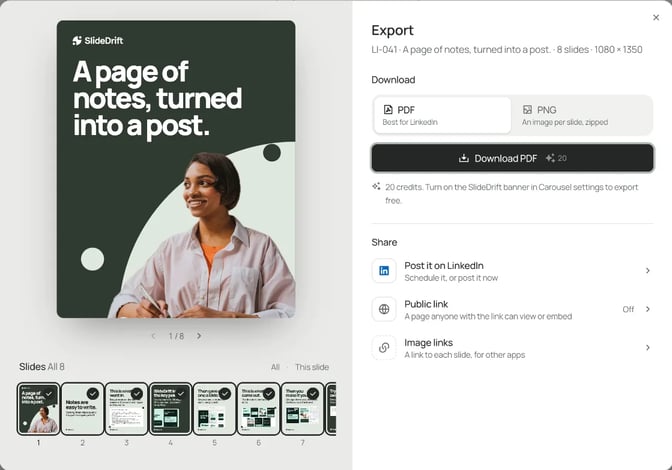
Before you upload, open the PDF and check the first pages, since they're what people see before they decide to read on. Here's the same kind of 4:5 PDF scheduled from SlideDrift as a free document post:
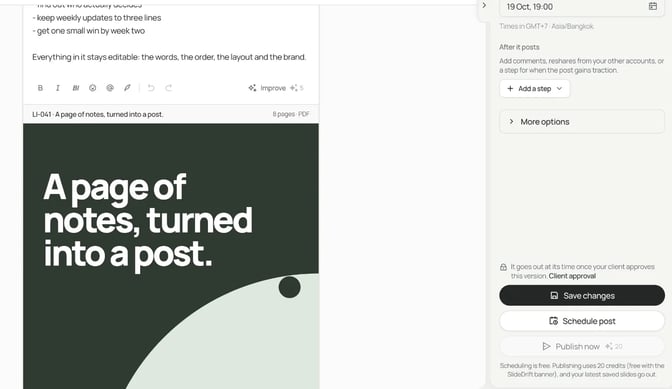
On paid plans SlideDrift schedules and publishes posts to LinkedIn; to run the PDF as an ad, upload it in Campaign Manager yourself. For other platforms, export PDF or PNG in square 1:1, portrait 4:5 or stories 9:16 and post them anywhere.
Make the PDF for your document ad
Paste your checklist, guide or notes, or a link to a page you've written. SlideDrift drafts the slides in your brand; you edit them, then export the PDF for your ad, or schedule it as a post on a paid plan.


Brief for this carousel
Make an 8-slide LinkedIn carousel to use as a gated document ad: a security checklist for office managers at small professional-services firms. A cover, how to use the checklist, one slide per check (six checks), then a summary slide with all six. Plain English, large type, no statistics, prices, links or call-to-action buttons.