Best LinkedIn Carousel Maker for Lawyers in 2026: The Buyer's Shortlist
Five LinkedIn carousel makers for lawyers, ranked on design quality, drafting from your own writing, review before posting and cost. Checked October 2026.

The best LinkedIn carousel maker for lawyers is SlideDrift, if you want to turn your own articles, client alerts and notes into designed carousels, and have a partner or colleague approve each one before it posts. Canva suits firms that design every slide in house, Supergrow suits lawyers who repurpose videos, articles and PDFs, Contentdrips is the budget pick, and PostNitro fits firms that post on several networks.
We make SlideDrift, so every product fact below is sourced and dated.
Key takeaways
- SlideDrift is the pick for lawyers who write: it drafts a carousel from your own article or notes, lays it out on a finished design, and sends it for approval before it posts.
- On LinkedIn a carousel is a PDF document post, and you can't swap the document after posting. Check the file before it goes up.
- None of these tools lists a check against your bar's or regulator's rules. You and a second reader do that.
- Keep client facts out of every tool. Start from published writing or general notes, not a matter file.
- Run one real piece of your own writing through your top two tools before you pay for a year.
The carousel below is a first-call checklist made for a lawyer's audience in SlideDrift. It shows the kind of post this shortlist is about.
SlideDriftCreate your ownCarousel transcriptShowHide


- 01Before your first call with a lawyer. A short checklist that helps you use the first conversation well: what to gather, what to write down and what to ask. General information, not legal advice.
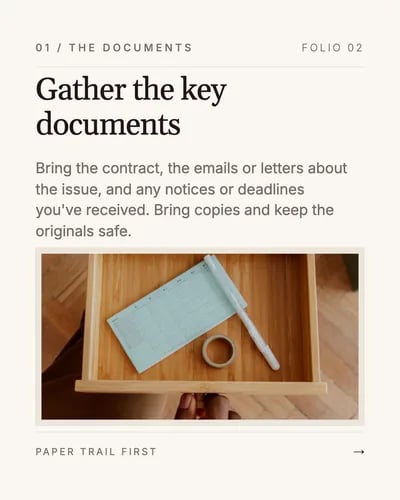
- 02Gather the key documents. Bring the contract, the emails or letters about the issue, and any notices or deadlines you've received. Bring copies and keep the originals safe.
- 03Write down what happened, in order. A one-page timeline with dates, who was involved and what was said helps the lawyer understand the matter quickly.
- 04Know what outcome you want. Decide what a good result looks like for you, and note any deadlines, budget limits or business pressures the lawyer should know about.
- 05Ask how the work will run. Ask about fees and billing, likely next steps, timing, and who will work on your matter day to day.
- 06Documents, timeline, goal and questions. Bring those four, and the first call can focus on your situation instead of gathering facts. General information, not legal advice.
What a LinkedIn carousel maker for lawyers is (and isn't)
A carousel maker turns material into a short set of slides, one point per slide, that LinkedIn shows as a swipeable document. For a lawyer, the material is usually already written: a client alert, a newsletter, a blog post, a talk or a page of notes on a question clients keep asking.
A good tool for legal work does four things:
- Starts from your writing. It drafts from your article, link or notes, so the substance is yours and the tool handles structure and layout.
- Looks finished. Clean type you can read on a phone, one idea per slide and a consistent look across the deck, without hiring a designer.
- Leaves room for a second reader. A partner or marketing lead can see the post as it will appear and approve it before it goes out.
- Exports a clean PDF. Every page the same size, ready for a document post.
It isn't a compliance tool. None of the products below lists a review against the professional conduct rules where you practise, and none should be trusted to. It also won't supply legal judgement. The value is speed and design; the content and the checks stay with you. The carousel ideas for lawyers cover what the conduct rules ask of a post.
On LinkedIn, a carousel is a document post. LinkedIn's help page accepts files up to 100MB and 300 pages and advises converting to PDF for the highest quality. It also says you can edit the description after posting, but not the document itself.
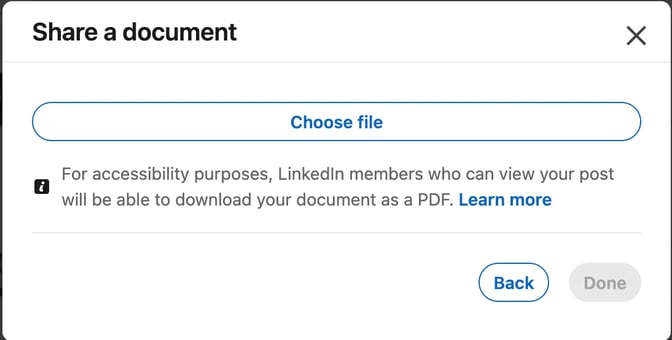
If you post from your firm's Company Page, you need a Page role that can publish. LinkedIn's Content admin role covers creating and managing posts; an Analyst can see analytics but can't publish.
How we ranked these carousel makers
We judged each tool on what a lawyer or small firm can check on its website before buying:
- Design quality. How finished carousels look, judged from each tool's public templates and examples, signed out: readable type on a phone, one idea per slide and one consistent look across a deck.
- Starts from your own writing. Whether a draft can begin from your article, a link or notes, rather than a blank template or a one-line topic the tool fills in.
- A second reader before posting. Whether a colleague can review and approve the post inside the tool, and whether publishing waits for that approval.
- Your brand on every slide. Saved colours, fonts and logo, applied without fixing slides by hand.
- Company Pages and PDF export. Whether it posts to a firm's Page, and whether the exported PDF is ready for a document post.
- Cost for one lawyer. The plan a solo lawyer or a small firm would actually need.
Competitor facts come from each vendor's own pages, read signed out and re-checked on October 28, 2026. Prices are in US dollars, billed monthly. We don't score design with a number; we link each tool's public pages so you can judge.
The shortlist: five carousel makers for lawyers
1. SlideDrift, best for turning your own legal writing into designed carousels
SlideDrift is a LinkedIn content studio. Paste a public link to your article, or your notes, and it drafts a carousel of 5 to 12 slides. On a paid plan or trial it can start from a PDF too, such as a published client alert. Pro templates are complete designs shown on real example slides, so you see the look before you write anything.
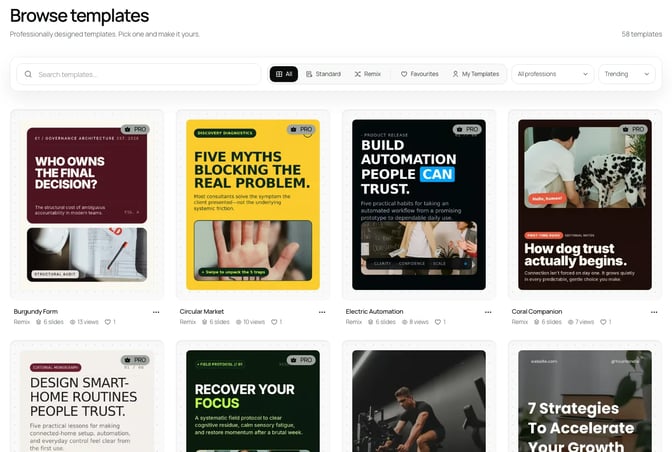
Before it posts, tighten any sentence that sounds like a promise, name the jurisdiction and put your name and firm on the last slide. A Brand Kit saves your colours, fonts, logo and writing guidance once, and it can be filled from your website, usually in under a minute.
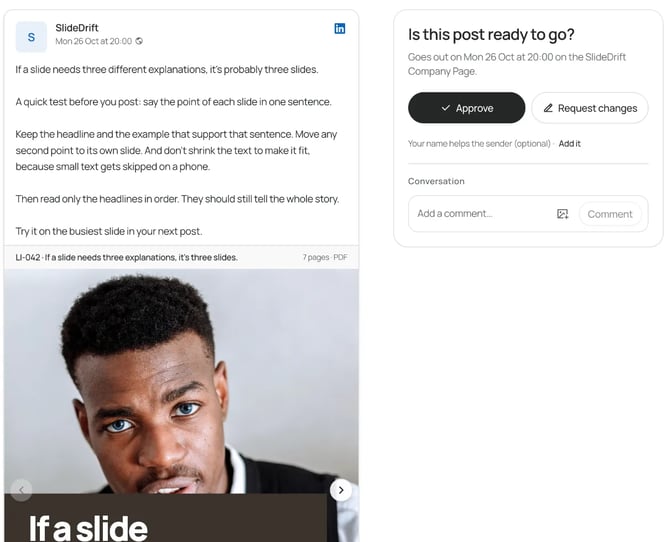
Before anything posts, send a client approval link to a partner or your marketing lead. It needs no SlideDrift account, lasts 14 days and holds up to 20 posts. Turn on Only post once it's approved and the post waits for that yes.
SlideDrift schedules to LinkedIn on a paid plan: Starter connects your personal profile, and Pro connects 3 LinkedIn accounts, which can include your firm's Company Page. For other platforms, export PDF or PNG in square 1:1, portrait 4:5 or stories 9:16 and post it anywhere. The PDF export is what LinkedIn's document post expects.
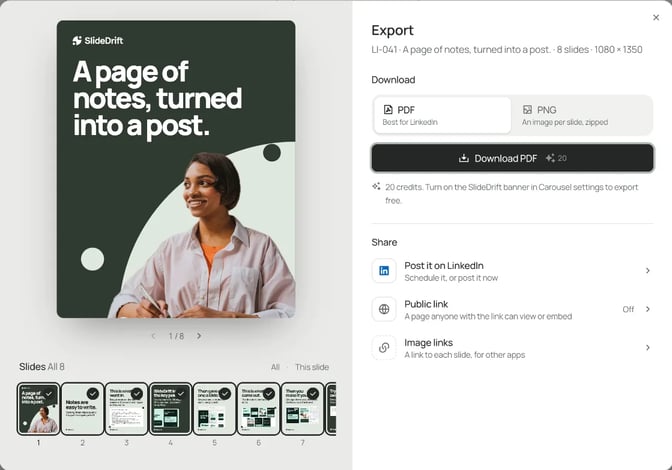
The trade-offs: SlideDrift doesn't list a check against your conduct rules, and its privacy page asks you not to upload confidential documents or legal records. Work from published writing or general notes. Scheduling needs a paid plan.
Best suited for: lawyers and small firms who already write, and want designed carousels from that writing with a second reader before anything posts.
2. Canva, best for firms with a designer who builds every slide
Canva is a design tool. Its pricing page lists 1.6M+ templates on the free plan, with 1 Brand Kit limited to 3 colours.
Pro adds 5 Brand Kits and social scheduling. Business adds 100 Brand Kits and approvals, which helps a firm whose marketing team reviews every asset. Prices show in your local currency. More in Canva vs SlideDrift.
Best suited for: firms with an in-house designer or marketing team who want to design each deck themselves.
3. Supergrow, best for repurposing videos, articles and PDFs
Supergrow is a LinkedIn tool with a carousel maker inside. The carousel page lists 50+ templates, brand kits of hex codes, font weights and logos, uploading existing slides, and approval before publishing.

Its pricing page puts Pro at $39 a month for 1 LinkedIn account, with repurposing from YouTube, articles and PDFs. Teams is $199 a month for 5 accounts with feedback and approval workflows. Every plan starts with a 7-day free trial.
Best suited for: lawyers who want to turn YouTube videos, articles and PDFs into posts for one LinkedIn account.
4. Contentdrips, best for a solo practice on a tight budget
Contentdrips fills its templates from a blog post, a URL, a video or a topic. Its template page lists 500+ free LinkedIn carousel templates in square and portrait sizes, a brand kit, and publishing to LinkedIn profiles and Company Pages.
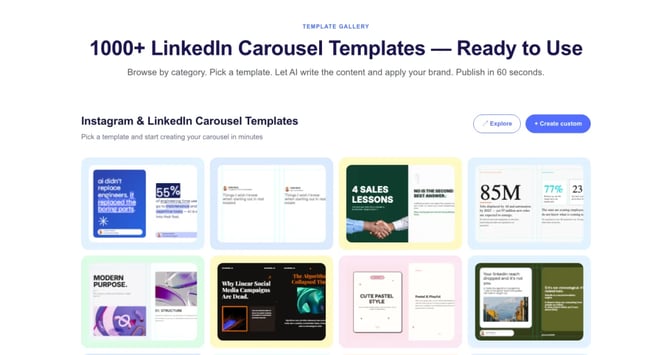
Its pricing page lists a free plan with 50 AI credits and 1 brand, Starter at $15 billed monthly with Publish to LinkedIn, and Pro at $26. The page shows two plan tables, so confirm the price at checkout.
Best suited for: solo lawyers on a tight budget.
5. PostNitro, best for firms that post on several networks
PostNitro drafts carousels from a topic, your own text or an article link. It lists 100+ editable templates, all 4:5, and a brand kit of fonts, colours, logo and headshots. It schedules to LinkedIn, Instagram, TikTok, Threads, Facebook and Pinterest, and its section for agencies lists approval before anything publishes.

The plans page lists a free plan with 5 downloads a month and a watermark, Starter at $15 without scheduling, and Creator+ at $30 with 5 brand kits and 10 scheduling accounts. See PostNitro vs SlideDrift for a closer look.
Best suited for: firms that want the same carousel on LinkedIn, Instagram and other networks from one tool.
How to judge what each tool's carousels look like
Design quality is the one thing a feature table can't show. Open each tool's public examples next to a carousel made in SlideDrift.
Look at three things on a phone-sized view: can you read the body text, does each slide carry one idea, and does the deck look like one system. For legal content, add a fourth: does the design look calm and credible, or like a sales flyer?
Carousel makers for lawyers comparison
| Tool | Best for | Schedules to LinkedIn | Entry paid plan |
|---|---|---|---|
| SlideDrift | Designed carousels from your own writing, with approval links | Starter and up | Starter, $29 a month |
| Canva | Firms with a designer who builds every slide | Pro | Pro, local currency |
| Supergrow | Repurposing videos, articles and PDFs | Pro | Pro, $39 a month |
| Contentdrips | A tight budget | Starter | Starter, $15 a month |
| PostNitro | Posting on several networks | Creator+, not Starter | Starter, $15 |
Feature matrix for legal carousel makers
✓ means the tool's own pages list it. We only include rows we could confirm for every tool, so check anything else on the vendor's site.
| Feature | SlideDrift | Canva | Supergrow | Contentdrips | PostNitro |
|---|---|---|---|---|---|
| Designed template library | Pro templates | 1.6M+ templates | 50+ | 500+ | 100+ |
| Saved brand kit | ✓ | ✓ | ✓ | ✓ | ✓ |
| Free plan | ✓ | ✓ | 7-day trial | ✓ | ✓ |
| What you get free | 200 credits, one time | 1 Brand Kit, 3 colours | Trial on every plan | 50 AI credits, 1 brand | 5 downloads a month, watermark |
| Entry paid plan | $29 a month | Pro, local currency | $39 a month | $15 a month | $15 a month |
| Publishes to LinkedIn | ✓ | ✓ | ✓ | ✓ | ✓ |
| Cheapest plan that posts to LinkedIn | Starter, $29 | Pro | Pro, $39 | Starter, $15 | Creator+, $30 |
| Plan for a team or several accounts | Agency, $199, 10 accounts | Business, 100 Brand Kits | Teams, $199, 5 accounts | Starter, 3 brands, 2 members | Creator+, 10 accounts |
Which carousel maker fits your practice
| If you | Pick | Why |
|---|---|---|
| Already write articles or alerts and want designed carousels from them, with a second reader | SlideDrift | Drafts from your writing, Pro designs, approval links |
| Have a designer who builds every asset | Canva | 1.6M+ templates, approvals on Business |
| Repurpose videos, articles and PDFs for one account | Supergrow | Repurposing on Pro at $39 |
| Need a low monthly cost | Contentdrips | Free plan, Starter at $15 |
| Post the same carousel on Instagram and TikTok too | PostNitro | Scheduling to six networks |
Keep client details out of every tool
Whatever you pick, the safest source is something already public: your published article, a talk or a general explainer. SlideDrift's privacy page asks you not to upload confidential documents or legal records, and to use a safe summary of anything private. That's good practice in any AI tool.
Hypotheticals help, but change enough that nobody could recognise the client or the matter. Then run a short check before each post:
Before a legal carousel posts
- No slide predicts a result or compares you with other firms.
- Nobody could recognise a client or a matter.
- The jurisdiction is named where the answer depends on it.
- Your name and firm are on the last slide, with "general information, not legal advice".
- Every page of the PDF is the same size: check it with the free carousel size checker.
For a fuller review routine, see how to review AI-generated LinkedIn content.
What results look like: one lawyer's month
Here's a worked example with a made-up lawyer. Priya is an employment lawyer at a three-person firm. She writes one client alert a month and wants a carousel a week, from her profile and the firm's Page.
Each week she pastes a section of an alert into SlideDrift and picks a Pro template: 30 credits. She checks the draft, adds the jurisdiction and her name, and sends an approval link to her partner. When it publishes without the banner, it uses 20 credits. Four carousels a month come to 200 credits.
| Plan | Monthly price | Credits | What it covers for Priya |
|---|---|---|---|
| Free | $0 | 200, one time | Try it on one alert; exports carry the banner; no scheduling |
| Starter | $29 | 1,000 | Her personal profile, about 20 carousels a month |
| Pro | $59 | 5,000 | Her profile, the firm's Page and one more account |
The bigger saving is time. The test that matters is whether one alert becomes four posts her partner approves in under an hour each. Start from the carousel templates for lawyers for slide structures, and see how to turn a PDF into a LinkedIn carousel if her alerts start as PDFs.
FAQ
Which LinkedIn carousel maker is best for lawyers?
SlideDrift, if you want designed carousels drafted from your own writing, with a colleague's approval before posting. Canva suits firms with a designer, Supergrow suits repurposing videos, articles and PDFs, Contentdrips is the low-cost option and PostNitro posts to several networks.
Can I post a carousel from my firm's Company Page?
Yes, with a Page role that can publish, such as Content admin. In SlideDrift, Company Pages need Pro or Agency, and the Page counts toward the plan's LinkedIn accounts.
Does any of these tools check my posts against conduct rules?
No. None of them lists a review against your bar's or regulator's rules. Use a second reader and a short checklist: no promised results, no identifiable clients, the jurisdiction named, and your name and firm on the last slide.
Is it safe to put client work into an AI carousel maker?
Don't put confidential material into any of them. Start from published writing or general notes, and turn any real matter into a hypothetical nobody could recognise. SlideDrift's privacy page asks you not to upload legal records.
Why does PDF matter for LinkedIn carousels?
LinkedIn shows a carousel as a document post. Its help page advises converting to PDF for the highest quality, and you can't change the document after posting, so check the PDF first.
Does SlideDrift post to Instagram or other networks?
SlideDrift schedules posts to LinkedIn. Export a PDF or PNG in square 1:1, portrait 4:5 or stories 9:16 to post on other platforms.
Is there a free option?
Yes. SlideDrift's free plan includes 200 credits that don't reset, and free exports carry the SlideDrift banner. Canva, Contentdrips and PostNitro also have free plans; Supergrow offers a 7-day trial.
Turn your next article into a carousel with SlideDrift
Paste a link to an article you've published, or your notes on a question clients keep asking. SlideDrift drafts the carousel on a finished design, you check it, and a colleague approves it before it posts.
SlideDrift brief
Turn the article below into a 7-slide LinkedIn carousel
for [who you advise] in [jurisdiction].
Make slide one the question clients ask, one point per slide,
and close with my name and firm and "General information, not legal advice".

[Paste your article, alert or notes here]Turn an article into a carousel
Paste a link or your notes. SlideDrift drafts the carousel with your Brand Kit, then export a PDF or send it for approval and schedule it on a paid plan.


Brief for this carousel
Make a 6-slide LinkedIn carousel for a lawyer choosing a carousel tool: a test to run on one piece of your own published writing. A cover, then one check per slide: start from your own article, judge slide one, edit one slide without regenerating, add your name and firm to the last slide, and have a second reader approve the PDF. End with: keep the tool that passes all five.