LinkedIn Post Best Practices for People Who Sell Expertise
LinkedIn post best practices for consultants, lawyers and advisers: what to say, how often to post, and what to do after you post, as 12 habits.
The LinkedIn post best practices that matter most for people who sell expertise are habits, not tricks. Say one useful thing a client would recognise, post at a pace you can keep for months, and stay with the post after it goes up.
Below are 12 habits in three groups. They're about what to say, how often and what to do next. For how a post looks, see the LinkedIn post design guide.
- What to say: six habits for the words.
- How often: three habits for your pace.
- After you post: three habits for the days that follow.
- A worked example: a consultant's first month.
The 12 habits at a glance
| # | Habit | Group |
|---|---|---|
| 1 | Start from a question a client asked | What to say |
| 2 | One idea, one reader | What to say |
| 3 | Put the point in the first line | What to say |
| 4 | Add a detail only you could know | What to say |
| 5 | Only say what you can back up | What to say |
| 6 | End with one ask | What to say |
| 7 | Pick a pace you can keep | How often |
| 8 | Write in batches, post on a rhythm | How often |
| 9 | Reuse your best ideas with new words | How often |
| 10 | Reply to every real comment | After you post |
| 11 | Fix mistakes the right way | After you post |
| 12 | Check what worked a week later | After you post |
None of these needs a big following or a design budget. They need a little time each week and a habit of writing things down.
Paste your notes, see them as a carousel
SlideDrift drafts the slides from your notes, a post or a link. Edit them, then export the PDF to post.
What to say: six habits for the words
1. Start from a question a client asked
The easiest post to write is an answer you've already given. When a client asks something good, write the question down that day, in their words.
A post that answers a real question sounds like you, because it is you. It also reaches the people who have that question and haven't asked yet. The LinkedIn post ideas guide has 40 more places to look for material.
2. One idea, one reader
Before you write, finish this line: "This post helps [one kind of reader] with [one thing]." If you need "and" in the second half, you have two posts.
A post for "business owners" is a post for nobody. A post for "owners of firms about to make their first hire" gets read by those owners, and they're the ones who might call you.
3. Put the point in the first line
Readers decide from the opening whether to tap "…more". So lead with the answer, the surprise or the reader's own problem, not with a warm-up.
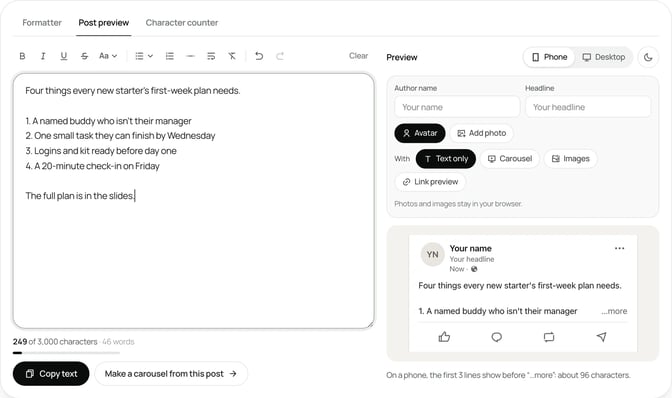
Read your first line on its own. If it would make sense at the top of any post by anyone, rewrite it. The free LinkedIn hook generator gives you ten openings to compare, and the LinkedIn post preview shows roughly where the fold falls on a phone.
4. Add a detail only you could know
LinkedIn's help page on posts written with AI help says content that "feels generic, repetitive, or lacks a clear point of view" is less likely to be widely distributed. The fix is the same whether you use AI or not.
Add one thing from your own work: the clause that caused the problem, what you changed in your process, the question you now ask in every first meeting. That detail is what makes a reader trust you rather than the topic.
5. Only say what you can back up
Trust is the whole point of posting as an expert, so protect it. LinkedIn's Professional Community Policies rule out false or misleading content.
In practice that means:
- No invented numbers. If you didn't measure it, don't put a figure on it.
- No identifiable clients. Change the details, or get written permission first, and check your professional body's rules.
- General guidance, said plainly. If your field needs it, add one line saying the post isn't advice for anyone's situation.
6. End with one ask
Close with a single question or a single next step. Not both, and not three.
A good question is one your reader can answer from their own experience in a sentence. "What would you add?" works. "Thoughts?" rarely does. The LinkedIn post examples show twelve full posts that each end this way.
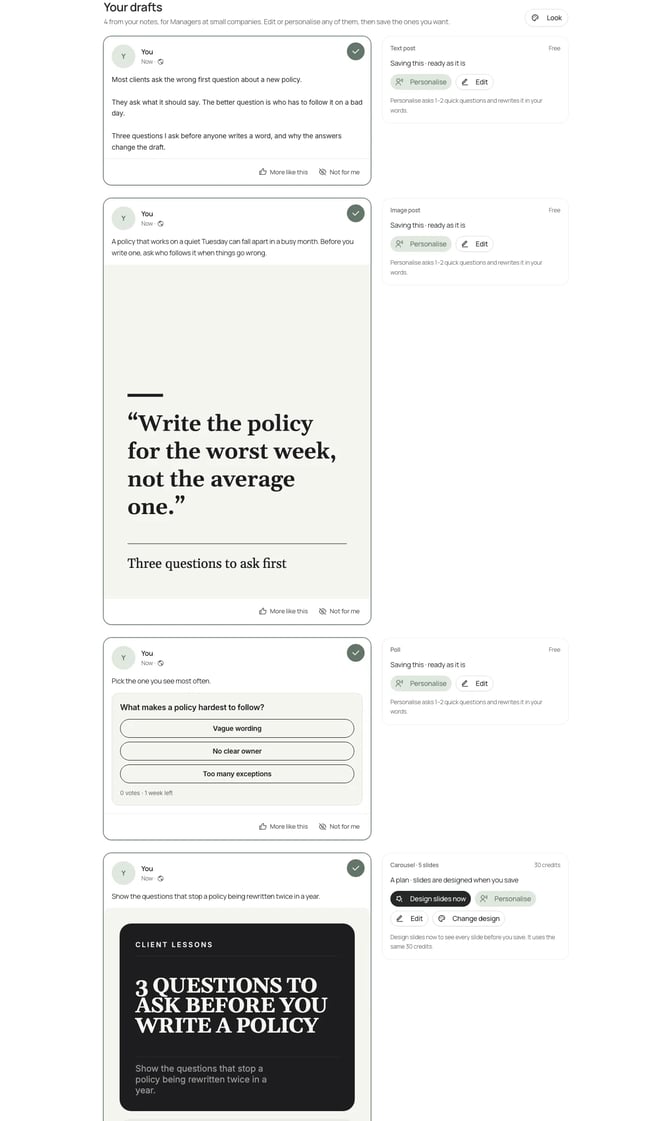
If you're stuck on the first draft, SlideDrift's Post ideas turns your notes, a public link or a short idea into a mix of text posts, image posts, polls and carousels. Drafting uses no credits within daily limits, and nothing is published until you schedule it.
How often: three habits for your pace
7. Pick a pace you can keep
There's no single right number of posts a week, and LinkedIn doesn't publish one for personal profiles. What it does say, in its Page posts FAQ, is that Pages that post weekly grow their followers faster than Pages that post monthly.
The useful lesson for a profile is the same: regular beats bursts. Choose a pace you could still keep in a busy month, whether that's once a week or three times, and treat it as the floor. Our guide on how often to post LinkedIn carousels covers what the posting studies do and don't show.
8. Write in batches, post on a rhythm
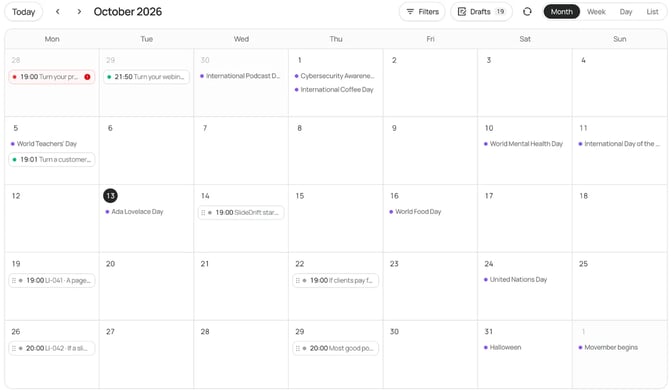
Writing on the day you post is how a posting habit dies. Set aside one session to draft the next two or three weeks, then schedule them on the same days each week.
Pick your days and times once, then stop thinking about them. The best time to post on LinkedIn guide shows how to test two slots over a few weeks. In SlideDrift you can save preferred times, and the time picker offers the next free one.
9. Reuse your best ideas with new words
Most of your followers didn't see last month's post. A strong idea can come back with a new opening, a new example or a new format: a text post one month, a carousel the next.
Don't repost the same words. SlideDrift's repeat option asks for new wording on each repeat, because LinkedIn can turn down a post that matches an earlier one word for word. If a post was really a list of steps, the LinkedIn carousel checklist helps you turn it into slides.
After you post: three habits for the days that follow
10. Reply to every real comment
A comment is someone raising a hand. Reply with something that moves the conversation on: an answer, a follow-up question, or thanks for a point you hadn't thought of.
Skip the swaps. LinkedIn's Professional Community Policies ask members not to agree ahead of time to like or re-share each other's posts, so groups that trade likes on a schedule are out. Real replies from people in your field are worth more anyway.
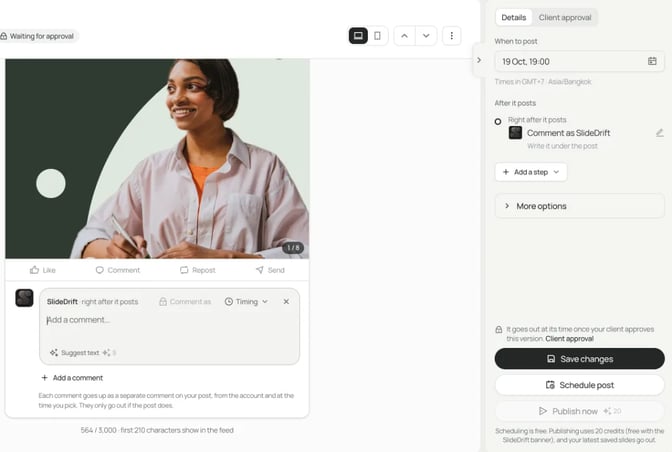
If a link or a source belongs with the post, add it as a comment. In SlideDrift you can set a comment to go up right after the post, up to three more later, and reshares from your other connected accounts. They only go out if the post does.
11. Fix mistakes the right way
Spotted a typo? Edit it. LinkedIn's page on editing a post says you can change the text after posting, and the post then shows an Edited label.
You can't swap a photo, document or video that way: you'd delete the post and create a new one. So check the image or carousel before you post, and keep edits for small fixes to the words.
12. Check what worked a week later
Give a post a few days, then look at its numbers. LinkedIn's post analytics show impressions, members reached, reactions, comments, reposts, saves and more, and LinkedIn says they're estimates.
Look for patterns, not single scores. Which topics drew comments from the kind of people you work with? Which got saved? Write one line about each post in a note, and let that shape the next batch. Our guide to LinkedIn impressions explains what each number means. SlideDrift's Analytics shows a connected account's posts over 7 days to 12 months, including your top posts.
Worked example: a consultant's first month
Nadia is a made-up independent procurement consultant. She wants clients to know her name before they need her, but she's tried posting before and stopped after two weeks.
Week 1: the list. Nadia looks back through a month of emails and writes down eight questions clients asked her. She circles the four she could answer from memory. That's habit 1.
Week 1: the batch. In one sitting she drafts four posts, one per question, each for one reader: small business owners signing their first big supplier contract. Every post opens with the answer and ends with one question (habits 2, 3 and 6).
Week 1: the detail. Her first draft about notice periods reads like a textbook. She adds the moment a client found a 12-month auto-renewal clause the week after it renewed, with the names and figures changed. Now it sounds like her (habits 4 and 5).
Weeks 2 to 5: the rhythm. She schedules the four posts for Tuesday mornings, one a week. That's a pace she can keep in a busy month (habits 7 and 8).
After each post. She replies to every comment the same day. When someone asks for her contract checklist, she adds it as a comment rather than putting a link in the post (habit 10).
End of the month. Nadia checks each post's analytics. The supplier-contract question drew the most comments from business owners, so she turns it into a carousel for the next month, using a brief like this:
SlideDrift brief
Make a 6-slide LinkedIn carousel for small business owners about to sign their first large supplier contract.
Goal: help them spot the four clauses that cause the most trouble later.
Structure: a hook slide ("Four questions to ask before you sign a supplier contract"), one slide per question with a short made-up example, and a closing slide asking readers which question they'd add.
Tone: plain, practical and calm.
Avoid: invented statistics, real company names and legal advice for any one situation.That's habit 9: the idea that worked comes back in a new format.
FAQ
What are LinkedIn post best practices?
Say one useful thing to one kind of reader, put the point first, add a detail from your own work, end with one ask, post at a pace you can keep, and reply to comments. Then check your analytics and let them shape what you write next.
How often should I post on LinkedIn?
As often as you can keep up for months. LinkedIn doesn't publish a number for personal profiles. Its Page help says Pages that post weekly grow faster than Pages that post monthly, so a regular weekly rhythm is a sensible floor.
Should I put links in my LinkedIn posts?
LinkedIn says a post can share a link or an image, not both, so if the post leads with an image or carousel, put the link in a comment instead. In SlideDrift you can set that comment to go up right after the post.
Can I edit a LinkedIn post after posting it?
Yes, the text. LinkedIn shows an Edited label afterwards. To change a photo, document or video, you have to delete the post and create a new one.
What should I do after I post on LinkedIn?
Reply to real comments, fix any typos in the text, and look at the post's analytics after a few days. Note which topics drew comments or saves from the people you want to work with.
Is it OK to use AI to write LinkedIn posts?
Yes, as a first draft. LinkedIn says you're responsible for what you post, and generic content is less likely to be widely distributed. Add your own example and check every claim before you post.
Keep the habit going with SlideDrift
SlideDrift is a LinkedIn content studio. It turns your notes, a link or a client question into text posts, image posts, polls and carousels in your brand, then schedules them to LinkedIn with the follow-up comments set. Scheduling needs a paid plan.
SlideDrift publishes natively only to LinkedIn, so for other platforms export your carousel as PDF or PNG in square 1:1, portrait 4:5 or stories 9:16 sizes and post it anywhere.
Turn a client question into a post
Paste your notes or a question a client asked. Pick your brand profile, edit the draft in the editor, then schedule it or export it.


Brief for this carousel
Make a 6-slide LinkedIn carousel for independent procurement consultants on four questions to ask before signing a new supplier contract. A hook slide, one slide per question with a short example, and a closing slide asking readers which question they'd add.