Best Tools to Turn a Blog Post Into a LinkedIn Carousel in 2026: The Buyer's Shortlist
Six tools that turn a blog post into a LinkedIn carousel, ranked on design quality, how they read your article, brand settings and the price of posting.

Of the best tools to turn a blog post into a LinkedIn carousel, SlideDrift is the one we'd start with. Paste the post's link and it drafts an editable carousel on a designed template, in your brand, ready to export or schedule. PostNitro suits posting the same carousel to six networks. Contentdrips is the budget option for publishing to LinkedIn, and Canva fits people who'd rather design every slide by hand.
We make SlideDrift, so every claim below is sourced and dated.
Key takeaways
- SlideDrift is our pick for consultants, coaches and founders who blog: it reads a post from its link, lays it out on designed templates with your Brand Kit, and schedules to LinkedIn from $29 a month.
- Most of these tools can read a public link. The difference is what comes back: a finished-looking deck you'd post, or a rough draft you redesign.
- PostNitro is best for scheduling one carousel to six networks, from $30 a month. Contentdrips is the budget pick, publishing to LinkedIn from $15.
- Taplio is a LinkedIn writing suite with a carousel generator inside; aiCarousels is a free place to try the idea first.
- Run the same blog post through your top two before you pay. The carousel below is the 10-minute test we use.
SlideDriftCreate your ownCarousel transcriptShowHide


- 01The 10-minute test. Test any carousel generator in 10 minutes. Every tool's demo looks good. Run these five checks on your own material before you pay: a real source, the first slide, one edit, your brand and the exported PDF. Use the same source in every tool you test.
- 02Test 01, bring your own source. Start from a real source. Paste an article, a newsletter or notes you'd actually post about. A one-line topic shows what the tool invents; your own material shows what it understands.
- 03Test 02, the hook check. Judge slide one first. Does the first slide make a specific promise to one reader? If it could introduce any post, the tool wrote a title, not a hook. A good hook: specific, one reader, one promise.
- 04Test 03, no full regeneration. Edit one slide without starting over. Change a headline, swap an image and reorder two slides. If fixing one slide means regenerating the whole deck, every draft becomes a gamble.
- 05Test 04, your brand settings. Apply your brand once, then reuse it. Save your fonts, colors and logo once, and check they land on every slide of the next carousel without fixing anything by hand.
- 06Test 05, the final check. Export the PDF and open it on a phone. Every page the same size, text readable at phone size, slides in the right order. Pick the tool that passes all five on your own material.
Paste your notes, see them as a carousel
SlideDrift drafts the slides from your notes, a post or a link. Edit them, then export the PDF to post.
What a blog-to-carousel tool is (and isn't)
A blog-to-carousel tool takes an article you've already written and turns it into a short set of slides. You give it a link or the text. It pulls out the argument, writes a first slide that makes a promise, puts one point on each slide and adds a closing slide. The better ones lay those words out on a design that already works and apply your fonts, colours and logo.
It isn't a summariser. A 1,500-word post holds more than a carousel should carry, so a good tool chooses an angle rather than shrinking every paragraph. If you want help with that choice before you open any tool, the free blog to carousel angle finder suggests three carousels from one link.
It also isn't a design tool in the Canva sense. You trade some control over every element for a first draft that's already written and laid out. Some tools in this list are carousel makers first, some are LinkedIn writing suites with a carousel button, and some post to every network.
Whatever you use, the result on LinkedIn is the same: a PDF uploaded as a document post. LinkedIn's help page accepts files up to 100MB and 300 pages, and advises converting to PDF with every page the same size. For a step-by-step walkthrough, see how to create a LinkedIn carousel from a URL.
How we ranked these tools
We judged each tool on what you can check on its own website, signed out:
- Design quality. How the finished slides look, judged from each tool's public templates and examples: type you can read on a phone, one idea per slide, layouts that change from slide to slide, one consistent look.
- How it reads your post. Whether it takes a blog link, pasted text or a PDF, and what it says about pages it can't read.
- Brand settings. Whether you save fonts, colours and logo once and get them on every carousel.
- Sizes and export. A clean PDF for LinkedIn, and which shapes you can export for other platforms.
- Free start. What you can try without paying, and what the free plan holds back.
- Price of posting. The cheapest monthly plan that schedules or publishes to LinkedIn.
Facts come from each tool's own pages, read on October 21, 2026. Prices are in US dollars, billed monthly, unless the vendor shows local currency. We don't give design scores: we show each tool's public examples so you can judge for yourself.
The shortlist: six tools that turn a blog post into a carousel
1. SlideDrift, best for designed carousels from your own blog posts
SlideDrift is a LinkedIn content studio built around carousels. Paste a public blog post link, add a note on who it's for and the angle you want, and it drafts an editable carousel of 5 to 12 slides. SlideDrift's docs say it reads article-style pages best: blog posts, articles and web newsletters. If a page sits behind a login or a popup, paste the text instead. You can try it with your own post on SlideDrift's LinkedIn carousel generator page.
The design is where it stands apart. Its template library has Standard templates and Remix designs, and public Remix designs show real example slides before you generate, so you know what your post will look like.
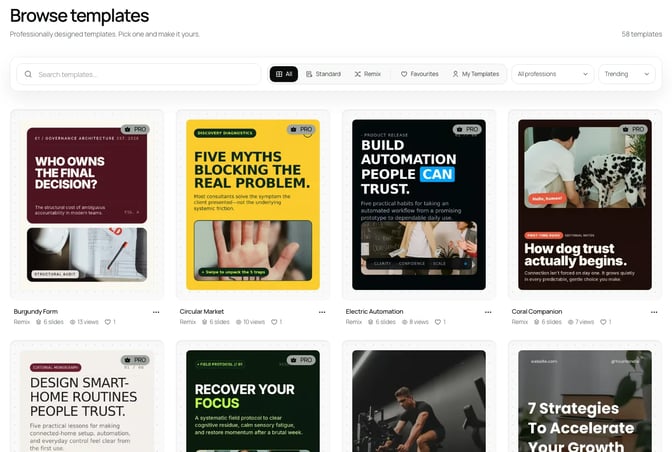
A draft costs 10 credits, or 30 with a Pro template. After that you edit any slide's words, images and order without regenerating the deck. Your Brand Kit, which you can import from your website, puts your colours, fonts and logo on every carousel.

SlideDrift posts natively only to LinkedIn: schedule to your profile from Starter at $29 a month, or to Company Pages on the Pro plan at $59. To post elsewhere, export PDF or PNG in square 1:1, portrait 4:5 or stories 9:16 and upload it to other platforms. The same calendar takes text posts, polls, image, multi-image and video posts, so the carousel and the post that announces your blog live in one place.
The free plan includes 200 credits that don't reset, and free exports carry a small SlideDrift banner. The free Chrome extension captures the article you're reading as a brief you can take into SlideDrift.
Best suited for: consultants, coaches, accountants and founders who blog and want each post to become a designed carousel in their brand, then scheduled to LinkedIn.
2. PostNitro, best for scheduling one carousel to six networks
PostNitro starts from a topic, an article URL, text you already wrote or a post from X. Its 100+ templates are built for a 4:5 feed and recoloured by your brand kit, and carousels also come in 1:1 and 16:9.
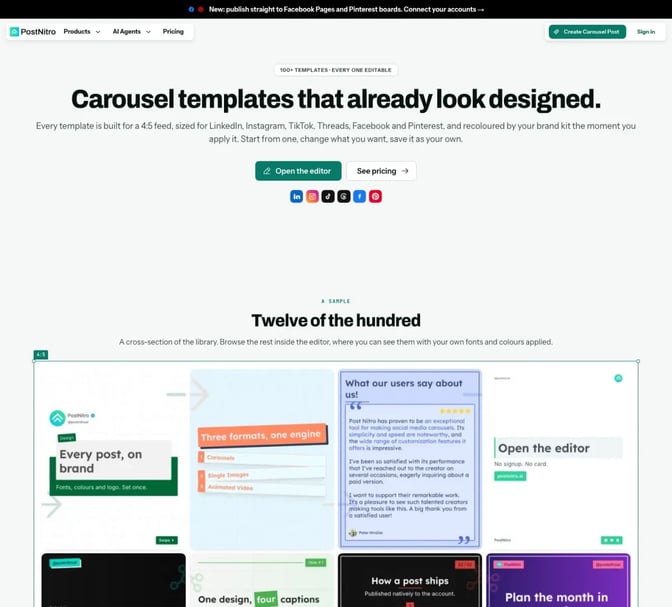
The plans page lists a free plan with up to 5 AI slides per carousel, 5 downloads a month and a watermark. Starter is $15 a month with no social scheduling. Creator+ at $30 schedules to 10 accounts across LinkedIn, Instagram, TikTok, Threads, Facebook and Pinterest. More in PostNitro vs SlideDrift.
Best suited for: bloggers who post the same carousel to LinkedIn, Instagram, TikTok and more from one tool.
3. Contentdrips, best budget option for publishing to LinkedIn
Contentdrips takes a blog article URL and returns a LinkedIn carousel plus the post text to go with it. Its template page invites you to browse 500+ free LinkedIn carousel templates in square 1:1 and portrait 4:5 sizes.
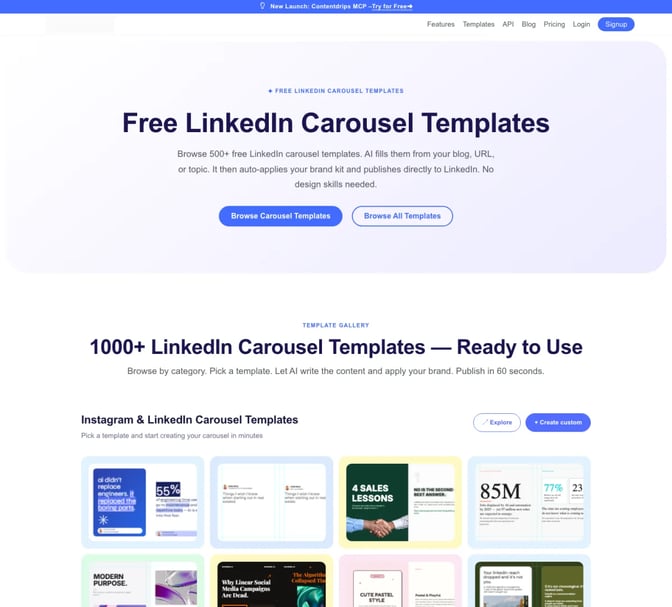
Its pricing page lists a free plan with 50 AI credits and 1 brand. Starter is $15 billed monthly with publishing to LinkedIn and 3 brands. The homepage also lists direct publishing to Instagram.
For a side-by-side look, see Contentdrips vs SlideDrift.
Best suited for: bloggers on a tight budget who like picking from a big template gallery and want carousels published to LinkedIn.
4. Taplio, best for carousels inside a LinkedIn writing suite
Taplio's carousel generator starts from a post, an article, a YouTube URL or a short idea. It applies a saved brand kit, then exports a PDF or schedules the carousel. Around it sit post writing, scheduling and analytics.

Its pricing page lists Starter at $39 a month, Growth at $69 and Pro at $199, each with a 7-day free trial. The Starter card lists scheduling and analytics rather than AI writing, so check which plan includes the carousel generator before you buy. See Taplio vs SlideDrift.
If carousels are what you need from it, see the Taplio alternative for carousels.
Best suited for: people who mainly write text posts and want a carousel generator in the same subscription.
5. aiCarousels, best for trying the idea before you pay
aiCarousels calls itself a free carousel maker for LinkedIn, Instagram and TikTok. Its menu links to tools that start from a topic, your text, a website, a YouTube video or a PDF, and you style slides with preset colour palettes and font pairings.

The homepage shows no prices or scheduling, so plan to download the PDF and post it yourself. More in aiCarousels vs SlideDrift.
Best suited for: a no-cost first test of turning a blog link into slides, or one simple carousel reused across three networks.
6. Canva, best for designing every slide by hand
Canva's carousel templates start from a design, not from your post. You pick a template, then copy each point across and lay it out yourself. In return you get full control, and a template search for LinkedIn carousels gives you plenty to start from.
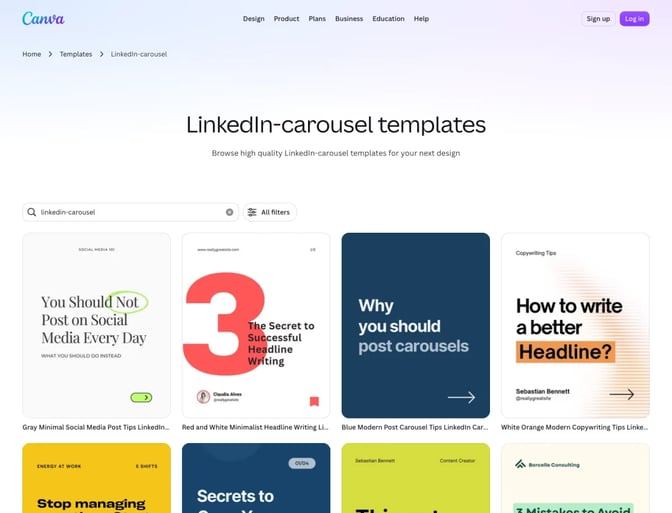
Canva Free exports PDF, JPG and PNG and includes one Brand Kit limited to three colours. Social content scheduling is on Pro, priced in your local currency. The Canva vs SlideDrift comparison goes further.
Best suited for: people who enjoy design and want every slide exactly their way, and who have the time to build it.
Blog-to-carousel tools comparison
| Tool | Reads your blog post from | Free start | Posts to LinkedIn from | Other networks |
|---|---|---|---|---|
| SlideDrift | Link, pasted text or notes; PDF on paid plans | 200 credits; exports carry a banner | $29 a month; Company Pages $59 | Exports PDF or PNG in 1:1, 4:5 and 9:16 for other platforms |
| PostNitro | Article URL, your text, a topic, an X post | 5 AI slides per carousel, 5 downloads, watermark | $30 a month (Creator+) | Instagram, TikTok, Threads, Facebook, Pinterest |
| Contentdrips | Blog article URL or a topic | 50 AI credits | $15 a month (Starter) | |
| Taplio | Post, article, YouTube URL or idea | 7-day free trial | $39 a month; check the plan | Not listed |
| aiCarousels | Topic, text, website, YouTube, PDF | Calls itself free | No scheduling listed | Instagram and TikTok formats |
| Canva | You copy it in by hand | Free plan; PDF, JPG, PNG | Scheduling on Pro | Not listed |
Blog-to-carousel feature matrix
✓ means the tool's own pages list it, ✗ means it isn't offered, and "Not listed" means we couldn't find it on a public page.
| Feature | SlideDrift | PostNitro | Contentdrips | Taplio | aiCarousels | Canva |
|---|---|---|---|---|---|---|
| Starts from a blog link | ✓ | ✓ | ✓ | ✓ | ✓ | Not listed |
| Starts from pasted text | ✓ | ✓ | ✓ | ✓ post | ✓ | Not listed |
| Starts from a PDF | ✓ paid plans | Not listed | Not listed | Not listed | ✓ | Not listed |
| Designed template library | Standard and Remix | 100+ | 500+ | Not listed | Palettes, font pairs | ✓ |
| Brand kit saved once | ✓ | ✓ | ✓ | ✓ | Not listed | Free: 3 colours |
| Brand kit from your website | ✓ | Not listed | Not listed | Not listed | Not listed | Not listed |
| Stories size (9:16) | ✓ | Not listed | 1:1 and 4:5 | Not listed | Instagram stories format | Not listed |
| Publishes to LinkedIn | ✓ from $29 | ✓ from $30 | ✓ from $15 | ✓ from $39 | Not listed | ✓ Pro |
| Writes the post text too | ✓ Suggest text | Not listed | ✓ | ✓ | Not listed | Not listed |
| Free start | ✓ | ✓ watermark | ✓ | Trial | ✓ | ✓ |
Which blog-to-carousel tool fits your work
| If you need | Pick | Why |
|---|---|---|
| Designed carousels from your blog posts, in your brand, posted to LinkedIn | SlideDrift | Remix designs, Brand Kit from your website, scheduling from $29 |
| One carousel scheduled to six networks | PostNitro | Creator+ schedules to six networks from $30 |
| LinkedIn publishing on the smallest budget | Contentdrips | Publishes to LinkedIn on its $15 plan |
| A writing suite with a carousel button | Taplio | Text posts, analytics and carousels in one place |
| A free test before you sign up anywhere | aiCarousels | A free maker that takes a website link |
| Control over every element | Canva | You design each slide yourself |
Side by side: what the slides look like
Every tool's demo looks good, so judge the slides themselves. The top row shows examples each tool publishes on its own site. The bottom row shows template covers and finished carousels made in SlideDrift.
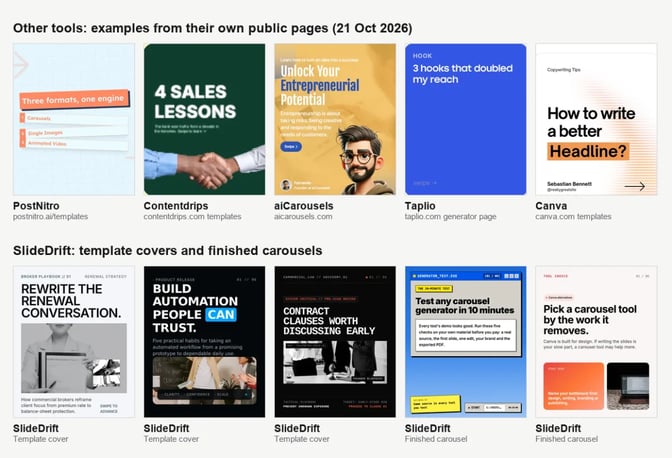
Look for three things: type you could read on a phone, one idea per slide, and a design that feels like one brand rather than a stock template. Then look at your own result, because a sample shows the best case.
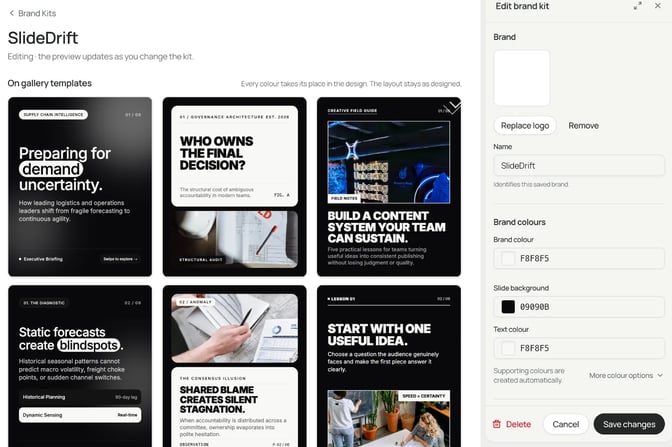
That last point matters more for blog posts than most content. Your blog already has a look. If every carousel arrives in a different stock style, readers won't connect the two.
How to turn a blog post into a carousel with any tool
The tool matters less than the choices you make before you paste the link.
- Pick a post with one clear argument. Listicles, how-tos and opinion pieces convert well. A newsy roundup rarely does.
- Choose one reader and one angle. A 1,500-word post can hold three carousels. Pick the one your ideal client most needs.
- Paste the link, plus a note. Tell the tool who it's for and what to keep. If the page won't load, paste the text.
- Rewrite slide one yourself. It should make a specific promise. The free LinkedIn hook generator gives you options to compare.
- Cut to one point per slide. Delete anything that only works in long form, like a long quote or a table.
- Check it on your phone, then export the PDF. Every page the same size, every line readable. The LinkedIn carousel size guide has the dimensions.
For how many slides to aim for, see how many slides a LinkedIn carousel should have.
What results look like: one blog post a week for a month
Here's a made-up example. Dana is an independent finance consultant who publishes one blog post a week and wants each one to become a carousel on her LinkedIn profile.
Over a month that's four carousels. In SlideDrift each draft uses 10 credits, or 30 with a Pro template. Four drafts at 10 credits each come to 40 credits, well inside the 200 free credits, though free exports carry a banner. To schedule them to her profile, she'd need a paid plan.
Here's the cheapest plan in each tool that publishes or schedules to LinkedIn, from their pricing pages:
| Tool | Plan | Monthly price | What it covers |
|---|---|---|---|
| Contentdrips | Starter | $15 | Publishing to LinkedIn, 3 brands |
| SlideDrift | Starter | $29 | Scheduling to one LinkedIn profile, plus text, poll, image and video posts |
| PostNitro | Creator+ | $30 | Scheduling to 10 accounts on six networks |
| Taplio | Starter | $39 | Scheduling; check which plan has the carousel generator |
The price gap is small next to the time. If a carousel built by hand takes Dana an afternoon, the real test is whether a tool's first draft gets her to something she'd post in far less. That's why the 10-minute test above uses your own post, not a demo.
For the wider field, including tools that start from a topic rather than your writing, see the best AI LinkedIn carousel generators.
FAQ
What is the best tool to turn a blog post into a LinkedIn carousel?
We'd start with SlideDrift if you want designed carousels from your blog posts, in your brand, scheduled to LinkedIn. PostNitro fits posting one carousel to six networks, and Contentdrips is the budget option for LinkedIn publishing.
Can I turn a blog post into a carousel for free?
Yes, with limits. SlideDrift gives 200 credits and puts a banner on free exports. PostNitro's free plan gives 5 AI slides per carousel and 5 watermarked downloads a month. Contentdrips gives 50 AI credits, and aiCarousels calls its maker free.
What if the tool can't read my blog post?
Check the page is public. Pages behind a login, a paywall or a heavy popup may not extract cleanly. Copy the article text and paste it in instead; most of these tools take pasted text.
Should I turn the whole post into slides?
No. Pick one angle for one reader and cut the rest. A long post can become two or three separate carousels, each with its own first slide and one point per slide.
Do these tools work for Instagram and TikTok carousels too?
PostNitro schedules to six networks, and aiCarousels makes LinkedIn, Instagram and TikTok formats. SlideDrift posts only to LinkedIn, but exports PDF or PNG in 1:1, 4:5 and 9:16 for other platforms.
Can I keep my blog's brand on the carousel?
Yes. Save your colours, fonts and logo in the tool's brand kit before your first carousel. SlideDrift can also import a Brand Kit from your website, which is useful when your blog already sets the look.
Is a carousel just a PDF on LinkedIn?
Yes. You upload it as a document post. LinkedIn advises converting to PDF and keeping every page the same size. See how to export a LinkedIn carousel as a PDF.
Turn your next blog post into a carousel in SlideDrift
Paste your blog post's link into SlideDrift, add a line on who it's for, pick a template and your Brand Kit, then edit the draft before you export or schedule it.
SlideDrift brief
Turn the blog post at the link below into an 8-slide LinkedIn carousel.
Write it for [who you help], around one angle: [the main point].
Make slide one a specific promise. One point per slide.
End with a short recap and one next step.

[Paste your blog post link here]Turn a blog post into a carousel
Paste a blog link, an article or your notes. SlideDrift drafts the carousel in your brand, you edit it, then export a PDF or schedule it to LinkedIn on a paid plan.


Brief for this carousel
Make a 6-slide LinkedIn carousel on turning one blog post into a carousel. A cover (your best blog post deserves a second life on LinkedIn), then one step per slide: pick a post with one clear argument, find the angle for one reader, cut to one point per slide, write a first slide that makes a promise, and end with one next step. Close with: test two tools on the same post before you pay.